Laravel Queue Workers and Horizon on FlyWP
Queued jobs only run while a worker is running. On a Laravel site, FlyWP can run a queue worker for you, or run Horizon if your app uses it. You manage both from the Laravel page.
Choose a queue mode
Section titled “Choose a queue mode”-
Open your Laravel site and click Laravel in the site menu.
-
In the Queue Processing card, choose one mode:
- Off
- Queue worker
- Horizon (shown only when Horizon is installed in your app)
-
Click Save Changes.
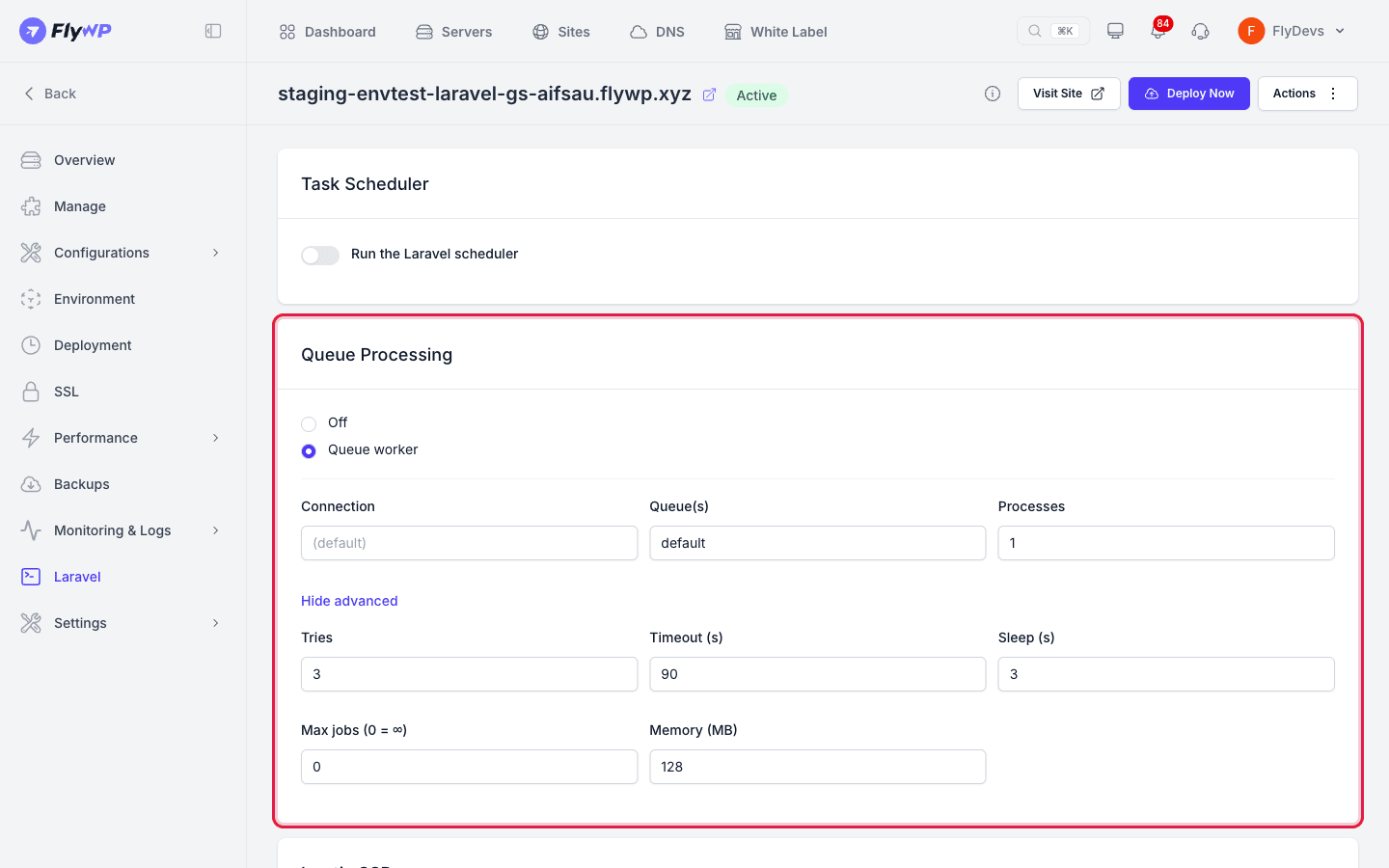
Only one mode runs at a time, because Horizon manages its own workers. A new site starts with the queue set to Off. Save Changes is active only after you change something.
FlyWP reads your composer.json to see whether laravel/horizon is installed, so the card briefly shows Checking installed packages…. If it cannot read the file, a Detection unavailable notice appears at the top of the page. In that case the Horizon option is not offered unless the site is already set to it.
Queue worker settings
Section titled “Queue worker settings”When you choose Queue worker, set these fields:
| Field | Default | Allowed |
|---|---|---|
| Connection | (default) | Letters, numbers, dashes, and underscores, up to 50 characters. Leave empty for your app's default connection. |
| Queue(s) | default | Letters, numbers, commas, dashes, and underscores, up to 255 characters. Separate multiple queues with commas. |
| Processes | 1 | 1 to 20. Each process is a separate copy of the worker. |
Click Advanced for more options. Click Hide advanced to close them:
| Field | Default | Allowed |
|---|---|---|
| Tries | 3 | 1 to 100 |
| Timeout (s) | 90 | 1 to 3600 |
| Sleep (s) | 3 | 0 to 300 |
| Max jobs (0 = ∞) | 0 | 0 to 100000 |
| Memory (MB) | 128 | 32 to 4096 |
Horizon
Section titled “Horizon”When you choose Horizon, configure it in your app's config/horizon.php. Its dashboard is at /horizon on your site.
Applying changes and restarts
Section titled “Applying changes and restarts”FlyWP first shows Laravel settings updated. Changes may take a moment to take effect. It then recreates the site's containers and shows Laravel settings applied successfully. when it is done.
Workers read your code and .env when they start. Each deployment of a Laravel site runs php artisan queue:restart, and saving the Environment page restarts the workers if Restart Queue Workers is on.
Related guides
Section titled “Related guides”Still stuck? How can we help?
View as Markdown