

 Server + Control panel in one simple billing


Multi-Cloud or Fully Managed
Launch your own hosting brand with FlyWP White Label Explore Plans →
 More Than a Cloud Server Control Panel
Run high-performance WordPress your way – built for speed, control, and security. Fully managed or on your own server, designed for WordPress. Docker 🐳 powered, fully automated, and built to scale.
Go fully managed for simplicity, or stay in control with your own server. FlyWP adapts to how you work.
Perfect if you want to skip server headaches and focus on growth.
Ideal for developers and teams who prefer their own infrastructure.
Multi-Cloud or Fully Managed

Fully Focused on WordPress

Made for Developers & Teams
Simplified, powerful, and built to scale, without juggling multiple tools.
Tune up your WordPress site’s speed with the power of our trusted server partner, and experience lightning-fast performance.
Experience the Thrill of Flying High with Server & Site Launch.
Maximize your WordPress site’s speed with our Full Page Caching feature.

Elevate your WordPress experience with the most trusted caching plugins at your fingertips.

Maximize the performance of your WordPress sites with Redis caching on FlyWP.

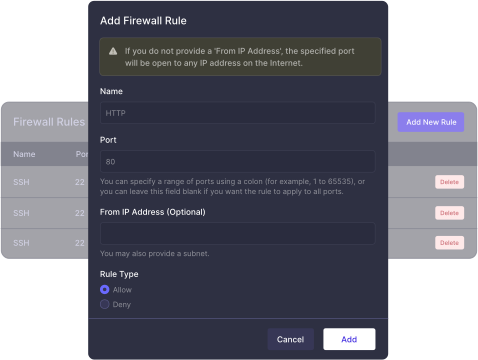
Built-in protection to block threats before they reach your server
Each site runs in its own container – secure, isolated, and stable

Enable HTTPS instantly with free SSL for every site

Add an extra layer of protection with seamless Cloudflare integration

Hardened Nginx configuration built for performance and safety

Keep your stack secure with timely, automatic updates

Built from the ground up to deliver peak WordPress performance and reliability

Update multiple plugins and themes across sites in just a few clicks

Access your WordPress dashboard instantly – no passwords, no friction

Manage all your servers and sites from one powerful dashboard

Integrates seamlessly with top cloud providers for flexible deployment

Assign precise roles and control access with confidence

Easily manage and edit WP-config settings without touching code

Run and manage multiple sites from a single WordPress installation

Execute powerful WP-CLI commands directly for faster workflows

Push to Git and watch your changes go live – automated and seamless
Built to support modern WordPress workflows with Bedrock out of the box folder structure.
Track every action with clear, real-time logs for better debugging
Direct database access for full control and faster troubleshooting

Quickly view server and application logs whenever you need insights

Switch PHP versions in seconds – no downtime, no hassle

Streamlined for your convenience, we’ve eliminated the complexities that once accompanied website staging. With Just a few clicks, and your staging process is simplified, allowing you to proceed without any hassle.
FlyWP makes it quick and effortless to create a test site. With one click, create as many test sites as you want for any kind of testing purposes, giving you the freedom to experiment, perfect, and bring your projects to life
Get Started
We understand that every journey starts with a single step, and for beginners, that first step can be the most important and hardest one. Testing sites can be very helpful to onboard new members in the team, where members can explore, experiment, and do more
Get Started
FlyWP makes it quick and effortless to create a test site. With one click, create as many test sites as you want for any kind of testing purposes, giving you the freedom to experiment, perfect, and bring your projects to life
Get Started
We take immense pride in what we’ve accomplished for our customers. Their feedback on our cloud server service means a lot to us. Here are some testimonials from our customers sharing their experiences:
An amazing app to run WordPress on AWS. I have been using AWS for a long time, but deploying a WordPress website through it was a lengthy process with a long learning curve. With FlyWP, Deploy and manage “n” number of sites and a completely user-friendly experience. If you are a Beginer or a WordPress developer or using a WordPress site, purchase this deal immediately. Because this deal is worth every penny.
I was battling to get my first VPS up and running before trying FlyWP. Now everything is running smoothly. 5 tacos.
FlyWP is a great product so far. Everything seems OK and the roadmap is very promising – I hope they will continue to deliver. 😊
Positively surprised! Excellent performance and time optimization and VPS configuration for WordPress. I recommend it!
FlyWP is a great product so far. Everything seems OK and the roadmap is very promising – I hope they will continue to deliver. 😊
FlyWP has exceeded my expectations with exceptional services, especially in managing WordPress sites. The support for ARM processors and ARM-based hosting, along with strong security features like SSH access, Redis caching, and Magic Login, make it a standout platform. Overall, it’s an innovative and reliable solution for WordPress management.
Here’s a look at the 20+ plugins you’ll no longer need with FlyWP. From SEO to backups and beyond, FlyWP replaces them all, simplifying your site management without cluttering your dashboard.
File Manager
Let’s Encrypt SSL on FlyWP
WP Config Editor
Enable Debug Mode
Disable Auto Updates
Memory Limit increase
Disable XML-RPC-API
Disable RSS and Atom Feeds
Prevent files/folders access
FastCGI Cache
Disable Comments
Disable Trackbacks
Add Security Headers
Disable WP Login
7G Firewall
Backup & Restore
Maintenance Mode
SMTP
Deploy from Git
Magic Login Link
With FlyWP’s 1-click installer, you can launch essential apps without any technical setup.
Powerful workflow automation platform
MySQL database administration
Your own self-hosted private cloud
Self-hosted AI chat interface
Open Source Marketing Automation
Bitwarden-compatible password manager server
WireGuard VPN server with web-based admin UI
Privacy-focused web analytics platform
Use the FlyWP Migration Tool to move your WordPress sites – no downtime, no complexity.

FlyWP is a product of weDevs, a trustworthy brand that’s powering more than 600K+ websiteson the internet. Since the last 12+ years, customers have been ❤️pouring their love for weDevs. Explore more about the weDevs team
12+
Years Experienced
20+
Amazing Products
600K+
Happy Users
10M+
Total downloads

Skip the setup and start instantly. Deploy high-performance WordPress servers fully managed by FlyWP.
Start Managed Hosting – From $7Our dedicated team is committed to providing you with informative and supportive answers
FlyWP is a WordPress cloud server management and managed hosting platform that lets developers, freelancers, and agencies deploy, manage, secure, and scale WordPress sites across their own cloud infrastructure or FlyWP-managed servers.
FlyWP is a customizable managed hosting platform for WordPress and a cloud server control panel. You can either use FlyWP Managed Hosting or connect your own server and manage everything from one unified dashboard.
FlyWP is designed specifically for high-performance hosting for WordPress. This focus lets you enjoy faster speeds, better stability, and a smoother workflow. Support for other PHP apps may be considered down the road, but our priority is giving you the best WordPress experience possible.
With FlyWP Managed Hosting, you can deploy and run servers directly through FlyWP — everything is handled for you in one place. With Bring Your Own Server (BYOS), you connect your existing cloud server (like DigitalOcean, AWS, etc.) and manage it using FlyWP. Both options give you full access to FlyWP features – the difference is how you prefer to manage infrastructure.
Yes, FlyWP fully supports multisite installations. You can create and manage multisite networks directly from the FlyWP dashboard, whether on subdomains or sub-directories.
Yes, FlyWP allows you to manage and host multiple websites on a single server. The number of websites depends on your server’s capacity, making FlyWP an ideal solution for managing multiple WordPress sites efficiently.
FlyWP offers a flexible backup system that lets you add an external backup provider, set up automated backups, and restore your sites whenever needed – all from a single dashboard.
Yes, FlyWP allows you to set up email gateways for specific sites. You can choose from popular options like PostMark, Sendgrid, and Mailgun, or configure a custom SMTP server for email sending
Yes. FlyWP automatically configures unattended OS-level security updates on your server. This ensures critical security patches are applied promptly without manual intervention, helping keep your infrastructure secure by default.
At this time, FlyWP does not provide publicly documented best practices specifically for auditing containerized stacks. That said, we’re always open to feedback, if you have recommendations or tooling suggestions, we’d be glad to review them and consider incorporating them into our documentation or future platform enhancements.
FlyWP does not require any non-standard SSH configuration. As long as root login via SSH key authentication remains enabled, the FlyWP agent will function correctly. You are free to apply most standard SSH hardening practices without impacting FlyWP functionality.
No. FlyWP does not currently include built-in brute-force protection such as fail2ban. However, you are free, and encouraged, to install your own solution. We recommend CrowdSec as a modern and effective alternative.
FlyWP uses a simple and flexible pricing model: – Managed Hosting: Starts from $7/month (server + FlyWP included) – Self-Managed (BYOS): Pay per server – no tier-based plans – No feature restrictions (except add-ons) – Automatic discounts as you scale You only pay for what you use.
Not with Managed Hosting. FlyWP provisions and manages the server for you; there’s no need to create or manage external cloud accounts. If you use BYOS, then yes – you’ll connect your own cloud provider.
Yes. FlyWP is built for flexibility — you can use Managed Hosting, your own servers, or both depending on your needs.
All core FlyWP features are included across all plans: – Server & site management – Backups & restore – Team collaboration – Performance tools – Security & firewall – Deployments & automation Only optional add-ons (like uptime monitoring) are separate.
Unlimited. You can run as many WordPress sites as your server resources allow — there are no artificial limits.
Yes. With Managed Hosting, you don’t need any server or DevOps experience. Everything is handled for you, so you can focus on your website.
Absolutely. FlyWP provides full control, SSH access, advanced configurations, and team collaboration tools — making it ideal for developers, freelancers, and agencies.
FlyWP gives you: – More control over your infrastructure – Better performance with optimized stacks – Flexible pricing (no tiers or feature locks) – One platform to manage everything It’s built for how modern WordPress teams actually work.
Book a free 15-minute 1:1 demo with our specialist and see how easily you can deploy, manage, and optimize WordPress sites on your own cloud servers.


 No configuration needed


