Add-ons
FlyWP offers optional add-ons that extend what your sites and servers can do beyond the core platform. Add-ons are billed separately from your base plan and can be enabled per site or, for some add-ons, across your whole team at once.
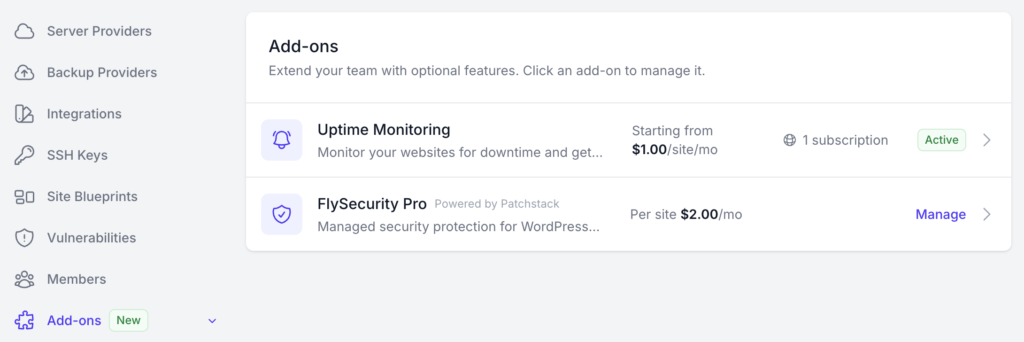
You can see and manage all available add-ons from Team Settings → Add-ons.
Available add-ons
Section titled “Available add-ons”FlySecurity Pro
Section titled “FlySecurity Pro”Real-time vulnerability protection for your WordPress sites, powered by Patchstack. Unlike the free built-in vulnerability scanner (which only reports issues it finds), FlySecurity Pro actively applies virtual patches to vulnerable plugins, themes, and WordPress core, protecting your site before an official update is even available.
- 30-day free trial per protected site
- $2.00 per protected site per month after the trial
- Enable per-site from Site → Security → Vulnerabilities, or protect multiple sites at once from Team Settings → Add-ons → FlySecurity Pro
See the full FlySecurity Pro guide for setup and management details.
FlyWP Uptime Monitor
Section titled “FlyWP Uptime Monitor”24/7 uptime and performance monitoring for your sites, with instant email alerts when a site goes down, response-time analytics, flexible check intervals, and historical uptime reports.
- Subscribe from Billing → Addons → Uptime Monitor
- Once subscribed, enable it per site from that site’s Uptime Monitoring section
See the full Uptime Monitor guide for setup and configuration details.
- Add-ons are billed independently of your hosting plan check Billing → Addons for current pricing and active subscriptions.
- More add-ons may be added over time; this page will be updated as they become available.
Next Steps
Section titled “Next Steps”- FlySecurity Pro
- FlyWP Uptime Monitor
- Vulnerability Scanner — the free scanning tier included with every WordPress site
Still stuck? How can we help?