Enable HTTP/3 (QUIC) Support in FlyWP
HTTP/3 (QUIC) support can be enabled directly from your FlyWP server dashboard. Once enabled, all websites hosted on that server will automatically use HTTP/3 support.
Important: HTTP/3 support is currently enabled on a per-server basis only. It is not possible to enable or disable HTTP/3 for individual sites.
How to Enable HTTP/3 (QUIC)
Section titled “How to Enable HTTP/3 (QUIC)”- Log in to your FlyWP dashboard.
- Open the desired server.
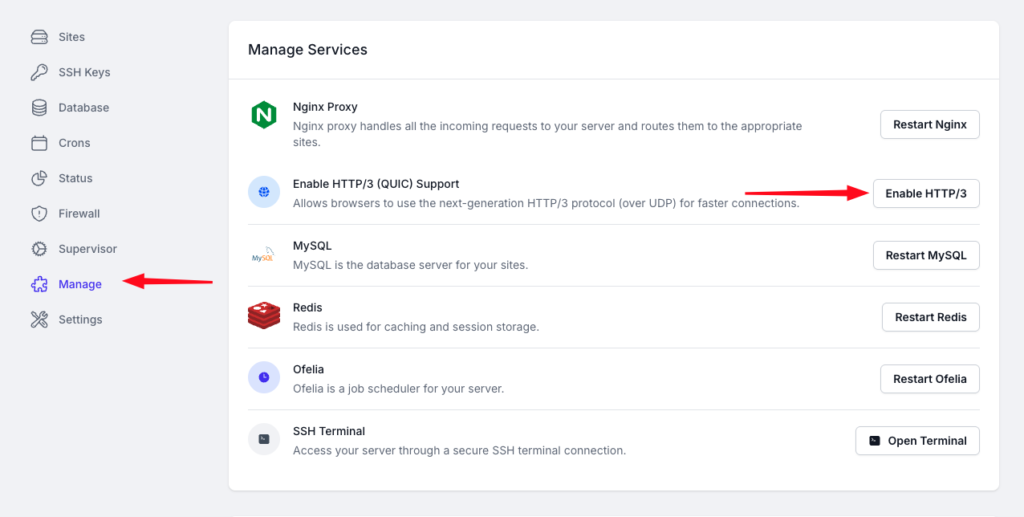
- Navigate to Manage from the left sidebar.
- Under the Manage Services section, locate Enable HTTP/3 (QUIC) Support.
- Click the Enable HTTP/3 button.
Once enabled, FlyWP will configure the main Nginx proxy to serve HTTP/3 traffic for all sites hosted on that server.
Warning: Temporary Downtime During Activation
Section titled “Warning: Temporary Downtime During Activation”Warning: Enabling HTTP/3 requires restarting the main Nginx proxy service.
During this restart process:
- All websites on the server may become temporarily unavailable.
- Downtime typically lasts between 10–30 seconds.
- Actual downtime duration depends on the server load and configuration.
We recommend enabling HTTP/3 during low-traffic periods to minimise user impact.
- HTTP/3 uses the QUIC protocol over UDP for faster and more efficient connections.
- After enabling HTTP/3, supported browsers will automatically start using it.
- Existing websites on the server do not require additional configuration.
- Any new sites added to the same server will also have HTTP/3 support automatically enabled.
Still stuck? How can we help?