FlyWP Managed Servers
FlyWP Managed is the fastest way to get a production WordPress server running. You choose a provider, click Launch, and FlyWP handles provisioning, configuration, and billing end to end.
What “Managed” means
Section titled “What “Managed” means”No provider account required. You don’t need a DigitalOcean, Vultr, or Akamai account. You don’t need to generate API keys or connect anything. FlyWP provisions the server on your behalf.
One bill. Infrastructure is billed through FlyWP. There’s no separate invoice from the underlying cloud provider to reconcile.
No FlyWP platform fee. Using FlyWP to manage a Managed server costs nothing extra. You pay for the server; the management layer is included.
No server limit. Launch as many Managed servers as you need. There is no per-server management charge and no cap.
Supported providers
Section titled “Supported providers”| Provider | Status |
|---|---|
| DigitalOcean | Available |
| Vultr | Available |
| Akamai (Linode) | Available |
All server types from each provider are supported. More providers are planned.
Managed vs. Bring Your Own Server
Section titled “Managed vs. Bring Your Own Server”Both modes give you the same FlyWP management features. The difference is who owns the infrastructure relationship and how management is billed.
| FlyWP Managed | Bring Your Own Server | |
|---|---|---|
| Provider account | Not needed | Required – you connect your own |
| Infrastructure billing | Through FlyWP | Direct from your provider |
| FlyWP management fee | None | Per server |
| Server limit | Unlimited | Unlimited (each server billed) |
Choose Managed if you want the simplest path – one vendor, one bill, no per-server management cost. This is the right default for most people.
Choose BYOS if you already have a provider account you want to keep using – existing credits, negotiated pricing, an internal account, or a provider FlyWP doesn’t support yet. You’ll pay a per-server management fee, but you keep your existing infrastructure relationship.
The practical trade-off: Managed is cheaper as you add servers, because there’s no per-server fee. BYOS costs more per server but keeps your provider relationship intact.
Launching a Managed server
Section titled “Launching a Managed server”- Go to Create Server.
- Make sure FlyWP Managed (Flexible) is selected. It’s the default.
- Under Select Provider, choose DigitalOcean, Vultr, or Akamai.
- Pick your server size and region.
- Click Launch Server.
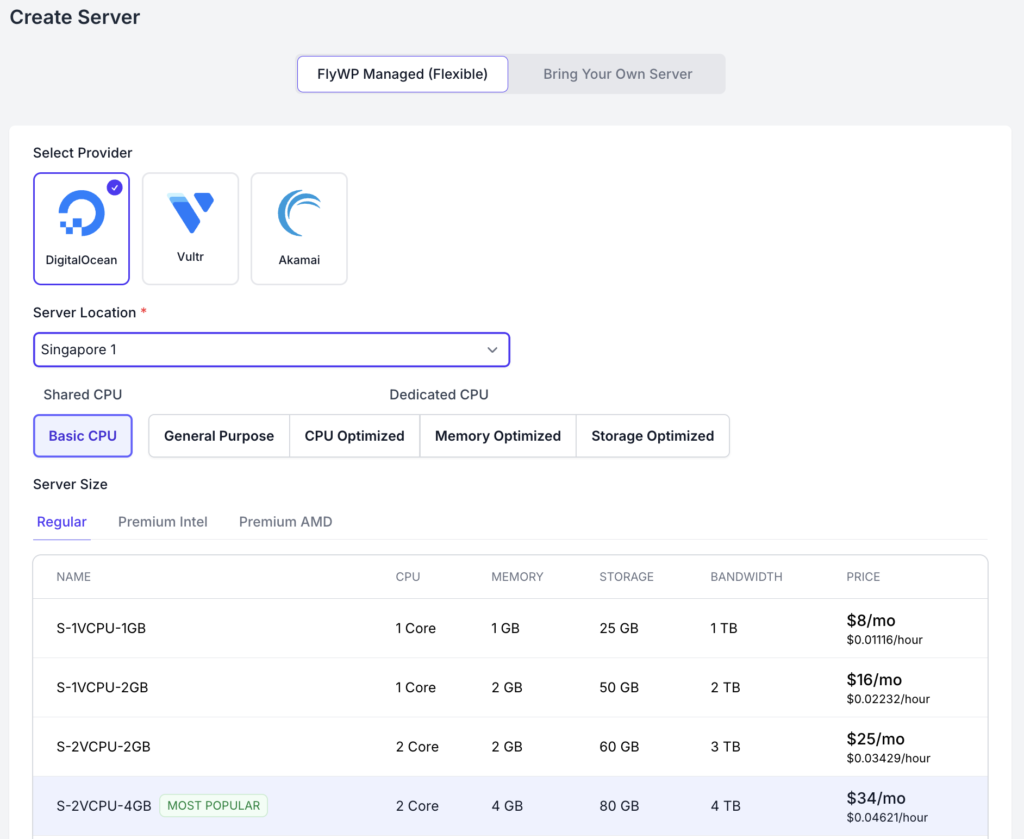
FlyWP provisions and configures the server. When it’s ready, it appears in your server list and you can start deploying sites.
Regions
Section titled “Regions”Every region offered by your chosen provider is available. Pick the one closest to your visitors.
Resizing
Section titled “Resizing”Direct resizing from the FlyWP dashboard is in development. For now, contact FlyWP Support and we’ll handle the resize for you.
Because of this, it’s worth giving the size a little thought up front — not because you’re locked in, but because changing it today means a support round-trip rather than a click.
Billing and cancellation
Section titled “Billing and cancellation”Managed servers are billed upfront — FlyWP charges for the server cost at the start of the period, not in arrears.
Important: cancellation and non-payment both end in permanent deletion. A Managed server is provisioned in FlyWP’s provider account, so there is no copy of it in an account of your own. When it’s deleted, it’s gone. Keep your own backups.
If you cancel a server, it is deleted.
If a payment fails, you have a 3-day grace period to resolve it. If the payment isn’t resolved within those 3 days, the server is deleted.
Three days is a short window, and it doesn’t pause for weekends or holidays. Two things worth doing:
- Keep a working payment method on file, and update it before a card expires rather than after.
- Contact Support the moment you know a payment will be late. We can talk about options while the server still exists. Once it’s deleted, there’s nothing left to restore.
If you’re stepping away from a site rather than abandoning it, take a backup and export it before cancelling. Don’t rely on the grace period as a safety net — it’s a window to fix a payment, not a place to store a server.
Do I need a DigitalOcean, Vultr, or Akamai account? No. FlyWP provisions on your behalf. You never touch the provider directly.
Does FlyWP charge extra to manage a Managed server? No. Management is included. You pay for the server itself, nothing more.
How many Managed servers can I run? As many as you want. There’s no restriction.
Can I run Managed and BYOS servers side by side? Yes. The choice is per server, not per account.
Which regions can I deploy to? All regions from your selected provider.
Can I resize a server later? Yes – Contact Support and we’ll do it for you. Self-serve resizing from the dashboard is coming.
What happens to my server if I cancel? It’s deleted permanently. Back up and export your sites before cancelling.
What happens if my payment fails? You get 3 days to resolve it. After that, the server is deleted. Contact Support before the window closes if you need help.
Can I open port 25, 465, 587? FlyWP-Managed Server does not allow opening email-related ports to ensure our servers do not get abused by threat actors.
Still stuck? How can we help?