Deploying One-Click Apps in FlyWP
Prerequisites
Section titled “Prerequisites”Before deploying an app via one-click:
- You must have a FlyWP server provisioned and connected.
- SSH access to server may be required for advanced setup.
- A domain/subdomain configured (or use FlyWP test domain)
- Understand minimum resource/cpu/memory requirements for the app you’re deploying.
- For production usage, appropriate security (SSL, firewall, backups) must be configured.
Using One-Click Apps in FlyWP (generic workflow)
Section titled “Using One-Click Apps in FlyWP (generic workflow)”-
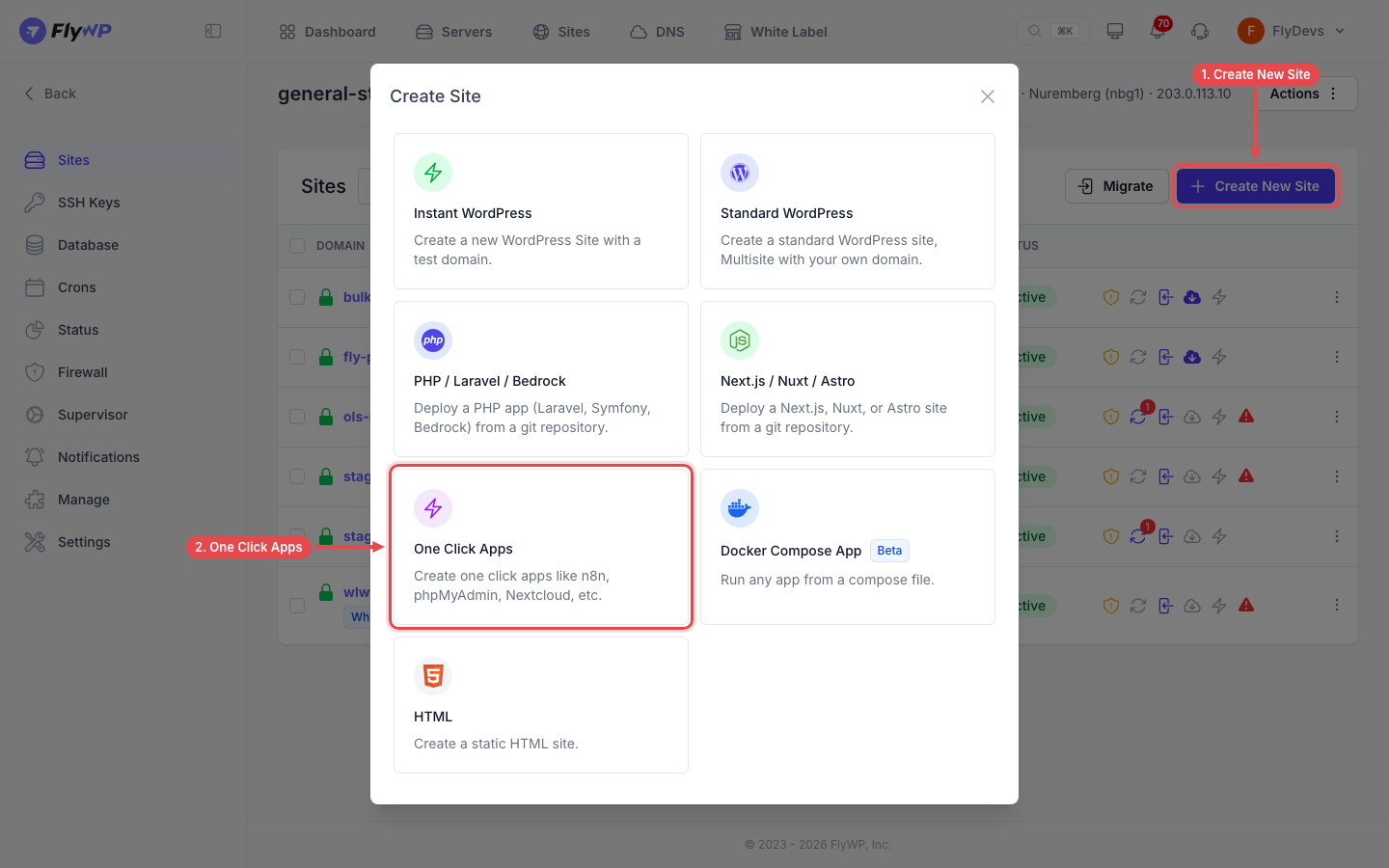
In FlyWP dashboard, navigate to your server → Sites → Create New Site.
-
Choose One Click Apps and select the app you want.
-
Enter the domain (or use a test domain) and fill in any fields the app asks for.
-
The system runs provisioning: creates Linux user account, directories, Docker container(s) for the app, installs dependencies, sets permissions.
-
Once deployment completes, access the app URL and finalize any app-specific setup (e.g., login, database connection).
-
For production: configure SSL (Let’s Encrypt or custom), review firewall rules, disable or restrict dev consoles (especially phpMyAdmin).
Available Apps
Section titled “Available Apps”- n8n: workflow automation.
- Nextcloud: self-hosted file storage and collaboration.
- phpMyAdmin: web GUI for MySQL/MariaDB.
- Open WebUI: self-hosted AI chat interface.
- Mautic: open-source marketing automation.
- Vaultwarden: lightweight Bitwarden-compatible password manager. See Vaultwarden.
- WireGuard VPN: fast, modern VPN. See WireGuard.
- Umami: privacy-focused website analytics. See Umami.
App-Specific Details
Section titled “App-Specific Details”- n8n is a workflow automation tool.
- FlyWP runs n8n as a Docker container behind an nginx proxy. n8n has no separate database; it keeps its data in a Docker volume on your server.
- After launch: visit the assigned domain URL (e.g.,https://your-domain) and create admin account.

- FlyWP sets
WEBHOOK_URLto your site’s domain. Check this value if external services send webhooks to a different public address. - For production: back up the n8n data volume, disable open signup (if not wanted), consider scaling resources.
- Note: workflows may trigger external API calls—monitor resource usage.
Nextcloud
Section titled “Nextcloud”- Nextcloud is a self-hosted collaboration/file-share platform.
- Nextcloud runs as its own container behind nginx and uses the server’s shared MySQL database. Assign a domain/subdomain and SSL before you use it.

- After setup: login as admin, create users/groups, enable/disable apps as needed.
- Security considerations: enforce HTTPS, limit public access, secure file permissions, enable automatic backups of data and database.
- Integration: You can integrate Nextcloud with n8n (e.g., automate file workflows) using n8n nodes.
phpMyAdmin
Section titled “phpMyAdmin”- phpMyAdmin is a web GUI for MySQL/MariaDB.
- Deploy via one-click: container + authentication. After launch: login with database credentials (provided by FlyWP when site created).
- Security: Because phpMyAdmin gives full DB access, restrict access (IP whitelist, disable when unused).
- Use case: DB administration, backups, table optimization. Avoid leaving it open in production.
Best Practices & Deployment Tips
Section titled “Best Practices & Deployment Tips”- Always use a custom domain + SSL; avoid unsecured HTTP in production.
- Use persistent storage (Docker volumes) for apps with data (e.g., Nextcloud files, n8n workflows) so you don’t lose data on redeploy.
- Monitor resource usage (CPU, RAM) especially for n8n and Nextcloud—they may need more than a minimal VM.
- For security: apply least privilege for database users, disable unused services, apply OS updates regularly.
- Backups: schedule both database + file backups. FlyWP supports backup/restore features.
- Update strategy: ensure the one-click app supports version upgrades (Docker image updates) without breaking data.
- For multi-tenant use: isolate apps in separate containers/users so one compromise does not spread.
Still stuck? How can we help?
View as Markdown