
FlyWP provides a reliable and system-level approach to managing WordPress cron jobs by leveraging container-based scheduling instead of relying on default WordPress traffic-triggered cron execution.
Overview
In a standard WordPress setup, WP-Cron is triggered on page loads, which can lead to inconsistent execution—especially on low-traffic or high-performance cached sites.
FlyWP solves this by using Ofelia, a lightweight job scheduler for Docker environments, to trigger cron events at consistent intervals.
How It Works
FlyWP uses Ofelia to execute WP-CLI commands inside each site container. This ensures that scheduled WordPress tasks run independently of site traffic.
Example Configuration
labels:
  ofelia.enabled: 'true'
  ofelia.job-exec.wpcron-17229.schedule: '@every 10m'
  ofelia.job-exec.wpcron-17229.command: 'wp cron event run --due-now'
Breakdown
- ofelia.enabled
Enables Ofelia job scheduling for the container. - schedule
Defines how often the cron runs.
Example:@every 10m→ runs every 10 minutes. - command
Executes the WP-CLI cron command:wp cron event run --due-now
This runs all due scheduled events in WordPress.
Customizing Cron Frequency
You can easily adjust how often cron runs from the FlyWP dashboard:
Path:Site Dashboard → Settings → Cron
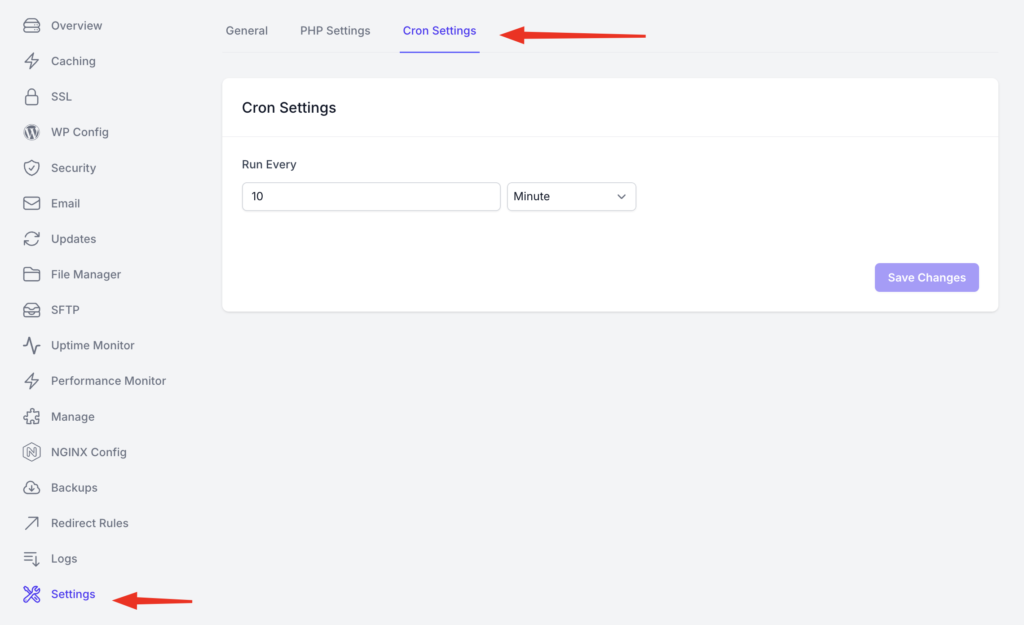
From there, you can define your preferred execution interval based on your site’s needs.
Execution Behavior
- Cron jobs are triggered using WP-CLI, not HTTP requests.
- Any scheduled event registered in WordPress will run as long as:
- It is properly scheduled using WordPress APIs.
- It is accessible via WP-CLI.
Key Advantages
- Reliable execution (not dependent on traffic)
- Consistent scheduling
- Better performance for cached or low-traffic sites
- Full compatibility with WordPress cron system
Notes
- FlyWP does not replace WordPress cron—it ensures it runs reliably.
- Developers can continue using standard WordPress scheduling functions like
wp_schedule_event. - If a cron event is available via WP-CLI, FlyWP will execute it.