
cPanel has run WordPress sites for years, but its bill climbs as you add client accounts. If you manage WordPress sites on a server and want a cPanel alternative for WordPress, this guide answers one question plainly. Why should you choose FlyWP over cPanel? We build FlyWP, so we'll show you the real numbers, the honest trade-offs, and the cases where cPanel is still the right call.
TLDR
- cPanel prices its license by how many accounts sit on each server, and those prices have now changed seven years in a row.
- FlyWP charges a flat $3 to $5 per server each month on your own server, with no limit on WordPress sites.
- Every FlyWP site runs in its own Docker container, so one client's problem stays with that client.
- Caching, staging, bulk updates and backups come built in, set up for WordPress from the start.
- cPanel is still the better pick if you need mailboxes on the same server or you host apps other than WordPress.
cPanel vs FlyWP at a Glance
cPanel is a general hosting panel that charges by account, while FlyWP is a WordPress platform that charges by server. The table below sets them side by side, using prices checked on cpanel.net and flywp.com in October 2026.
| cPanel | FlyWP | |
|---|---|---|
| Built for | Any website, app and mailbox on a server | WordPress sites first |
| How you pay | One license per server, priced by number of accounts | Flat fee per server |
| Panel price per server | $29.99 to $69.99 a month for up to 100 accounts, billed monthly | $3 to $5 a month on your own server |
| Keeping client sites apart | A separate account for each client | Every site in its own Docker container |
| WordPress tools | WP Toolkit included | The whole platform is built around WordPress |
| Mailboxes included | Site email sending only, mailboxes stay with an outside provider | |
| Server choice | Any server you license | DigitalOcean, AWS, Vultr, Hetzner, Akamai, any custom server, or FlyWP Managed Hosting |
| Moving in | Built-in Transfer Tool | Migration tool for sites on any host (beta) |
Two rows decide most switches. The pricing model decides what growth costs you, and the email row decides whether you need one more service.
What Pushes WordPress Teams Away From cPanel
Most people leave cPanel because of what the license now costs, not because the panel stopped working.
For years, cPanel charged one flat price per server. Then in 2019 it moved to account-based pricing, according to a pricing timeline published by hosting provider ServerPoint. Since then, every account you add can push you into a higher tier.
The increases also keep coming. European hosting provider VPSBG reported that the January 2026 update marked the seventh straight year of cPanel price changes.
cPanel's own pricing page, October 2026. On monthly billing, Solo costs $29.99 a month for 1 account. Admin costs $35.99 for up to 5 accounts, and Pro costs $53.99 for up to 30. Premier costs $69.99 for up to 100 accounts, plus $0.49 for each account after that.
There's a second reason too. cPanel was built to host almost anything, from PHP apps to mailboxes. It manages WordPress through WP Toolkit, a tool that sits on top of that general panel. As a result, teams that only run WordPress can end up paying for features they never use.
If you're weighing several options, our roundup of the best control panels for WordPress covers the wider field.
Why Teams Pick FlyWP as Their cPanel Alternative for WordPress
FlyWP wins on cost, separation between sites and WordPress focus. Here are the five reasons, then each one in detail.
- You pay per server, not per account.
- Every site runs in its own container.
- WordPress tools are built into the platform.
- You pick the cloud, or let FlyWP run the server.
- Your team gets the access it needs and nothing more.
Pay per Server, Not per Account
FlyWP charges one flat monthly fee for each server, no matter how many sites or clients live on it.
On your own server, FlyWP costs $5 per server for one to three servers. The price drops to $4 for four to nine servers and $3 once you reach ten. Every tier includes unlimited sites and all features except optional add-ons such as uptime monitoring. You can compare every tier on the FlyWP pricing page.
cPanel counts accounts instead. In cPanel's own words, an account is a user that manages websites, files, domains and email. Agencies usually give each client a separate account, so the number of clients decides the license tier.
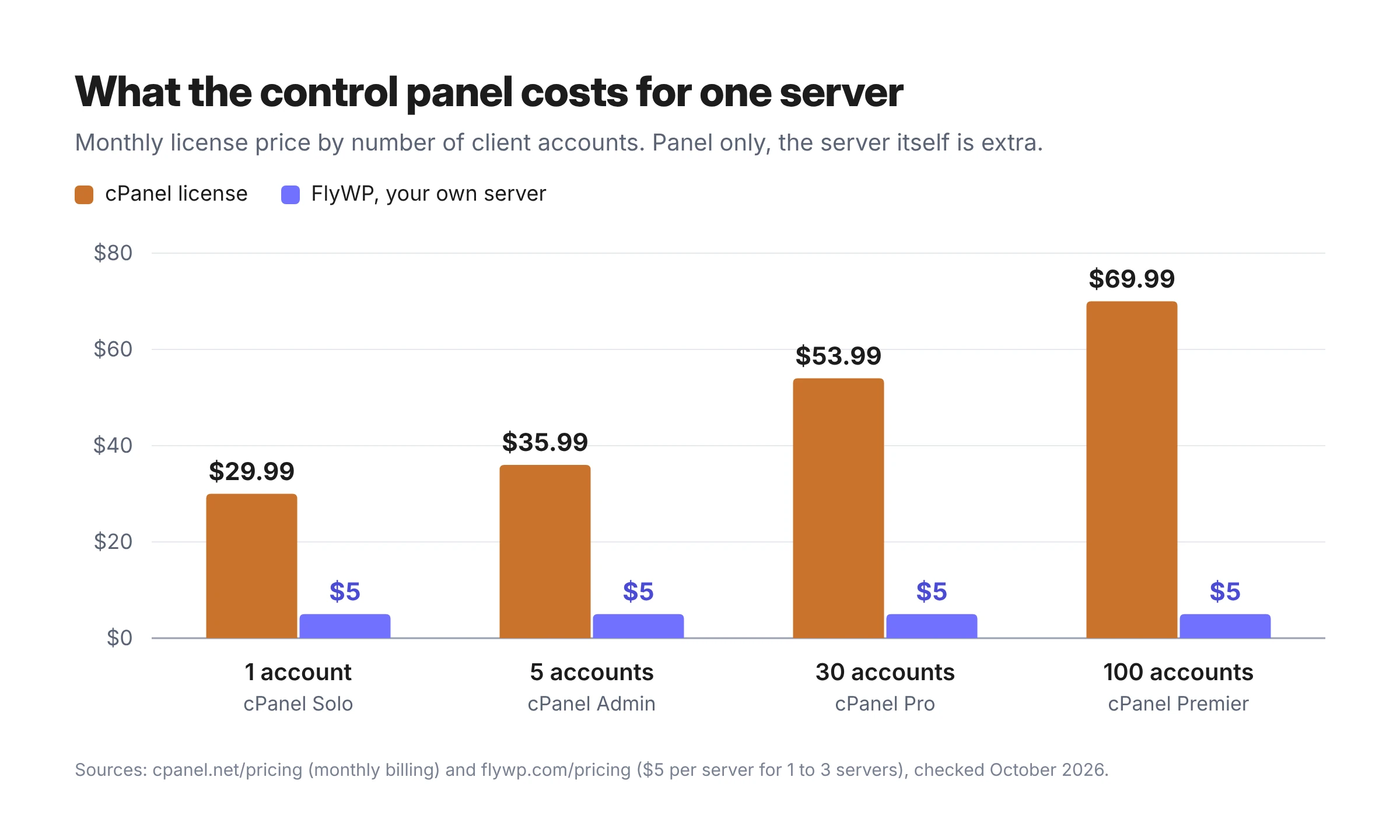
A simple example. Say you run 20 client sites on one server, each in its own cPanel account. That needs the Pro license at $53.99 a month. On FlyWP, the same server costs $5 a month. Across three servers like it, that's $161.97 a month against $15.
Both figures cover the panel only. You still pay your cloud provider for the server itself, whichever panel you choose.
To be fair, you could put every site into one cPanel account and stay on Solo at $29.99. However, all your clients would then share one account, which leads straight to the next point.
Every Site Runs in Its Own Container
FlyWP places each WordPress site in its own Docker container, so sites on the same server stay apart.
Inside a single cPanel account, every site runs under the same user and lives in the same file space. So if one site gets hacked through a weak plugin, the attacker can often reach the files of every other site in that account. Separate accounts solve this, but each one adds to your license count.
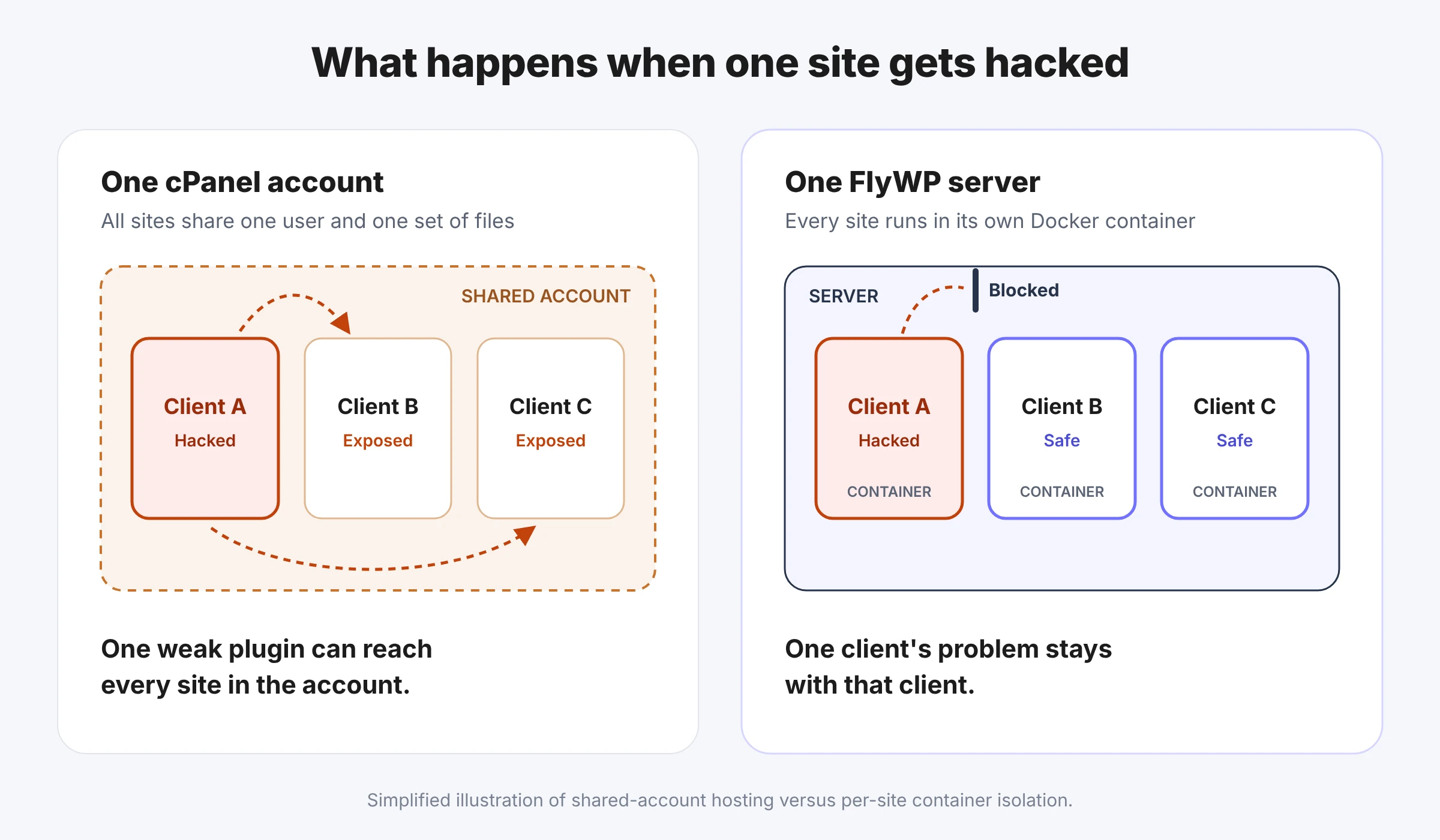
On FlyWP, that separation is the default and costs nothing extra. One client's problem stays one client's problem. For a deeper look at how this works, read our comparison of Docker vs traditional WordPress hosting.
WordPress Tools Are Built In, Not Bolted On
FlyWP is made for WordPress, so the tools you use every week sit in one dashboard.
- Server-side page caching and Redis object caching
- One-click staging and unlimited test sites
- Bulk plugin and theme updates across many sites
- Magic Login into wp-admin without a password
- A WP Config manager and quick PHP version switching
- WP-CLI, SSH, multisite and Bedrock support
- Backups to Amazon S3, Cloudflare R2, Google Drive, Wasabi and more
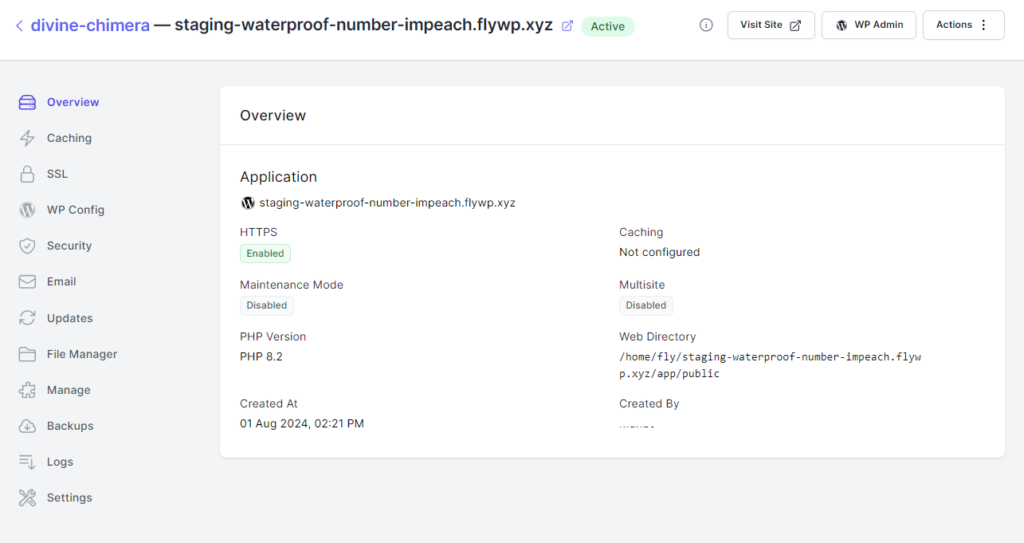
cPanel does include WP Toolkit, which handles installs, updates and other everyday WordPress tasks. The real difference is focus. On FlyWP, the server stack, the caching and the security rules are all set up for WordPress from the start. You also choose between Nginx and OpenLiteSpeed for your sites.
Pick Your Cloud, or Let FlyWP Run It
FlyWP handles WordPress server management on a server you already have, or it gives you one.
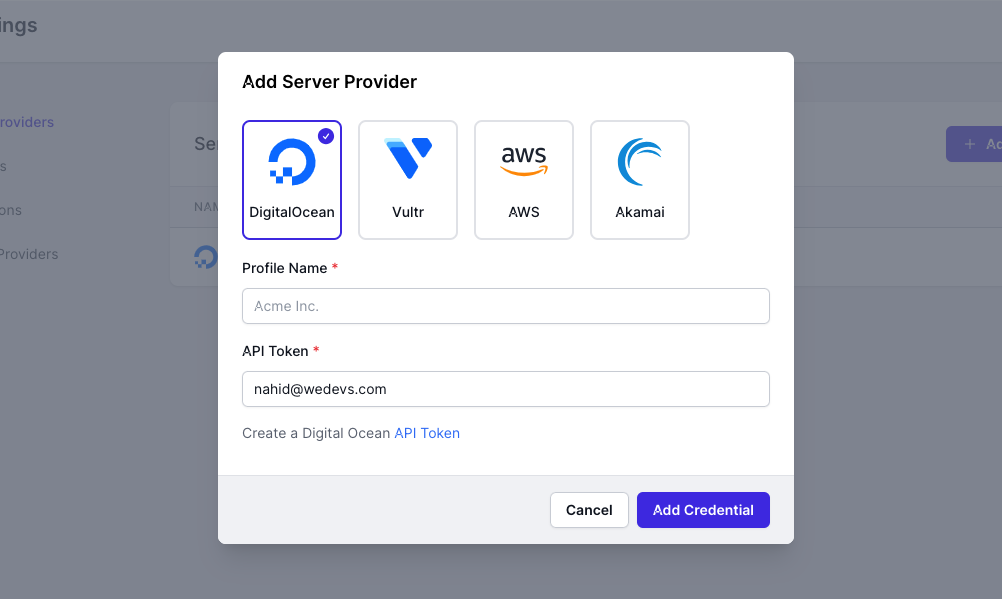
With Bring Your Own Server, you connect DigitalOcean, AWS, Vultr, Hetzner, Akamai or any custom server. FlyWP supports both ARM and x86 machines, so you can pick whichever gives you the best value.
On the other hand, if you'd rather skip server work entirely, FlyWP Managed Hosting starts at $7 a month with the server and the panel in one bill. cPanel can't offer that, because it sells software licenses and doesn't provide hosting itself. Our bring your own server guide for agencies explains how to choose between the two.
Give Your Team the Access It Needs and Nothing More
FlyWP lets you decide exactly what each person on your team can see and change.
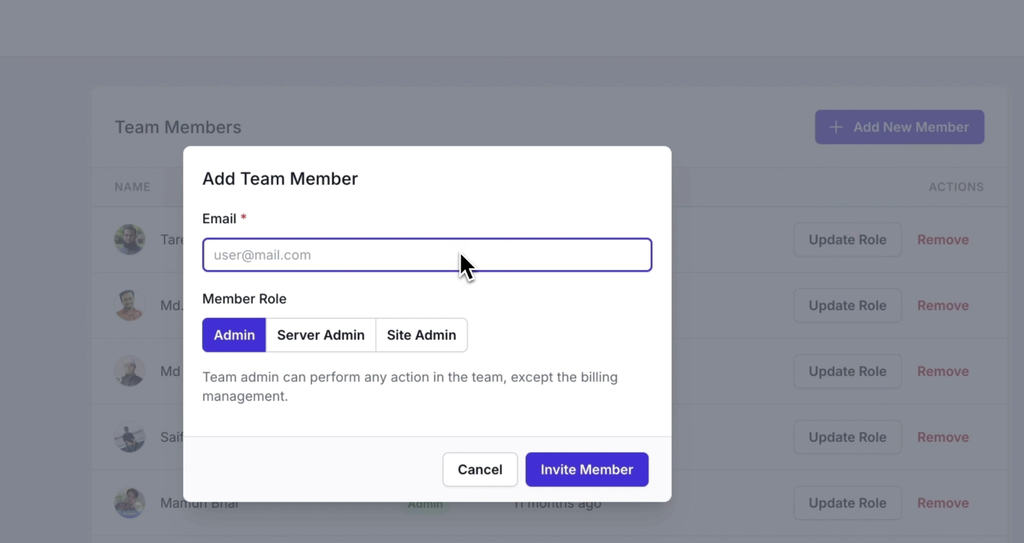
Granular team permissions let you assign roles to specific servers and sites. For example, a developer can manage one client's site without seeing your other clients. Meanwhile, site-specific SFTP access lets a freelancer reach one site's files and nothing else. As your team grows, you add people without handing out one shared login.
Where cPanel Is Still the Better Choice
cPanel still wins in three situations, and it's better to know them before you switch.
- You want mailboxes on the same server. cPanel includes email accounts. FlyWP doesn't host mailboxes, because mail sent from a fresh server IP often lands in spam. Instead, it connects your sites to senders like Postmark, Mailgun and SendGrid. You can read more about how email works on FlyWP.
- You host a lot more than WordPress. cPanel runs almost any PHP app. FlyWP focuses on WordPress, plus Node.js sites built with Next.js, Nuxt or Astro and a short list of one-click apps such as n8n.
- You sell hosting accounts that customers log in to. cPanel and WHM were built for hosts who resell accounts, and many of those customers already know its screens. FlyWP White Label, which lets agencies sell hosting under their own brand, is still on a waitlist as of October 2026.
If none of these apply to you, cPanel's higher license cost buys very little for a WordPress-only workload.
How to Move WordPress Sites From cPanel to FlyWP
You can move a site from any cPanel host into FlyWP with the built-in migration tool, without exporting files by hand.
- Create a server in FlyWP. Connect your own cloud server or launch a managed one.
- Click Migrate (Beta). You'll find the button on your server's page in FlyWP.
- Connect your WordPress site. Enter the site's URL and click Connect to WordPress, then log in and approve the connection. Alternatively, install the FlyWP Migrator plugin yourself and copy its migration key into FlyWP.
- Use a test domain first. FlyWP suggests a flywp.xyz test domain, so you can check the copy before it goes live.
- Match your PHP version. Pick the same PHP version your site used on cPanel, then start the migration.
- Test, rename and switch DNS. Check the migrated site, rename it to your real domain, then point your domain to the new server.
The migration tool is still in beta, so test every site on its temporary domain before you switch. Large sites also take longer to copy. The full walkthrough lives in the FlyWP docs on migrating WordPress sites from any host.
How to Decide If FlyWP Is Right for You
Answer these four questions in order, and the choice usually becomes clear.
- Are all or most of your sites WordPress? If yes, FlyWP fits. If not, cPanel's wider app support may matter more.
- Can your mailboxes live with an outside provider? If yes, nothing ties you to cPanel.
- Do you run several client sites per server? The more accounts you'd need on cPanel, the more you save on FlyWP.
- Do you want to manage your own cloud server? If yes, use Bring Your Own Server. If not, start with FlyWP Managed Hosting.
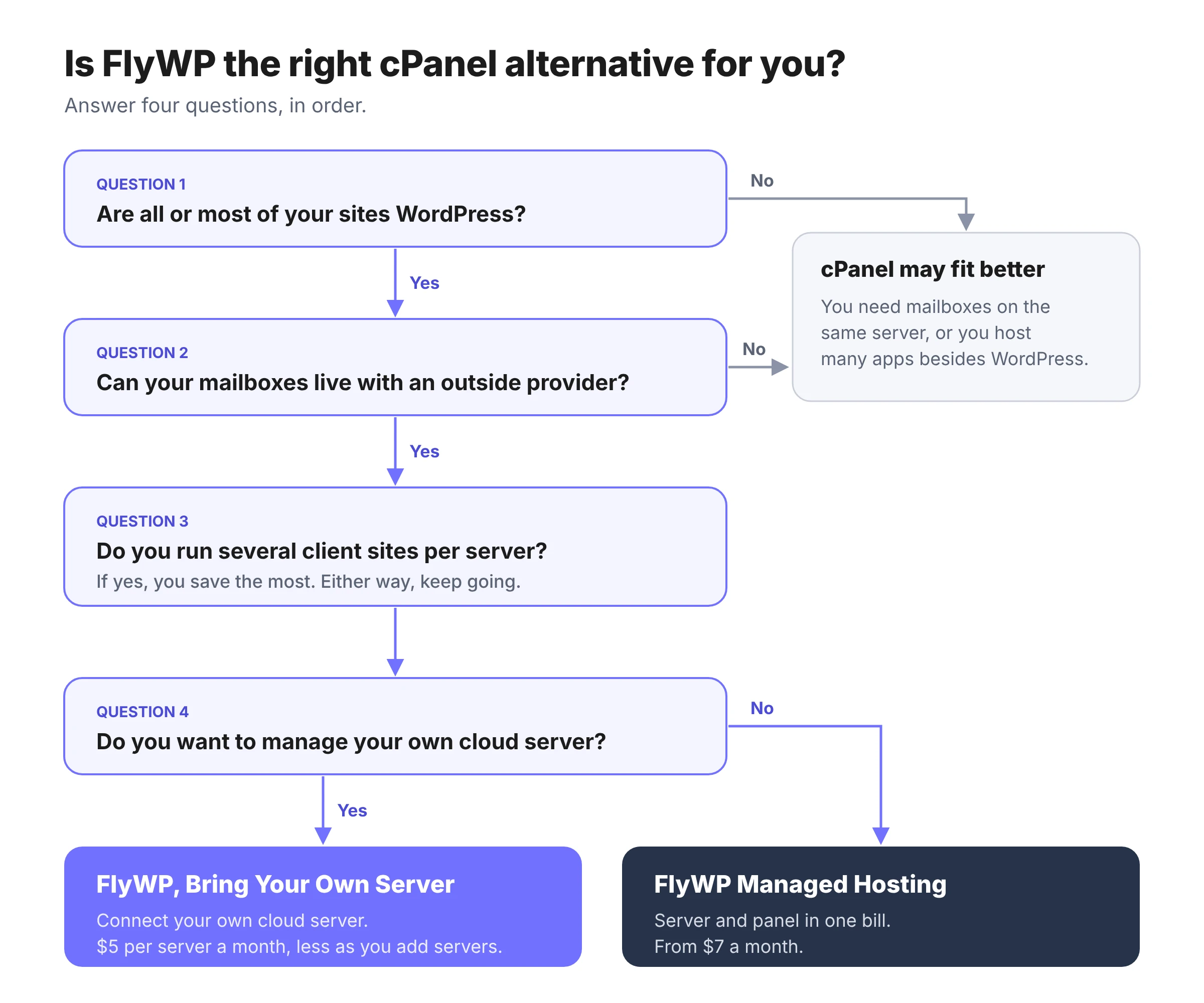
If you answered yes to the first three and you're running dozens of sites, see how teams manage 50 WordPress websites from one dashboard.
Frequently Asked Questions
Can I keep my email with my old cPanel host after moving my website?
Yes, as long as you keep that hosting plan active. Point only your website's A record to FlyWP and leave your MX records on the old host, so mail keeps arriving there. Many teams use the move as a chance to shift email to a dedicated provider like Google Workspace or Zoho Mail.
Will my site go down while I migrate?
Your live site keeps running on the cPanel server while FlyWP copies it to a test domain. Visitors only reach the new server after you change DNS, so plan that switch for a quiet hour.
Do I need server skills to run FlyWP on my own server?
No, you don't need deep server skills. FlyWP sets up the server stack for you and turns on automatic OS-level security updates. If you'd rather not touch a server at all, Managed Hosting takes that part off your plate.
Is a server overkill for one small WordPress site?
It can be. A single low-traffic brochure site often runs fine on shared hosting. A server setup starts to pay off once you run several sites, need staging, or want each client kept apart.
Do my existing SSL certificates move with my site?
You don't need to move them. FlyWP issues a free Let's Encrypt certificate for each site once your domain points to the server. You can also upload a custom certificate or use a Cloudflare origin certificate.
Switch to a cPanel Alternative for WordPress at Your Own Pace
A cPanel alternative for WordPress shouldn't charge you more for every client you add, and FlyWP is built around that idea. Start small by moving one site to a test domain and comparing it with your cPanel copy. When you're happy with the result, create your FlyWP account and bring the rest over.