Choosing the right web server is important for website performance, speed, and reliability. Two popular options for hosting WordPress websites are Nginx and OpenLiteSpeed.
Both web servers are known for their performance and ability to handle high traffic. However, they work differently, especially when it comes to PHP processing, caching, and WordPress optimization.
So, which one should you choose?
Is OpenLiteSpeed faster than Nginx? Is Nginx better for high-traffic websites? And which is the best web server for WordPress?
In this guide, we'll compare Nginx vs OpenLiteSpeed, explain their key differences, explore their caching systems, and help you choose the right option for your website. If you also want to see how Apache fits in, our earlier comparison of OpenLiteSpeed vs NGINX vs Apache covers all three, and our roundup of the best web servers for WordPress looks at more options.
Let's get started.
Nginx vs OpenLiteSpeed: Quick Comparison
Before looking at the details, here's a quick comparison of Nginx and OpenLiteSpeed.
| Feature | Nginx | OpenLiteSpeed |
|---|---|---|
| Architecture | Event-driven | Event-driven |
| Open source | Yes | Yes |
| PHP processing | PHP-FPM | LSAPI |
| Page caching | FastCGI Cache | LiteSpeed Cache |
| WordPress support | Yes | Yes |
| .htaccess support | No native support | Yes |
| Reverse proxy | Yes | Yes |
| Static content delivery | Excellent | Excellent |
| Load balancing | Yes | Yes |
| Best suited for | Flexible web infrastructure | PHP and WordPress hosting |
Both servers are capable of running WordPress websites. The main differences come down to their caching systems, PHP processing, configuration, and application requirements.
What Is Nginx?
Nginx (pronounced Engine-X) is a popular open-source web server. It is also used as a reverse proxy, load balancer, and HTTP cache.
It is known for its event-driven architecture, which allows it to handle many connections without creating a separate process for every request.
Nginx is widely used by developers, hosting providers, and businesses that need a flexible and reliable web server.
How Does Nginx Work?
Nginx uses an event-driven and asynchronous architecture to process incoming requests.
Instead of creating a separate process for every connection, it uses worker processes to handle multiple connections efficiently.
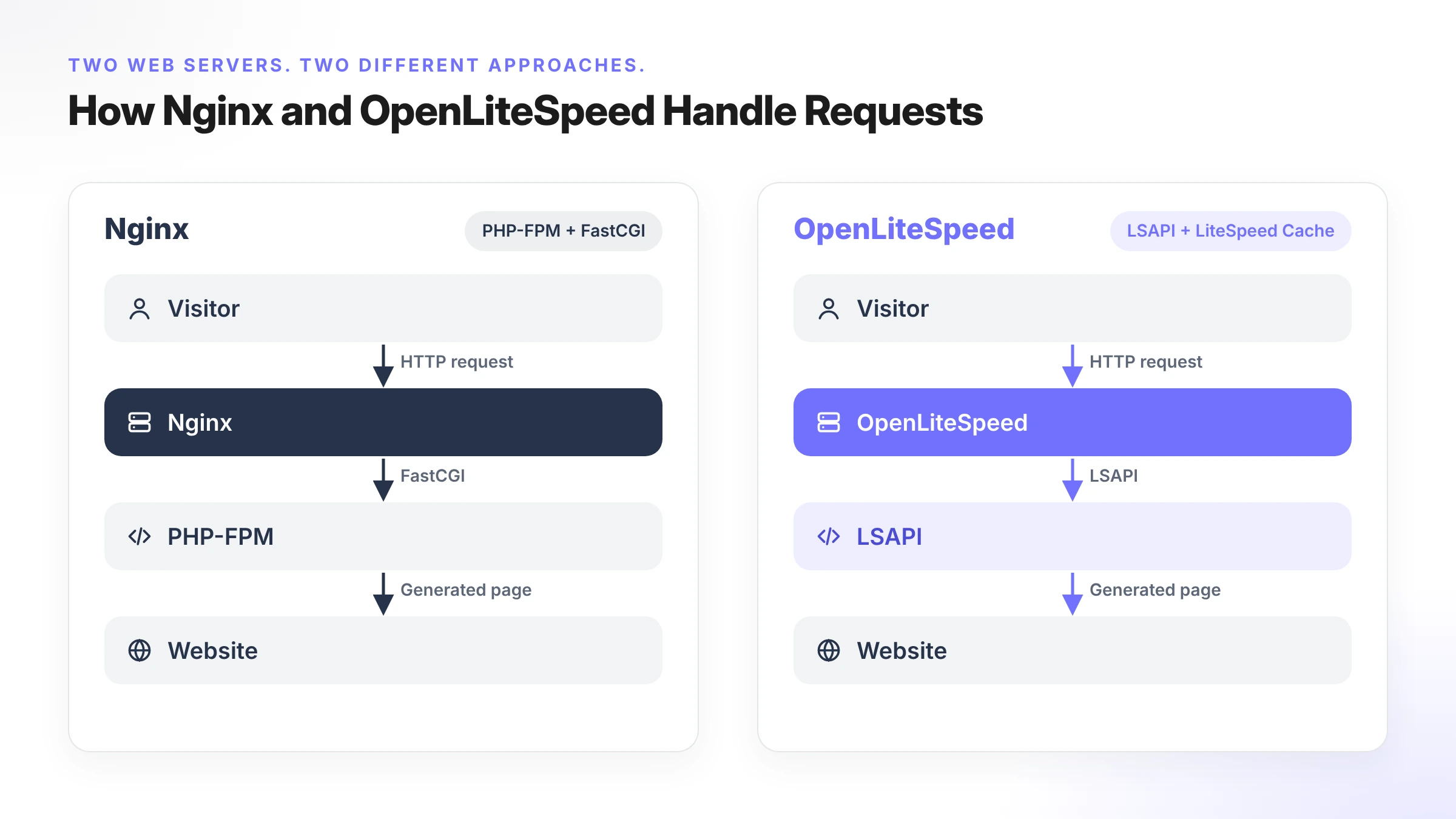
When someone visits a WordPress website hosted on Nginx, the server handles the incoming request. If the requested content is not available in the cache, Nginx can pass the request to PHP-FPM to execute the PHP code.
PHP-FPM processes the request and returns the generated content through Nginx.
This setup allows Nginx to serve static files directly while handling dynamic content through PHP-FPM.
Key Features of Nginx
1. Event-driven architecture
Nginx can handle thousands of concurrent connections with relatively low resource overhead. This makes it suitable for websites that receive regular or high traffic.
2. Fast static content delivery
Nginx is highly efficient at serving static files such as images, CSS, JavaScript, and HTML.
3. PHP-FPM integration
Nginx works with PHP-FPM to process dynamic PHP requests. This makes it a popular choice for WordPress, Laravel, and other PHP applications.
4. FastCGI Cache
Nginx supports FastCGI Cache, which can store generated PHP responses and serve cached pages without executing PHP for every request.
5. Reverse proxy and load balancing
Nginx can distribute incoming requests across multiple backend servers. This is useful for applications that need flexible infrastructure and traffic management. For a deeper look, see our guide to WordPress load balancing.
Limitations of Nginx
Although Nginx offers excellent performance, it has some limitations.
- It does not support
.htaccessfiles natively. Rewrite rules must be configured in the server configuration. - FastCGI Cache requires proper configuration and cache management.
- PHP processing requires a separate service such as PHP-FPM.
- WordPress cache exclusions and invalidation rules may need manual configuration.
For developers who want more control over their server environment, these requirements may not be a problem. However, beginners may need some additional configuration.
What Is OpenLiteSpeed?
OpenLiteSpeed is an open-source web server developed by LiteSpeed Technologies.
It is designed to deliver web content efficiently and is particularly popular among WordPress hosting providers.
One of its main advantages is its built-in caching technology, known as LiteSpeed Cache (LSCache).
OpenLiteSpeed also supports the LiteSpeed Server API (LSAPI) for PHP processing and provides native .htaccess support.
These features make it an interesting option for developers and website owners who primarily work with WordPress and other PHP applications.
How Does OpenLiteSpeed Work?
OpenLiteSpeed also uses an event-driven architecture to handle incoming requests.
When a visitor requests a WordPress page, OpenLiteSpeed checks whether a cached version is available.
If the page is cached and the cache rules allow it, the server can deliver the stored response without running PHP again.
If the requested content is not cached, OpenLiteSpeed communicates with the PHP application through LSAPI to generate the response.
This caching integration can reduce repeated PHP processing and improve response times for websites with many visitors.
Key Features of OpenLiteSpeed
1. Built-in LiteSpeed Cache
OpenLiteSpeed includes an integrated caching engine. It works with the LiteSpeed Cache WordPress plugin to manage page caching and other performance optimizations.
2. LSAPI support
OpenLiteSpeed uses LiteSpeed Server API (LSAPI) to communicate with PHP. It provides an efficient way to process PHP applications.
3. .htaccess support
Unlike Nginx, OpenLiteSpeed supports Apache-style .htaccess rewrite rules. This can make migration and configuration easier for some existing websites.
4. WordPress optimization
The LiteSpeed Cache plugin provides features such as page caching, image optimization, CSS and JavaScript optimization, and browser caching.
Some features depend on the server environment and available services.
5. Efficient request handling
Its event-driven architecture allows OpenLiteSpeed to handle multiple connections efficiently.
Limitations of OpenLiteSpeed
OpenLiteSpeed is a powerful web server, but it may not be the right choice for every application.
Some limitations include:
- Nginx-specific configurations and integrations may need to be replaced.
- It requires proper configuration to get the best results from LSCache.
- Developers working with different application types may prefer Nginx's familiar infrastructure.
- Some features available in LiteSpeed Enterprise are not necessarily available in OpenLiteSpeed.
It's also important to understand that OpenLiteSpeed and LiteSpeed Enterprise are different products. They share technology, but their features and licensing are not identical.
Nginx vs OpenLiteSpeed: Key Performance Differences
Performance is one of the biggest reasons people compare Nginx and OpenLiteSpeed.
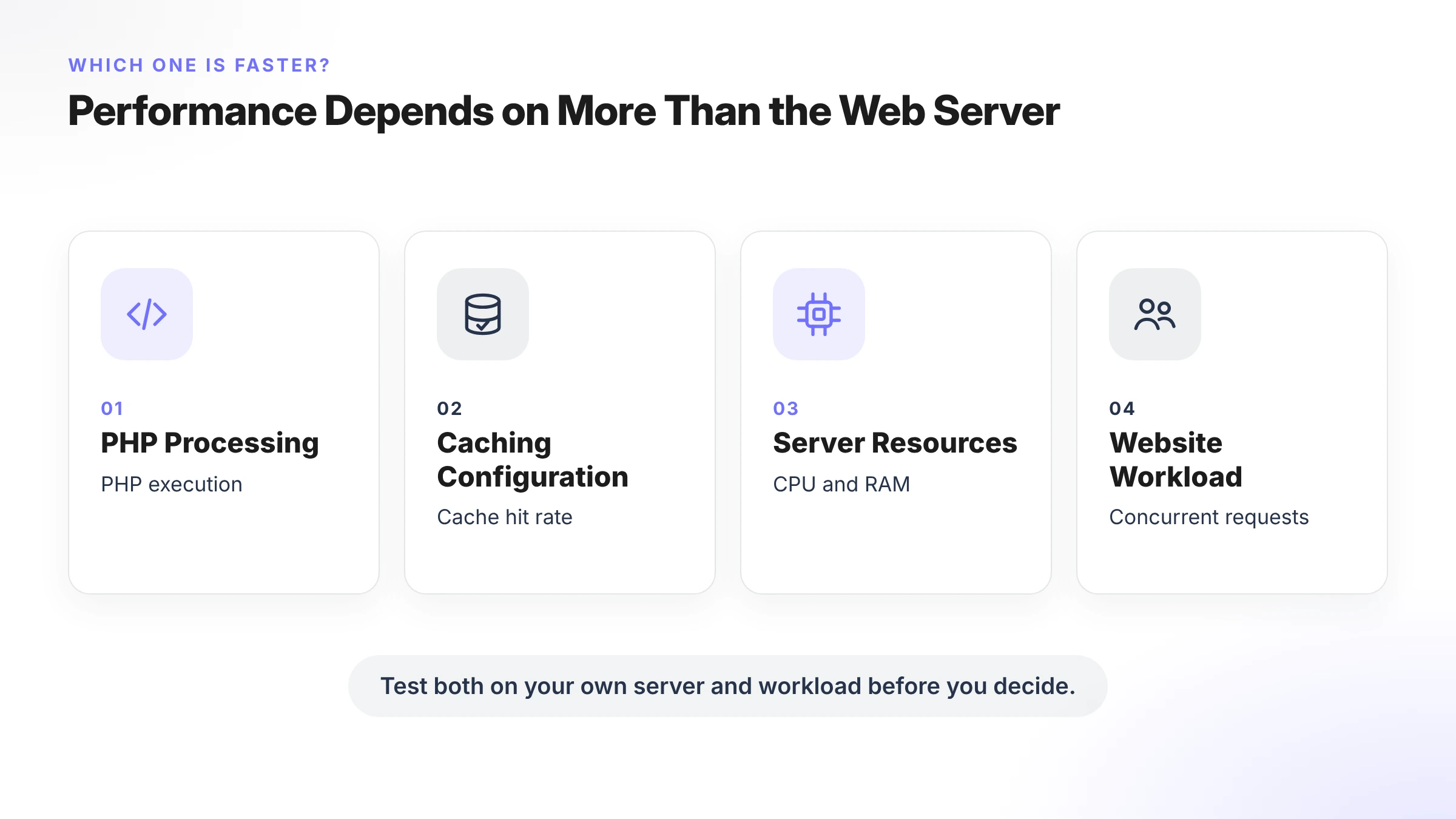
Both servers can deliver fast websites, but their performance can vary depending on the website, server resources, caching configuration, and traffic.
Let's compare the most important performance factors.
1. Static Content Delivery
Static content includes images, CSS files, JavaScript, fonts, and HTML files.
Nginx is particularly well-known for serving static files efficiently. Its event-driven architecture allows it to handle multiple requests without creating unnecessary processes.
OpenLiteSpeed also delivers static content efficiently and can handle concurrent requests.
For a typical WordPress website, both servers can provide excellent static content delivery.
Winner: Both
There is no universal winner here. Actual performance depends on server configuration, hardware, and the type of content being served.
2. Dynamic Content and PHP Processing
WordPress relies heavily on PHP to generate dynamic content.
For example, when a visitor opens a product page, checks an account, or submits a form, the server may need to execute PHP code.
Nginx uses PHP-FPM to process PHP requests.
OpenLiteSpeed uses LSAPI to communicate with PHP.
Both approaches are capable of handling dynamic WordPress requests efficiently.
However, performance depends on PHP configuration, database queries, application code, and available server resources. You can see how PHP versions behave on a real stack in our PHP benchmark tests for WordPress on FlyWP.
Winner: Depends on the workload
The best way to compare them is to test both under the same conditions.
3. WordPress Page Caching
Caching is one of the biggest differences between Nginx and OpenLiteSpeed.
Nginx uses FastCGI Cache, while OpenLiteSpeed uses its built-in LiteSpeed Cache system.
Both technologies can store generated WordPress pages and serve them to visitors without executing PHP for every request.
However, their integration and configuration are different.
We'll explain this in more detail in the next section.
Winner: OpenLiteSpeed for integrated LSCache functionality
4. CPU and RAM Usage
Server resource usage is another important factor when choosing a web server.
Both Nginx and OpenLiteSpeed are designed to handle multiple connections efficiently.
However, actual CPU and memory consumption depend on several factors:
- Number of concurrent visitors.
- PHP worker configuration.
- Cache hit rate.
- Database activity.
- Installed WordPress plugins.
- Server specifications.
A properly configured Nginx server can use fewer resources in some workloads. OpenLiteSpeed can also perform efficiently, particularly when cached requests reduce PHP processing. If your server feels slow regardless of the web server, see how to fix slow WordPress server response time and how to monitor server performance.
Winner: Depends on server configuration and workload
5. Handling High Traffic
Both web servers can handle websites with high traffic.
Nginx is widely used in large-scale infrastructure because of its reverse proxy, load balancing, and flexible configuration options.
OpenLiteSpeed is also suitable for busy WordPress websites, especially when page caching reduces the number of requests reaching PHP.
For websites with mostly anonymous visitors, effective page caching can make a significant difference.
For websites with many logged-in users and dynamic requests, PHP and database performance become more important. Our guide to high-traffic WordPress hosting explains what else to look at.
Winner: Both, depending on infrastructure requirements.
Nginx FastCGI Cache vs LiteSpeed Cache
Caching is one of the most important factors when comparing Nginx vs OpenLiteSpeed.
Both servers support page caching, but they use different technologies.
Let's understand how they work.
What Is Nginx FastCGI Cache?
FastCGI Cache is a caching mechanism available in Nginx.
It stores responses generated by backend applications, such as PHP-FPM.
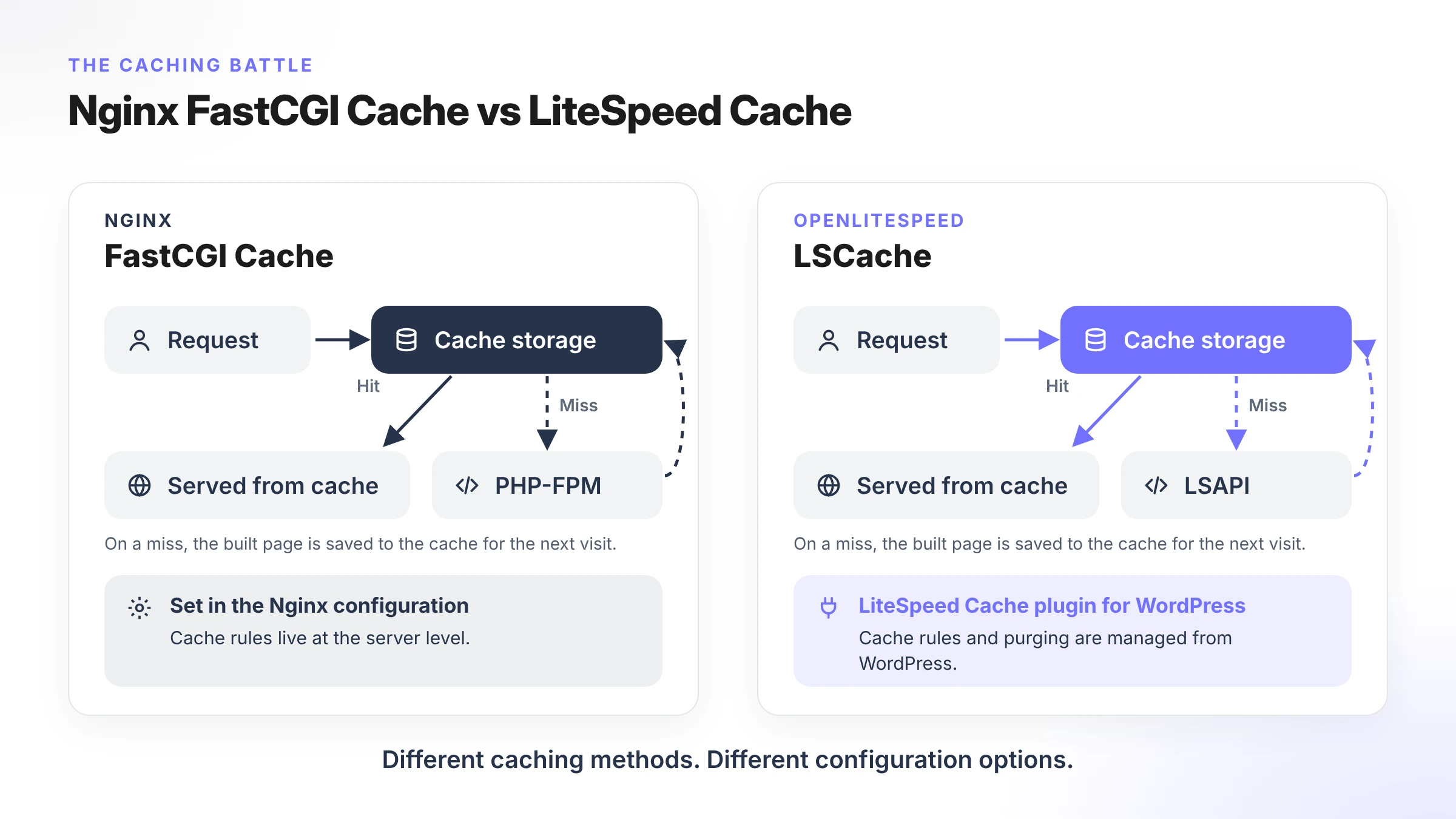
When a visitor requests a page, Nginx checks whether a cached response is available.
If the response is cached and valid, Nginx serves it directly instead of sending another request to PHP-FPM.
This reduces PHP processing and can improve website response times.
FastCGI Cache is particularly useful for WordPress websites with many visitors viewing the same pages.
However, it needs proper configuration.
For example, administrators must consider:
- Which pages should be cached.
- Which requests should bypass the cache.
- How logged-in users should be handled.
- How the cache should be cleared after content updates.
On FlyWP, you can read how this is set up in the FastCGI caching documentation. For object-level caching that works alongside page caching, see the benefits of Redis object caching in WordPress.
What Is LiteSpeed Cache?
LiteSpeed Cache is a server-level caching technology developed by LiteSpeed Technologies.
For WordPress, it works with the LiteSpeed Cache plugin.
The plugin communicates with the web server to manage page caching and provides additional optimization features.
Some of its key features include:
- Full-page caching.
- Cache management.
- Image optimization.
- CSS and JavaScript optimization.
- Browser caching.
- Database optimization tools.
The main advantage is that page caching is integrated into the web server.
This makes it easier to manage WordPress caching through the LiteSpeed Cache plugin.
FastCGI Cache vs LiteSpeed Cache: What's the Difference?
| Feature | Nginx FastCGI Cache | LiteSpeed Cache |
|---|---|---|
| Server integration | Nginx | LiteSpeed |
| Full-page caching | Yes | Yes |
| WordPress integration | Requires suitable configuration or plugins | Official LiteSpeed Cache plugin |
| Cache management | Server configuration | Plugin and server integration |
| Cache exclusions | Configured through rules | Managed through plugin settings and rules |
| Image optimization | External tools or plugins | Included in plugin |
| CSS/JS optimization | External tools or plugins | Included in plugin |
One important point: The LiteSpeed Cache WordPress plugin can be installed on Nginx, but its server-level page caching functionality requires a compatible LiteSpeed server. Other plugin features may still work depending on the configuration.
Which one should you choose?
If you prefer server-level control and want to configure caching according to your infrastructure, Nginx FastCGI Cache is a good option.
If you want integrated WordPress page caching and optimization tools, OpenLiteSpeed with the LiteSpeed Cache plugin is a strong choice.
Nginx vs OpenLiteSpeed: What Do Performance Benchmarks Show?
There are several published benchmarks comparing Nginx and OpenLiteSpeed.
However, benchmark results can vary significantly depending on the testing environment.
For example, OpenLiteSpeed has published a WordPress HTTP/2 benchmark comparing its performance with Nginx and Apache.
In that particular test, the reported results were:
| Web Server | Requests per second |
|---|---|
| OpenLiteSpeed | 15,883 |
| Nginx | 3,203 |
OpenLiteSpeed delivered approximately 4.96 times the reported throughput in that specific test.
However, these results should not be treated as a universal performance comparison.
The test used particular caching configurations, hardware, software versions, and concurrency settings.
Different workloads can produce different results.
Why Do Benchmark Results Differ?
Several factors affect web server performance.
1. Server specifications
CPU, RAM, storage, and network capacity can affect the results. Even the choice of provider matters, as our comparison of servers with the best TTFB shows.
2. Caching configuration
A properly configured cache can significantly reduce PHP execution and server workload.
3. PHP version
Different PHP versions and configurations can affect application performance.
4. WordPress setup
Themes, plugins, database queries, and application code all influence response times.
5. Traffic patterns
A website serving thousands of cached visitors behaves differently from a website processing thousands of dynamic requests.
For this reason, always consider the benchmark methodology before choosing a web server.
Nginx vs OpenLiteSpeed: Which Is Better for WordPress?
Both Nginx and OpenLiteSpeed are good options for WordPress hosting.
However, your choice should depend on the type of website you're managing.
Let's look at a few common use cases.
1. Personal Blogs and Content Websites
For blogs and content websites, caching plays an important role.
Most visitors read published content, which means many requests can be served from the page cache.
Both Nginx FastCGI Cache and OpenLiteSpeed LSCache can handle this type of workload.
If you prefer integrated WordPress caching and optimization, OpenLiteSpeed is a good option.
If you want more control over your server configuration, Nginx is also a strong choice.
2. High-Traffic WordPress Websites
High-traffic websites need efficient request handling and proper resource management.
Nginx offers flexible reverse proxy and load-balancing capabilities.
OpenLiteSpeed can also handle high traffic, especially when page caching reduces repeated PHP requests.
The right choice depends on your infrastructure and traffic patterns.
3. WooCommerce Stores
WooCommerce websites have different requirements from regular blogs.
Product pages may be cached, but shopping carts, checkout pages, and customer account pages usually need dynamic content.
Both servers can run WooCommerce websites.
However, cache exclusions and session handling must be configured correctly.
OpenLiteSpeed offers convenient integration with its caching plugin, while Nginx gives developers control over cache rules through server configuration. If you're running a store, see how FlyWP approaches hosting for WooCommerce.
4. Membership and LMS Websites
Membership websites and learning management systems often serve personalized content.
Visitors may have different permissions, course progress, account information, and dashboard content.
These pages cannot always be served from a shared page cache.
Both Nginx and OpenLiteSpeed can handle these websites, but the caching configuration must account for logged-in users and personalized content.
5. Agencies Managing Multiple Websites
Agencies often manage different types of WordPress websites.
Some clients may need an optimized WordPress environment, while others may need custom PHP applications or Node.js projects.
In these cases, having the flexibility to choose a web server for each project can be useful.
Nginx and OpenLiteSpeed both have their strengths, and you don't always need to use the same stack for every website. FlyWP's hosting for agencies is built around exactly this kind of multi-site workflow.
Nginx vs OpenLiteSpeed: Which One Should You Choose?
Now that we've compared both servers, here's a simple way to decide.
| Your requirements | Recommended option |
|---|---|
| Flexible application infrastructure | Nginx |
| Laravel and PHP applications | Nginx |
| Static and Node.js websites | Nginx |
| WordPress with integrated LSCache | OpenLiteSpeed |
Existing .htaccess rules | OpenLiteSpeed |
| Custom server configurations | Nginx |
| WordPress-focused hosting | OpenLiteSpeed |
| Different stacks for different projects | Both |
There is no single winner for every situation.
If you need flexibility across different application types, Nginx is an excellent choice.
If your primary focus is WordPress and you want integrated LiteSpeed caching, OpenLiteSpeed is worth considering.
The most important thing is to choose a server that matches your website's requirements.
Can You Manage Both Nginx and OpenLiteSpeed with FlyWP?
Choosing the right web server is only one part of managing WordPress infrastructure.
You also need to deploy websites, configure servers, manage domains, install SSL certificates, monitor performance, and maintain your websites.
Managing these tasks manually can take time, especially when you're working with multiple client projects.
This is where FlyWP comes in.
FlyWP is a WordPress server management platform that helps developers, freelancers, and agencies deploy and manage websites across their cloud servers from one dashboard.
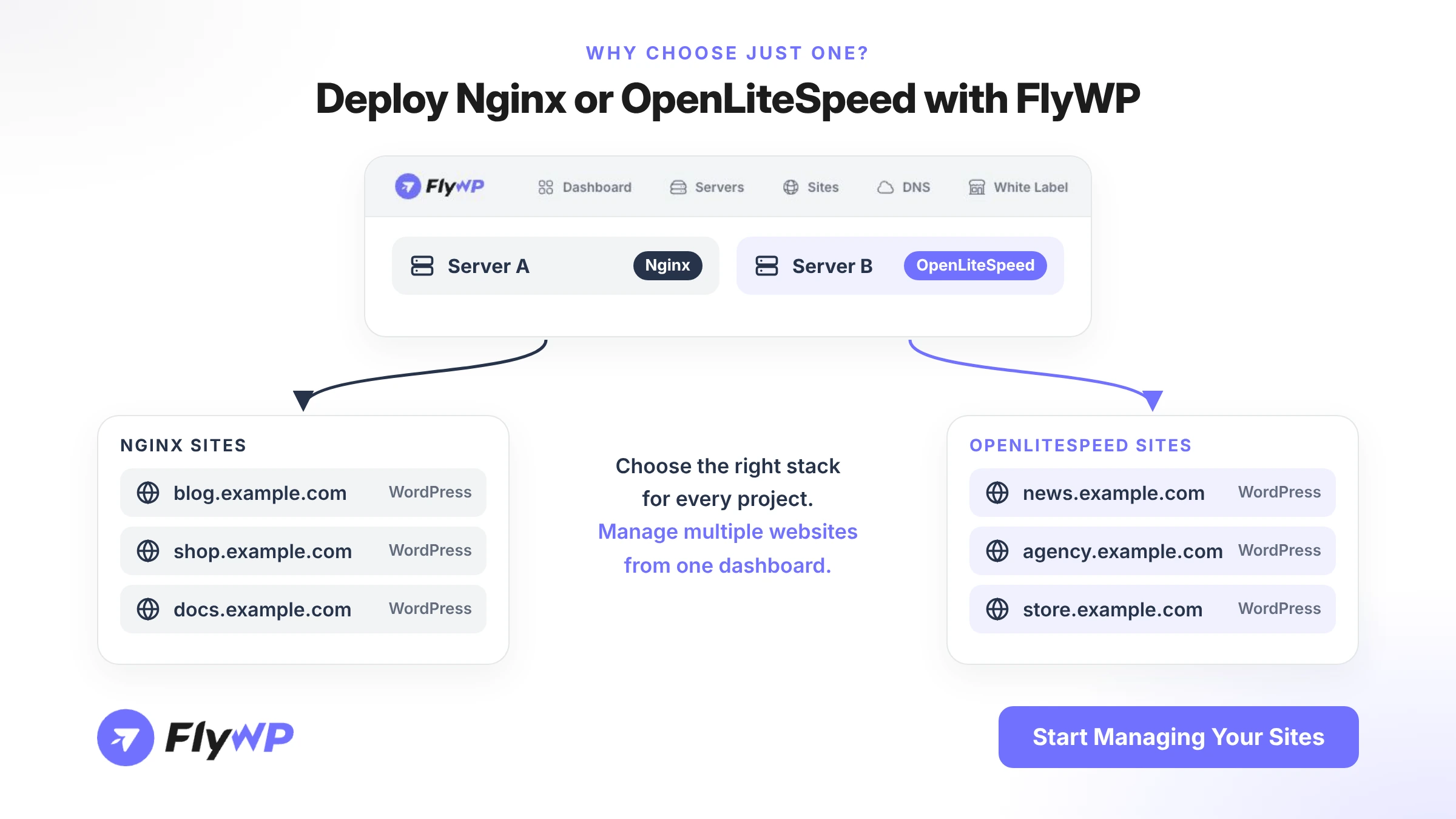
With FlyWP, you don't have to choose between Nginx and OpenLiteSpeed for your entire infrastructure.
You can select the stack that fits each project.
Deploy WordPress with Nginx
FlyWP supports Nginx for WordPress and other supported application types.
You can use it for:
- WordPress websites.
- Custom PHP applications.
- Laravel projects.
- Static websites.
- Node.js applications.
Nginx is a good choice when you need a flexible environment for different types of projects.
Deploy WordPress with OpenLiteSpeed
FlyWP also supports OpenLiteSpeed for WordPress websites.
It allows you to use the LiteSpeed caching environment and take advantage of its WordPress integration.
This can be useful for agencies and developers who prefer managing WordPress websites with LiteSpeed Cache.
Choose the Right Stack for Every Website
One of the biggest advantages of FlyWP's multiple site stacks is flexibility.
You can deploy different websites using different stacks based on project requirements.
For example:
- Use Nginx for a Laravel application.
- Use OpenLiteSpeed for a WordPress blog.
- Use Nginx for a custom PHP project.
- Use OpenLiteSpeed for a WordPress website that benefits from LSCache.
You can manage your websites from one centralized dashboard without having to use the same web server for every project.
Want to manage both Nginx and OpenLiteSpeed websites from one place?
Explore FlyWP Multiple Site Stacks and choose the right environment for your projects.
How to Deploy WordPress with Nginx or OpenLiteSpeed Using FlyWP
Getting started with FlyWP is simple.
Here's how you can deploy a WordPress website with your preferred web server.
- Connect your cloud server: Connect a supported cloud server to your FlyWP dashboard.
- Create a new website: Open your server dashboard and start creating a website.
- Choose your web server: Select Nginx or OpenLiteSpeed based on your requirements.
- Configure your website: Set up your domain and other required website settings.
- Deploy WordPress: Complete the deployment process and access your new website.
You can follow the detailed guides:
With FlyWP, you can manage both environments from the same dashboard and choose the right stack for every project.
Frequently Asked Questions
Is OpenLiteSpeed faster than Nginx?
OpenLiteSpeed can be faster in certain WordPress workloads, particularly when its integrated LSCache is properly configured. However, Nginx with FastCGI Cache can also deliver excellent performance. Actual results depend on the website, server configuration, and workload.
Which web server is best for WordPress?
Both Nginx and OpenLiteSpeed are excellent choices for WordPress. OpenLiteSpeed is a good option if you want integrated LiteSpeed caching, while Nginx offers more flexibility for different applications and server configurations.
Is Nginx better than OpenLiteSpeed for WooCommerce?
Not necessarily. Both servers support WooCommerce. OpenLiteSpeed offers integrated LSCache, while Nginx provides flexible cache configuration. The best option depends on your store's traffic, dynamic pages, and caching requirements.
Does Nginx support page caching?
Yes. Nginx supports page caching through FastCGI Cache. It can store PHP-generated responses and serve them directly to visitors without executing PHP for every request.
What is the difference between FastCGI Cache and LiteSpeed Cache?
FastCGI Cache is Nginx's server-level caching mechanism for backend responses. LiteSpeed Cache is an integrated caching system that works with the LiteSpeed Cache plugin for WordPress. Both can improve performance by reducing repeated PHP processing.
Can I use the LiteSpeed Cache plugin with Nginx?
Yes, you can install the LiteSpeed Cache WordPress plugin on Nginx. However, its server-level page caching features require a compatible LiteSpeed server. Other optimization features may still work on Nginx.
Does OpenLiteSpeed support .htaccess?
Yes. OpenLiteSpeed supports Apache-style .htaccess files, which makes it easier to work with many existing Apache and WordPress configurations. Nginx does not support .htaccess natively.
Is OpenLiteSpeed free?
Yes. OpenLiteSpeed is an open-source web server available for free. LiteSpeed Enterprise is a separate commercial product with additional features and licensing requirements.
What is the difference between OpenLiteSpeed and LiteSpeed Enterprise?
Both are developed by LiteSpeed Technologies and share similar technologies. However, they have differences in features, configuration, and licensing. OpenLiteSpeed is open source, while LiteSpeed Enterprise is a commercial web server.
Can I switch from Nginx to OpenLiteSpeed?
Yes, but switching requires proper planning. You may need to adjust rewrite rules, PHP configuration, caching settings, and other server-specific configurations. Always take a backup and test your website before moving to another web server.
Which web server is better for high-traffic websites?
Both Nginx and OpenLiteSpeed can handle high-traffic websites. Nginx offers flexible reverse proxy and load-balancing capabilities, while OpenLiteSpeed can deliver strong performance with properly configured page caching. Your infrastructure and workload matter more than the server name alone.
Can I manage Nginx and OpenLiteSpeed websites from one dashboard?
Yes. FlyWP allows you to deploy and manage supported websites using Nginx and OpenLiteSpeed from one centralized dashboard. This gives developers and agencies the flexibility to choose the right stack for each project.
Final Thoughts
So, Nginx vs OpenLiteSpeed: which one should you choose?
Both are powerful web servers with their own advantages.
Nginx is a great option for developers who need flexibility, custom configurations, reverse proxy capabilities, and support for different application types.
OpenLiteSpeed is a strong choice for WordPress users who want integrated page caching and LiteSpeed Cache support.
Instead of focusing only on which server is faster, consider your website's requirements, caching strategy, and infrastructure.
And if you manage multiple websites, you don't have to limit yourself to just one option.
With FlyWP, you can deploy WordPress websites using Nginx or OpenLiteSpeed and manage your infrastructure from one place.
Choose your stack. Deploy your websites. Manage everything with FlyWP.