




WordPress server control panel
The WordPress Control Panel That Replaces cPanel
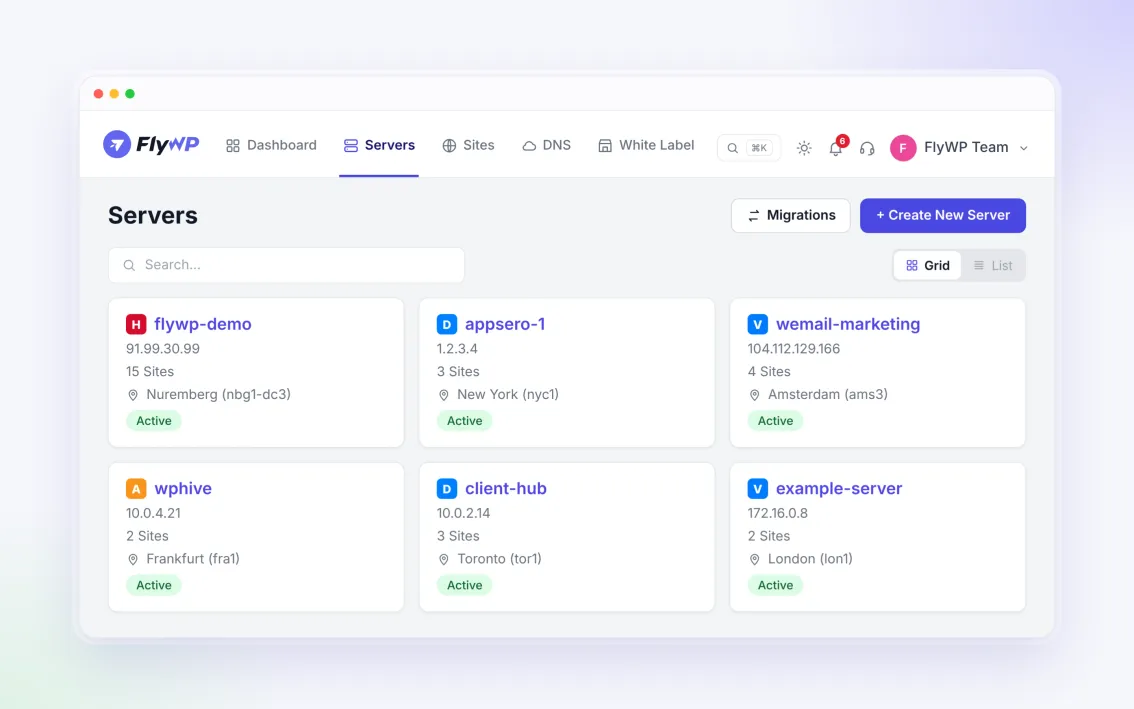
Manage all your WordPress sites and servers from one dashboard, instead of juggling cPanel, FTP and SSH. FlyWP brings server setup, site deployment and WordPress maintenance into one place.
Why switch from cPanel?
cPanel was built around hosting accounts, with licenses priced by how many accounts you run. FlyWP is built for WordPress teams on cloud servers: you pay per server, host unlimited sites, and get WordPress tools in the same dashboard.
Get Started FreeNo per-account licenses
Pay per server and host unlimited sites on each one.
Cloud-ready
Launch a managed server from FlyWP, or connect DigitalOcean, AWS, Vultr, Hetzner or Akamai.
WordPress-focused
Magic Login, a WP Config editor and centralized updates are part of the dashboard.
Built for teams
Give each team member role-based access to specific servers and sites.
Manage servers, sites and WordPress in one place
The tools you used across cPanel, WHM, FTP and the command line, in one WordPress-first dashboard.
Cloud server control
Launch a managed server or connect your own cloud account. Choose Nginx or OpenLiteSpeed for each site.
Built-in WordPress tools
One-click wp-admin login, a WP Config editor, and bulk updates for WordPress core, themes and plugins.
File and database manager
Edit site files in the browser-based File Manager, with no FTP client, and manage databases with phpMyAdmin.
SSL and DNS
Add free Let’s Encrypt or custom SSL certificates. Connect Cloudflare to manage DNS records from FlyWP.
Team and roles
Invite developers, designers and clients, and give each one access to the servers and sites they need.
Core features included
Backups, staging, team access and security are built in, with no hidden costs.
FlyWP vs cPanel: feature comparison
Both can host WordPress. Here is how they differ for teams running WordPress on cloud servers.
| Feature | FlyWP | cPanel & WHM |
|---|---|---|
| Supported servers | VPS and cloud servers: DigitalOcean, Vultr, Akamai, Hetzner, AWS or a custom server | Linux servers with a cPanel license |
| Pricing model | Per server, with unlimited sites on each server | Metered license per server, priced by number of accounts |
| Interface | One dashboard for servers and sites | WHM for servers, cPanel for each account |
| WordPress management | Magic Login, WP Config editor, updates, cloning and staging | WP Toolkit, sold separately or bundled by plan |
| Team access | Role-based access on specific servers and sites | Account-level access managed through resellers and WHM |
| Files and databases | File Manager and phpMyAdmin | File Manager and phpMyAdmin in each account |
| Backups | Scheduled backups to S3-compatible storage, one-click restore | Backup configuration in WHM, often a paid add-on |
| Web server | Nginx or OpenLiteSpeed, set per site | Apache by default, set at the server level |
| Best for | Developers, agencies and businesses hosting WordPress on cloud servers | Hosting providers selling shared or account-based hosting |
Switch to FlyWP in a few steps
Move your WordPress sites off cPanel one site at a time.
- 1
Connect or deploy a server
Connect your existing VPS or cloud server, or launch a managed server from FlyWP.
- 2
Install the FlyWP Migrator plugin
Add the plugin to your WordPress site on the cPanel host.
- 3
Migrate the site
FlyWP copies the site’s files and database to your new server and sets up the site.
- 4
Update your DNS
Point your domain to the new server. With Cloudflare connected, FlyWP can set this up for you.

Before you switch
- WordPress sites on a cPanel account
- A VPS or cloud server
- Email stays with an external provider
WordPress tools, not a generic hosting panel.
Handle routine WordPress work without logging into each site.
- Magic Login. Open any site’s wp-admin with one click.
- Centralized updates. Apply bulk updates to WordPress core, themes and plugins from one screen.
- WP Config Manager. Change important wp-config.php settings without editing files.
- Clone and transfer. Copy a site to staging, or move it to another server.
- Site Blueprints. Launch new client sites from reusable blueprints.
Security and backups, built in.
Protection that’s set up for every server, without configuring it by hand.
- Site isolation. Each site runs in its own Docker container, so one site’s problem doesn’t spread to the others.
- Firewalls. A server-level firewall plus the 8G firewall (on Nginx sites) to block known attacks.
- Scheduled backups. Back up to Amazon S3, Cloudflare R2, DigitalOcean Spaces, Google Drive and other storage.
- One-click restore. Bring a site back from a backup when you need it.
Built for modern WordPress
The control cPanel users expect. Built for WordPress.
Full root and SSH access, with a dashboard your whole team can use. See FlyWP for agencies.
For agencies and developers
Host client sites across one or more servers, reuse Site Blueprints, and give every client the right access.
For stores and businesses
Run WooCommerce and business WordPress sites on cloud servers you control, with your own caching setup.
For hosting providers
Offer customers a white-labeled FlyWP dashboard for their WordPress sites.
For site owners moving to a VPS
Get more control than shared hosting, and manage your server through a dashboard instead of the command line.
Everything you need to leave cPanel behind
- Managed or your own server
- Unlimited sites per server
- Nginx or OpenLiteSpeed
- PHP version manager
- Magic Login
- Centralized updates
- WP Config Manager
- Clone, transfer and staging
- File Manager
- phpMyAdmin
- Auto and custom SSL
- Cloudflare DNS management
- Scheduled backups and restore
- Docker site isolation
- 8G firewall
- Team permissions and SSH keys
Start Free. Pay Per Server When You Grow.
Manage one server and one site on the Free forever plan. When you need more, paid plans are priced per server with unlimited sites.
See PricingPrices are listed on the FlyWP pricing page. Volume discounts apply automatically as you add servers.
cPanel Alternative FAQs
Is FlyWP a cPanel alternative?
Can I connect my existing VPS or cloud server to FlyWP?
How is FlyWP pricing different from cPanel?
Can I migrate a WordPress site from cPanel to FlyWP?
What happens to my email accounts when I leave cPanel?
Does FlyWP manage DNS?
Does FlyWP work with shared hosting?

Ready to Move Beyond cPanel?
Host and manage your WordPress sites on your own cloud servers, with no per-account license fees.