
WordPress powers more than 43% of all websites. That scale makes it a frequent target – not because WordPress core is inherently insecure, but because misconfigured servers are common.
If you manage WordPress for clients, run WooCommerce stores, or deploy sites on VPS infrastructure, you already know: security plugins are not enough. Real WordPress security starts below WordPress.
In this guide, I explain how CIS benchmarks apply to WordPress, what they actually secure, and how to implement them in practice – without turning infrastructure hardening into ongoing operational overhead.
TL;DR:
- There is no official CIS benchmark for WordPress.
- CIS publishes benchmarks for operating systems, web servers, databases, and infrastructure components.
- WordPress security = stack security.
- Hardening Ubuntu/RHEL, NGINX/Apache, PHP, and MySQL/MariaDB covers most real-world WordPress attack paths.
- CIS Level 1 is sufficient for most production WordPress environments.
- Managed stacks like FlyWP reduce implementation complexity.
Definition:
CIS Benchmarks for WordPress refer to applying official CIS configuration standards to the infrastructure stack that WordPress runs on – not to WordPress core itself.
Introduction
You’ve probably searched for “CIS benchmark WordPress” expecting a PDF with WordPress-specific configuration controls.
It doesn’t exist.
CIS focuses on securing the technologies WordPress depends on:
- Linux (Ubuntu, RHEL)
- NGINX or Apache
- MySQL/MariaDB
- PHP runtime
That’s more important than it sounds.
Most real-world WordPress compromises are caused by:
- Weak SSH authentication
- Exposed database services
- Outdated PHP versions
- Misconfigured web servers
- Over-permissive file access
Not WordPress core itself.
WordPress inherits the security posture of its stack.
If the infrastructure is hardened correctly, WordPress benefits from that baseline protection.
What Are CIS Benchmarks?
The Center for Internet Security (CIS) develops consensus-based security configuration standards for IT systems.
They publish benchmarks for:
- Operating systems
- Web servers
- Databases
- Cloud providers
- Containers
These benchmarks are widely referenced in compliance frameworks such as HIPAA, PCI-DSS, and SOC 2.
Important distinction:
CIS benchmarks are configuration standards – not software.
Organizations can manually apply them or use assessment tools like CIS-CAT Pro for automated verification.
Does CIS Have a WordPress Benchmark?
Short answer: No.
CIS does not publish a WordPress-specific benchmark.
Why?
Because WordPress is a CMS. It runs on infrastructure.
CIS benchmarks focus on the infrastructure layer.
That leads to a key principle:
If the server is hardened correctly, WordPress inherits that protection.
How CIS Secures WordPress Indirectly
Think in layers:
Operating System
→ Web Server
→ PHP Runtime
→ Database
→ WordPress
Each layer introduces risk.
CIS benchmarks target the first four.
If the OS is compromised, WordPress is compromised.
If the database is exposed, WordPress is compromised.
If PHP allows unsafe execution, plugins become exploit paths.
CIS aligns with this inheritance-based security model.
CIS Benchmarks by Stack Layer
1. Operating System Hardening
Most WordPress VPS deployments run on:
- Ubuntu
- Red Hat Enterprise Linux
CIS OS benchmarks focus on eliminating direct server compromise.
| Control | Why It Matters |
| Disable root SSH login | Prevents direct privilege access |
| SSH key-only authentication | Eliminates password brute force |
| Firewall default deny | Reduces attack surface |
| Automatic security updates | Prevents kernel/OpenSSL exploits |
| Audit logging | Detects unauthorized changes |
Example:
If your SSH port is open globally and password login is enabled, bots will attempt brute-force attacks within minutes of provisioning a server.
CIS eliminates that risk early.
2. Web Server Hardening
Most performance-focused WordPress stacks use:
- NGINX
- or Apache HTTP Server
Key CIS Web Server Controls:
| Configuration | Risk Reduced |
| Disable server_tokens | Prevents version reconnaissance |
| Disable TRACE/TRACK | Reduces cross-site tracing |
| Enforce TLS 1.2/1.3 | Prevents downgrade attacks |
| Remove unused modules | Shrinks the attack surface |
| Add security headers | Mitigates XSS and clickjacking |
Example
If your server header exposes:
Server: nginx/1.14.0An attacker instantly knows which vulnerabilities to test.
CIS recommends hiding this.
3. Database Hardening
WordPress depends heavily on:
- MySQL
- MariaDB
Database misconfigurations are common in DIY VPS setups.
CIS Database Controls:
| Control | Risk Reduced |
| Disable remote root login | Prevents external database takeover |
| Unique DB user per WP site | Prevents cross-site compromise |
| Remove test databases | Reduces default exposure |
| Strong password policy | Blocks credential attacks |
| Encrypt data at rest | Protects sensitive information |
Example:
If multiple WordPress installs share one DB user and password, a single compromised plugin exposes all sites.
CIS discourages shared credentials.
4. PHP Runtime Hardening
WordPress runs on:
- PHP
Many plugin exploits rely on weak PHP configurations.
CIS-Aligned PHP Controls:
| Setting | Purpose |
| Disable exec/system/passthru | Blocks command injection |
| cgi.fix_pathinfo=0 | Prevents file execution abuse |
| Hide PHP version | Limits fingerprinting |
| Limit file uploads | Reduces malicious upload risk |
| Set memory/execution limits | Controls abuse scenarios |
Example:
If cgi.fix_pathinfo is enabled incorrectly, attackers can exploit file inclusion vulnerabilities.
CIS Level 1 vs Level 2
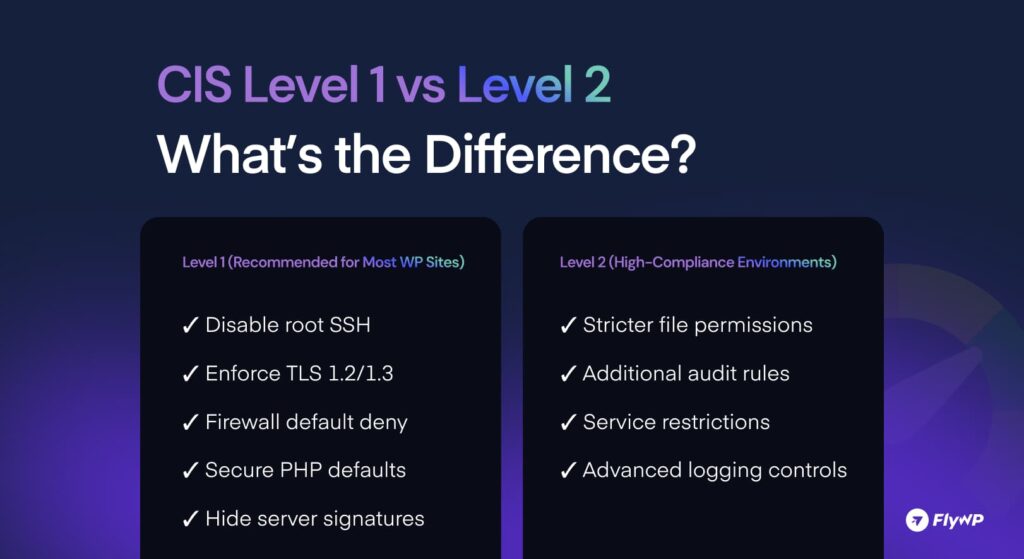
CIS benchmarks are divided into two levels.
| Level | Description | WordPress Suitability |
| Level 1 | Essential security hygiene | Recommended for all production sites |
| Level 2 | Defense-in-depth, stricter controls | High-compliance environments |
For most agencies, hosting customers and WooCommerce stores, Level 1 is sufficient when combined with WordPress best practices.
Level 2 may introduce restrictions that affect plugin compatibility.
How to Apply CIS Benchmarks to a WordPress Stack
There is no WordPress-specific benchmark. So the practical approach is stack-first.
Apply CIS controls in the infrastructure order:
Step 1: Harden the OS
Secure SSH, configure firewall, enable updates, and enforce logging.
Step 2: Secure the Web Server
Minimize exposed headers, restrict unsafe methods, and enforce modern TLS.
Step 3: Lock Down the Database
Disable remote access, isolate credentials per site.
Step 4: Restrict PHP Execution
Disable unsafe functions and tighten runtime behavior.
Step 5: Validate and Monitor
Audit periodically. Monitor logs. Reassess after major updates.
Security is not a one-time checklist. It is a configuration discipline over time.
WordPress Security Beyond CIS
CIS does not cover application-layer WordPress practices.
You still need:
- Automatic core updates
- Controlled plugin footprint
- Proper file permissions (755 directories, 644 files)
- Disabled directory browsing
- XML-RPC restrictions (if unused)
- Strong admin authentication
Infrastructure security reduces entry points.
WordPress hygiene reduces internal risk. Both layers are required.
Infrastructure vs Application Comparison:
| Area | Covered by CIS | Must Be Handled in WordPress |
| SSH security | Yes | No |
| TLS config | Yes | No |
| Plugin vulnerabilities | No | Yes |
| File permissions | Yes (system-level) | Yes (application awareness) |
| Admin account policy | No | Yes |
Security is layered.
Implementation Approaches
You have three options.
1. Manual Hardening
- Download CIS PDFs
- Apply controls manually
- Audit continuously
Pros:
- Full control
Cons:
- High effort
- Easy to misconfigure
- Requires ongoing maintenance
Pros: Full control
Cons: High effort, ongoing maintenance
2. CIS SecureSuite + CIS-CAT Pro
Enterprise approach.
- Automated compliance scans
- Control verification
- Reporting
Best for regulated industries.
3. Managed Hardened Stack (Practical Approach)
This is where managed platforms become practical execution layers.
Instead of manually applying 200+ CIS controls:
- OS hardening is preconfigured
- NGINX best practices are implemented
- Secure PHP defaults are enforced
- Firewall rules are simplified
- Server isolation is maintained
For example, FlyWP:
- Uses hardened NGINX configurations by default
- Isolates sites at the server level
- Simplifies firewall management
- Encourages key-based SSH
- Keeps system packages up to date
You still manage WordPress – but you don’t rebuild infrastructure security from scratch every time.
That reduces operational overhead for agencies.
Common Misconceptions
“Installing a security plugin makes me CIS compliant.” No. Plugins operate at the application layer.
“SSL certificate means secure server.” Not if outdated protocols and weak ciphers are enabled.
“Shared hosting can be fully CIS compliant.” Limited access makes full control difficult.
“WordPress itself is the biggest risk.” Most compromises are infrastructure misconfigurations.
“I have a security plugin, I’m fine.” Most plugins operate inside WordPress. If an attacker exploits a PHP or NGINX vulnerability, they bypass the plugin entirely.
“CIS is only for big banks.” Small businesses are targeted because they lack these standards. Automation tools now make enterprise security accessible to everyone.
Who Needs CIS-Level WordPress Security?
Stack-level hardening becomes important if you manage:
- WooCommerce stores
- Client websites
- Membership platforms
- Healthcare or legal content
- High-traffic publications
- SaaS landing pages
The more sensitive the data, the more important infrastructure configuration becomes.
Conclusion: Stack-Level Thinking
WordPress does not need its own CIS benchmark.
It needs a properly secured stack.
CIS benchmarks provide a structured baseline for infrastructure hardening. When combined with WordPress best practices, they significantly reduce the attack surface.
For teams managing multiple servers, using a hardened execution layer like FlyWP simplifies the process while maintaining control.
Security is not a plugin decision.
It is a stack decision.
Frequently Asked Questions: CIS Benchmarks for WordPress
No, there is no official CIS benchmark for WordPress. CIS benchmarks apply to the infrastructure stack that WordPress runs on, not the CMS itself. To secure WordPress using CIS, harden your OS, web server, database, and PHP runtime.
The relevant benchmarks are OS, web server, database, and system-level configuration benchmarks. These secure the layers underneath WordPress where most real vulnerabilities occur. Focus on Ubuntu/RHEL, NGINX/Apache, and MySQL/MariaDB benchmarks first.
No, there is no separate CIS certificate for WordPress.Compliance is achieved by applying CIS benchmarks to the underlying infrastructure components.Use audit tools or internal reviews to validate configuration alignment.
Most WordPress production systems only require CIS Level 1. Level 2 is intended for high-compliance or high-risk environments with stricter controls. Start with full Level 1 implementation before considering Level 2.
No, CIS hardening typically does not reduce performance.Many recommendations remove unnecessary services, which can improve efficiency. Test changes in staging before deploying to production.
Usually, no, because shared hosting does not provide root-level access. CIS hardening requires control over OS and server configurations. Use a dedicated VPS if you need full benchmark implementation.
Yes, you still need application-level protection.CIS secures the server, while plugins protect WordPress itself.Use both for layered security.
Yes, CIS provides free benchmark PDFs for personal use.Advanced tools and automated assessment features require membership.Download official benchmarks directly from the CIS website.
Yes, many hosting providers integrate CIS guidelines into their server builds.This helps maintain a consistent security baseline across environments. Always confirm what level of hardening your host actually implements.
Yes, you are still responsible for WordPress application security. Hosts secure the server environment, not your plugins, users, or content. Maintain updates, user access policies, and monitoring practices.
Sometimes, yes.
Stricter file permissions or disabled PHP functions may affect certain plugins. Always test configuration changes in a staging environment first.
No, even small WordPress sites benefit from CIS-aligned practices. Basic hardening, like strong SSH policies and proper permissions, improves security everywhere. Apply Level 1 controls regardless of site size.
Because WordPress runs on infrastructure components that already have benchmarks. Securing the stack secures the application.
Because plugins operate inside WordPress, while most real compromises happen at the OS or server configuration level.