

August was a major month for FlyWP, with three significant releases focused on expanding what you can manage, improving team control, and making site operations more flexible and reliable.
From Bulk Migration and Laravel/PHP/Symfony support to the new Fleet Dashboard, resource-specific team roles, Ed25519-signed Magic Login, and full file-scope transfers, this month’s updates introduced powerful capabilities for agencies, developers, and teams managing WordPress infrastructure at scale.
We also shipped a wide range of improvements and fixes across migrations, backups, DNS, team management, WordPress updates, and overall platform reliability.
Here’s everything we shipped in August.
⭐ Key Highlights
Bulk Migration:
Moving multiple WordPress sites into FlyWP is now significantly easier.
The new Bulk Migration extension lets you migrate multiple WordPress sites from supported platforms through one streamlined workflow.
The first supported migration source is Cloudways, with more platforms coming soon.
Whether you’re moving a handful of websites or an entire client portfolio, Bulk Migration helps reduce repetitive migration work and makes switching to FlyWP much more efficient.

Highlights:
- Migrate multiple websites in one workflow
- Save hours of repetitive migration work
- Ideal for agencies and high-volume site management
- More migration sources coming soon
Laravel, PHP & Symfony App Support:

FlyWP is no longer limited to WordPress.
You can now deploy and manage Laravel, plain PHP, and Symfony applications directly from FlyWP, making the platform more versatile for teams working with multiple PHP-based application stacks.
This means you can manage different application types alongside your WordPress projects from a single platform.
Highlights:
- Deploy Laravel applications
- Host Symfony projects
- Run custom PHP applications
- Manage multiple PHP application types from one platform
Bedrock Support on OpenLiteSpeed
FlyWP now officially supports Bedrock on OpenLiteSpeed.
The release includes full Bedrock compatibility along with automatic exec-user cleanup, providing a cleaner deployment experience and improved server security.
Activity Log
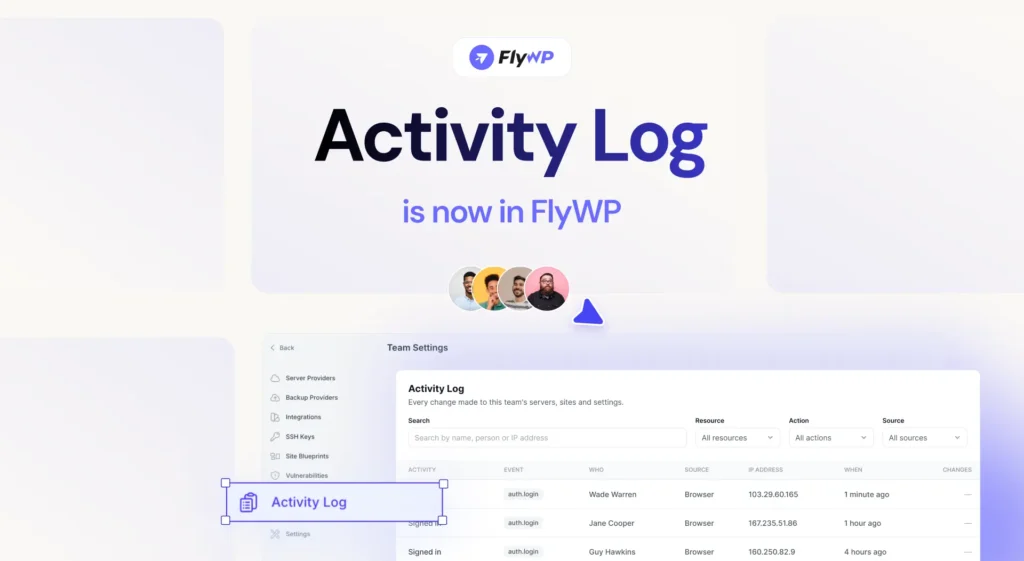
Get greater visibility into what’s happening across your FlyWP infrastructure.
The new Activity Log keeps a detailed record of actions across servers, sites, and teams, making it easier to track changes, improve accountability, and maintain a clear audit trail.
Seamless GitHub Reconnect
GitHub connections are now easier to recover when access is revoked.
You can reconnect GitHub without removing the existing provider entry, allowing linked repositories and connection history to remain intact.
This makes recovering from disconnected GitHub access much smoother.
New Fleet Dashboard
Managing larger infrastructure environments just became easier.
The new Fleet Dashboard provides a redesigned left-sidebar navigation experience alongside a live overview of your infrastructure.
You can quickly browse servers and websites using sortable and filterable site lists, making it easier to navigate and manage larger fleets.
Highlights:
- Redesigned left-sidebar navigation
- Live fleet overview
- Sortable site lists
- Powerful filtering
- Faster navigation across your infrastructure
Streamlined Team Onboarding
Inviting teammates is now simpler.
FlyWP has combined the invitation acceptance and registration process into a single streamlined flow, reducing friction and helping new team members get started faster.
Resource-Specific Multi-Role Assignments
Team permissions received a major upgrade in August.
You can now assign different roles to the same team member across different resources.
For example, a team member can be a Server Admin on one server, a Site Admin on another, and a Viewer on a different site. Specialized access, such as DNS Manager, can also be assigned at the zone level.
This gives teams much more granular control over infrastructure access.
Highlights:
- Assign different roles across different resources
- Control access at the server, site, and DNS zone level
- Support multiple roles based on specific responsibilities
- Give team members exactly the access they need
Granular permissions. Better control. Less unnecessary access.
Ed25519-Signed Magic Login
Magic Login is now more secure with per-site Ed25519 cryptographic signing.
The new signing mechanism operates independently of the API key, creating a more isolated and robust authentication flow while keeping Magic Login simple and convenient.
Clone & Transfer with Full File Scope
Clone and Transfer workflows are now more flexible.
You can now choose to copy the full app/public directory when cloning or transferring a site.
This is particularly useful for websites containing additional files within the public directory that need to be preserved during a clone or migration.
More control over what gets transferred.
⚡ Enhancements & Improvements:
Context-Aware ⌘K Command Palette
The ⌘K Command Palette is now smarter.
Instead of starting from scratch, it automatically opens within the context of the server or site you’re currently viewing, helping you reach your destination with fewer clicks.
More Reliable WordPress Updates with WP-CLI
WordPress core, plugin, and theme updates are now handled through WP-CLI on a dedicated long_running queue.
This new approach improves the reliability of long-running update operations and significantly reduces the risk of timeout-related failures.
Benefits:
- More reliable WordPress updates
- Better handling of long-running operations
- Reduced timeout risk
- More resilient background processing
Cleaner SFTP Username Format
The SFTP username placeholder has been refined by removing separators, creating a cleaner and more consistent naming format across FlyWP.
PHP Session Garbage Collection Backfill on OpenLiteSpeed
Existing OpenLiteSpeed sites now receive PHP session garbage collection automatically.
This helps clean up old PHP session data on long-running sites and supports better ongoing performance.
SSL-less Site Transfer Support
Site transfers no longer require an SSL certificate to proceed.
FlyWP can now gracefully handle sites without SSL, removing a common blocker when migrating legacy or pre-SSL environments.
Beyond the headline features, July also introduced several quality-of-life improvements to help you move faster every day.
Smarter Git Deployments
Git workflows received a significant upgrade with:
- Searchable repository selection
- Searchable branch selection
- Pagination for repositories with large branch lists
- Support beyond GitHub’s previous 30-branch limitation
Finding the right repository or deployment branch is now significantly faster – even for large projects.
Faster Interface Navigation
We also improved navigation throughout the dashboard with:
- Faster server/site navigation
- Better search relevance
- Improved role-aware search permissions
- Server-side theme preference that syncs across browsers and devices
These refinements make FlyWP feel more responsive and consistent regardless of where you log in.
🛠️ Bug Fixes & Reliability Improvements
August also included a broad set of fixes designed to make everyday infrastructure management more stable and predictable.
- Site Deletion with Disconnected Git Providers: Resolved an issue where site deletion could hang when the connected Git provider had already been disconnected.
- Vaultwarden Domain Synchronization: Fixed an issue where the Vaultwarden
DOMAINenvironment variable wasn’t updating after a domain change. - Git-Based Site Reliability: Improved site creation, deployment, and configuration-save flows for Git-based sites, providing a smoother experience for developer workflows.
- Atomic Primary-Domain Rename: Primary-domain renames now use built-in retry logic and automatic recovery for incomplete operations, helping prevent stuck or partially completed renames.
- True SMTP Egress Verification: SMTP egress checks are now performed directly from the server responsible for sending the email, providing more accurate deliverability verification.
- Safer Team Deletion: Additional safeguards now prevent a team from being deleted while it still owns active servers, sites, or unpaid invoices. This helps prevent accidental data loss and unexpected billing issues.
- Multisite Cloning Safeguard: FlyWP now blocks cloning for WordPress Multisite networks, preventing potentially broken network configurations and difficult-to-recover cloning operations.
- More Reliable Restore State Handling: Restore operations now handle completion states more reliably by triggering success callbacks before local snapshot cleanup, helping prevent restores from getting stuck in an incomplete state.
- More Precise DNS Zone Matching: DNS zone matching has been refined to use exact domain-label boundaries instead of broad suffix matching. This prevents false matches and ensures DNS operations target the correct zone.
- Force-Delete for BYOS Servers: BYOS servers can now be force-deleted even when the cloud provider API is unavailable or returns an error. This helps prevent orphaned infrastructure from becoming stuck in FlyWP because of provider-side API issues.
- Smoother Member Access Drawer: The member access drawer has been polished to slide in and out more smoothly, creating a more consistent experience when managing team permissions.
💡 Pro Tip: Explore these new enhancements in your dashboard now and keep your WordPress sites secure, fast, and easy to manage.
💜 Wrapping Up
August was a big step forward for FlyWP.
With Bulk Migration, FlyWP makes it easier to bring entire site portfolios onto the platform. With Laravel, PHP, and Symfony support, we’re expanding beyond WordPress and giving developers more flexibility in what they can deploy and manage.
At the same time, features like the Fleet Dashboard, Activity Log, resource-specific multi-role assignments, Ed25519-signed Magic Login, and full file-scope Clone & Transfer bring more control, visibility, security, and flexibility to everyday infrastructure management.
Behind the scenes, improvements to WordPress updates, migrations, restores, DNS, Git workflows, team management, and BYOS operations make FlyWP more reliable as your infrastructure grows.
More applications. More control. Better migrations. Stronger reliability.
And we’re just getting started.
Join our Facebook Community to share feedback, suggest features, and connect with fellow FlyWP users. You can also subscribe to our channel for tutorials, tips, and product updates to get the most out of FlyWP.
See you next month with even more powerful tools and improvements! 👋