

WordPress runs on a database. Every page a visitor loads triggers a series of queries that pull posts, options, user data, and settings out of MySQL. On a small blog, you never notice the cost. On a busy store or a membership site, those queries pile up, and your server starts to feel it.
This is where most WordPress performance optimization conversations begin and end with page caching. Page caching helps, but it only solves half the problem. It does nothing for logged-in users, carts, checkouts, or any request that has to hit the database fresh.
Redis fills that gap. It has quietly become a standard layer in modern WordPress infrastructure because it attacks the slowest part of the stack, the database round trip, and removes it for repeat requests.
This guide walks through what Redis is, how object caching works inside WordPress, when it actually helps, and how to set it up correctly. You will also learn where Redis fits next to page caching, why WooCommerce stores benefit the most, and how managed platforms reduce the operational headache of running it. By the end, you will know whether Redis belongs in your stack and how to deploy it without breaking anything.
TL;DR
- Redis is an in-memory data store that keeps frequently used data in RAM instead of on disk.
- Object caching saves the results of WordPress database queries so they do not have to run again on every page load.
- Main benefits include faster database queries, lower server load, quicker admin dashboards, and better scaling under traffic.
- WooCommerce gains the most because carts, sessions, and logged-in pages cannot use page caching and lean heavily on the database.
- Redis works with page caching, not instead of it. Use both for the best result.
- FlyWP ships Redis as part of its Docker-powered WordPress stack, so you enable object caching with a toggle instead of editing config files by hand.
What is Redis Object Caching in WordPress?
Redis Object Caching stores frequently accessed WordPress database queries in memory, allowing future requests to be served much faster without repeatedly querying the database. This reduces database load, improves website performance, and helps WordPress handle more traffic efficiently.
What is Redis?
Redis is an open source, in-memory data store. People use it for caching, session storage, message queues, and real-time data. In the WordPress world, its main job is caching.
The word “in-memory” is the important part. Redis keeps data in RAM rather than on a spinning disk or even an SSD. RAM is orders of magnitude faster to read from than disk, so a lookup that might take milliseconds against a database completes in microseconds against Redis.
Redis stores everything as key-value pairs. You ask for a key, you get a value back. There are no joins, no table scans, and no query planner deciding how to fetch your data. That simplicity is a big reason it stays fast even under load.
A few traits make Redis a good fit for WordPress.
- It lives in RAM, so reads are extremely fast.
- It uses simple key-value storage, which maps cleanly to how WordPress fetches options and post data.
- It handles high concurrency without slowing down, which matters when many visitors hit your site at once.
- It persists data optionally, so a restart does not always mean starting from an empty cache.
To picture the difference, think of your MySQL database as a filing cabinet. Finding a record means opening the drawer, flipping through folders, and pulling the right page. Redis is more like a sticky note on your monitor with the answer already written on it. One requires work every time. The other is instant.
What is Object Caching in WordPress?
Every time WordPress builds a page, it asks the database dozens of questions. What is the site title? Which plugins are active? What are the recent posts? Who is the logged-in user? Each answer is a database query.
Many of these queries return the same answer over and over. The site title does not change between page loads. Neither do most of your settings. Running those queries fresh every time wastes effort.
The WordPress object cache exists to fix this. It stores the result of a query in memory so the next request can reuse it. WordPress has had an object cache built in for years, but by default, it is non-persistent. That means the cache only lives for the duration of a single page load. The moment the page finishes rendering, the cache is thrown away, and the next visitor starts from scratch.
Persistent object caching changes the rules. With a backend like Redis, cached data survives between requests. The site title query runs once, gets stored in Redis, and serves every visitor after that from memory until the value changes.
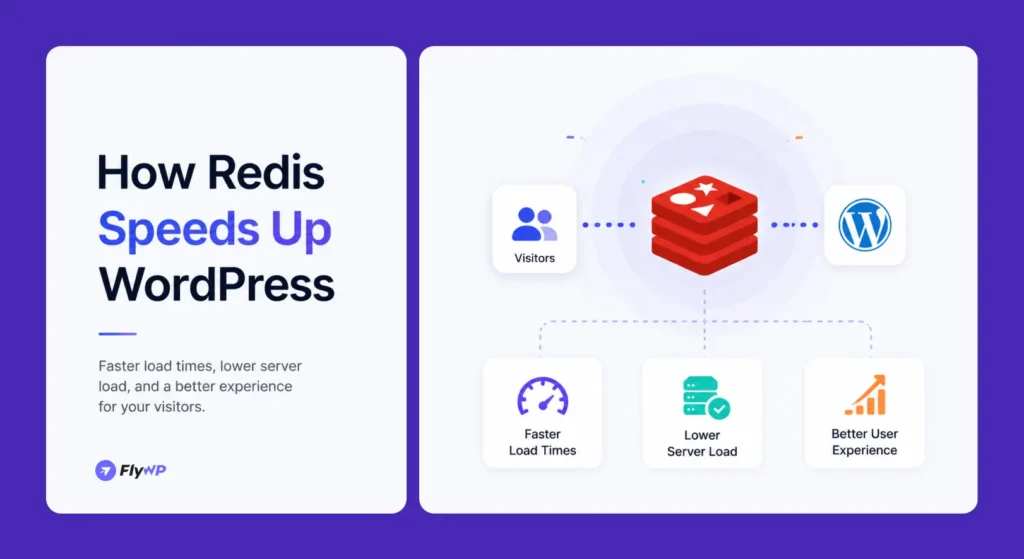
Object caching matters because the database is usually the slowest, most contended part of a WordPress site. Reducing the number of queries does more for real-world speed than almost any other server-level change, especially on sites with lots of dynamic content.
How Redis Works With WordPress
Once Redis is connected as a persistent object cache, it sits between WordPress and your database. WordPress checks Redis first, and only falls back to MySQL when it has to.
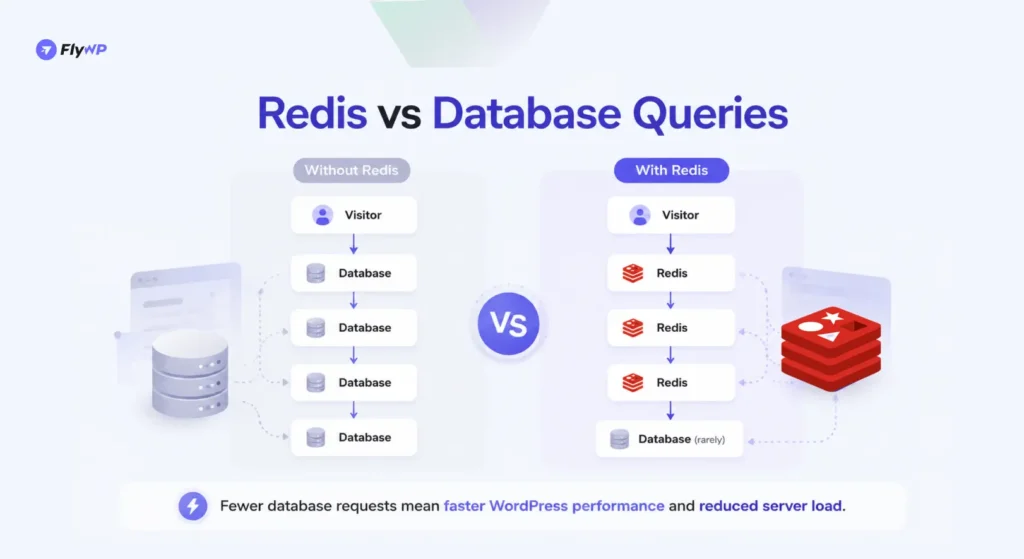
Here is the workflow for a typical request.
- A visitor requests a page. WordPress starts building the response and needs data.
- WordPress checks Redis. Before touching the database, it asks Redis whether the data it needs is already cached.
- Redis serves cached data. If the value is there, Redis returns it instantly from memory, and WordPress moves on. This is a cache hit.
- The database is queried only when necessary. If the value is not in Redis, this is a cache miss. WordPress runs the query against MySQL, gets the answer, stores it in Redis for next time, then continues.
The more cache hits you get, the fewer database queries run. On a warm cache, a page that once needed forty database queries might need only a handful. That reduction is where the speed comes from.
Worth noting, Redis caches data objects, not whole HTML pages. It works at the application layer, helping WordPress assemble pages faster. That distinction sets up the next question almost everyone asks.
Redis vs Page Cache: What’s the Difference?
Redis object caching stores database query results in memory, while page caching stores fully generated pages. Redis improves backend performance and dynamic content delivery, whereas page caching primarily improves frontend page load times.
Page caching stores the finished HTML of a page and serves that same HTML to the next visitor without running WordPress at all. Object caching with Redis stores individual pieces of data so WordPress can build pages faster. Page caching skips the work. Object caching speeds up the work that still has to happen.
Both are useful, and they solve different problems. Here is how they compare.
| Aspect | Page Cache | Redis Object Cache |
|---|---|---|
| What it stores | Full rendered HTML pages | Results of individual database queries |
| Where it acts | In front of WordPress | Inside WordPress, between PHP and MySQL |
| Best for | Anonymous visitors viewing static pages | Logged-in users, carts, and dynamic content |
| Works for logged-in users | Usually no | Yes |
| Helps the admin dashboard | No | Yes |
| Reduces database load | Indirectly | Directly |
| Typical tools | Nginx FastCGI, OPcache, LiteSpeed, WP Rocket | Redis, Memcached |
The key takeaway is that these layers are partners, not rivals. Page caching handles the easy wins, anonymous traffic on pages that rarely change. Redis handles everything page caching cannot touch, which, on a store or a membership site, is most of the traffic that actually matters.
A well-tuned WordPress site runs both. Page caching at the front, Redis object caching behind it, each covering the other’s blind spot.
Benefits of Redis Object Caching for WordPress
The value of Redis shows up across the whole site, not just the front end. Here is where it helps most.
Faster Database Queries
This is the core benefit. Repeated queries get answered from RAM instead of from MySQL. On a site with heavy query counts, this can cut Time to First Byte noticeably and make pages feel snappier even before any front-end optimization.
Reduced Server Load
Fewer database queries means MySQL works less. That frees up CPU and memory on your server for other tasks. Lower load also means your server handles traffic spikes more gracefully instead of buckling under them.
Better Scalability
When your database is the bottleneck, adding more visitors just makes things worse. Redis raises that ceiling. By absorbing repeated reads in memory, it lets a single server handle far more concurrent traffic before you need to upgrade hardware.
Faster Admin Dashboard
The WordPress admin is dynamic by nature and cannot be page-cached. Every admin screen runs fresh queries. Persistent object caching speeds up the dashboard, plugin screens, and bulk editing, which agencies and store managers feel every working day.
Improved Dynamic Content Delivery
Anything personalized, such as account pages, dashboards, and search results, bypasses page caching entirely. Redis keeps these dynamic requests fast by caching the underlying data they depend on.
Better WooCommerce Performance
Stores live and die on dynamic pages. Carts, checkouts, account areas, and filtered product views all skip page caching. Redis is often the single biggest performance win available to a WooCommerce store, which deserves its own section.
Redis for WooCommerce
Is Redis Good for WooCommerce?
Yes. Redis helps WooCommerce store frequently accessed database objects in memory, reducing query times and improving performance for carts, checkouts, product searches, and logged-in users. This makes Redis particularly valuable for growing online stores.
WooCommerce is where Redis stops being a nice-to-have and becomes close to essential. A content blog can lean almost entirely on page caching. A store cannot.
The reason is simple. Most of the important pages on a store are personal to the shopper.
- Cart sessions change with every item added or removed, so they cannot be served from a shared page cache.
- Checkout runs live queries for shipping, tax, payment, and stock on every step.
- Product filtering and search generate fresh queries based on the shopper’s selections.
- Logged-in customers see account data, order history, and saved details that are unique to them.
- Dynamic content like cart widgets and recently viewed products updates constantly.
All of this hits the database directly under normal traffic, which is fine. During a sale or a campaign spike, hundreds of shoppers checking out at once can overwhelm MySQL and slow the whole store, sometimes right when revenue is on the line.
Redis cushions that load. Session data, product objects, and repeated lookups come from memory, so the database handles only what truly needs a fresh query. The result is a checkout that stays responsive under pressure.
Is Redis Good for WooCommerce?
Yes. WooCommerce relies on dynamic pages like carts, checkouts, and account areas that page caching cannot serve. Redis object caching keeps these pages fast by caching repeated database queries in memory. For stores with steady traffic or sales spikes, Redis is one of the most effective performance upgrades available.
How to Enable Redis in WordPress
- Install Redis on your server.
- Install a Redis Object Cache plugin in WordPress.
- Configure Redis settings in your server environment.
- Enable object caching from the plugin settings.
- Verify that Redis is connected and serving cached objects.
Enabling Redis takes two parts. First, the Redis server must exist and be running. Then WordPress has to be told to use it. Here is the full process on a typical server.
Step 1: Install Redis
Redis runs as a service on your server. On a Linux VPS, you install it through your package manager.
sudo apt updatesudo apt install redis-serverYou also need the PHP Redis extension so PHP can talk to it.
sudo apt install php-redissudo systemctl restart php8.2-fpmConfirm Redis is running before you go further.
redis-cli pingA reply of PONG means Redis is up.
If you run a containerized setup, you add Redis as its own service in your Docker Compose file alongside WordPress and the database, then point WordPress at the container name instead of localhost. Managed platforms like FlyWP handle this networking for you, which removes one of the trickier parts of a Docker setup. There is a fuller walkthrough in the FlyWP Docker guide for WordPress.
Step 2: Install the Redis Plugin
WordPress does not connect to Redis on its own. It needs a bridge. The most common one is the free Redis Object Cache plugin by Till Krüss, available in the WordPress plugin directory.
Install and activate it from your dashboard under Plugins, Add New, and search for “Redis Object Cache.”
Step 3: Configure WordPress
Open wp-config.php and tell WordPress where Redis lives. For a standard local install, the defaults usually work, but it is good practice to set them.
define( 'WP_REDIS_HOST', '127.0.0.1' );define( 'WP_REDIS_PORT', 6379 );define( 'WP_REDIS_TIMEOUT', 1 );define( 'WP_REDIS_READ_TIMEOUT', 1 );If you run multiple sites on one Redis instance, set a unique prefix per site so their caches do not collide.
define( 'WP_CACHE_KEY_SALT', 'yoursite.com:' );In a Docker setup, WP_REDIS_HOST points to the Redis service name rather than 127.0.0.1.
Step 4: Enable Object Cache
In the Redis Object Cache plugin settings, click Enable Object Cache. This drops a object-cache.php file into your wp-content directory, which is the file that activates persistent caching. WordPress now routes its object cache through Redis.
Step 5: Verify Redis Is Working
Go back to the plugin’s settings page. It should report a Connected status with a green indicator. You can also confirm from the command line by watching live activity.
redis-cli monitorLoad a few pages on your site, and you should see Redis receiving and serving keys in real time. If you see traffic, persistent object caching is live.
Best Redis Plugins for WordPress
You have a few options for connecting WordPress to Redis. Most sites use the standard free plugin, but it helps to know the alternatives.
| Plugin | Best For | Cost | Notes |
|---|---|---|---|
| Redis Object Cache | Most WordPress and WooCommerce sites | Free, with a Pro tier | The default choice. Simple, well-maintained, widely supported. Built by Till Krüss. |
| Relay | High-traffic and performance-critical sites | Paid | A modern PHP extension that adds an in-memory layer on top of Redis for even faster reads. More setup is involved. |
| LiteSpeed Cache (Redis integration) | Sites on LiteSpeed or OpenLiteSpeed servers | Free | Object caching is one feature inside the broader LiteSpeed Cache plugin. Best when you already run a LiteSpeed stack. |
For the large majority of sites, the free Redis Object Cache plugin is the right starting point. It is reliable, easy to enable, and covers what most stores and content sites need.
Consider Relay only when you have measured a real bottleneck and need to squeeze out more, since it adds complexity. Reach for the LiteSpeed option when your server already runs the LiteSpeed stack, and you want everything managed in one plugin.
Common Redis Mistakes to Avoid
Redis is forgiving, but a few mistakes show up again and again. Avoiding them keeps your caching healthy.
- Insufficient memory allocation. Redis lives in RAM. If you cap its memory too low, it starts evicting useful data, and your hit rate drops. Give it enough headroom and set a sensible eviction policy.
- Confusing page cache with object cache. These are different layers. Enabling Redis does not replace page caching, and a page cache does not help logged-in users. Run both.
- Forgetting cache purges. Stale cached data causes strange bugs, like old prices or settings sticking around. Make sure your stack purges the object cache on relevant updates.
- Poor server configuration. Wrong host, wrong port, or a missing PHP Redis extension means WordPress silently falls back to the database. Always verify the connection after setup.
- Ignoring database optimization. Redis hides a slow database; it does not fix one. Clean up autoloaded options, transients, and bloated tables so the queries that do run stay fast.
How FlyWP Simplifies Redis Management
Everything above works, but it involves real server work. Installing Redis, wiring up the PHP extension, editing config files, managing container networking, and keeping memory tuned all add up. For one site, it is manageable. For an agency running dozens of client sites, it becomes a recurring tax on your time.
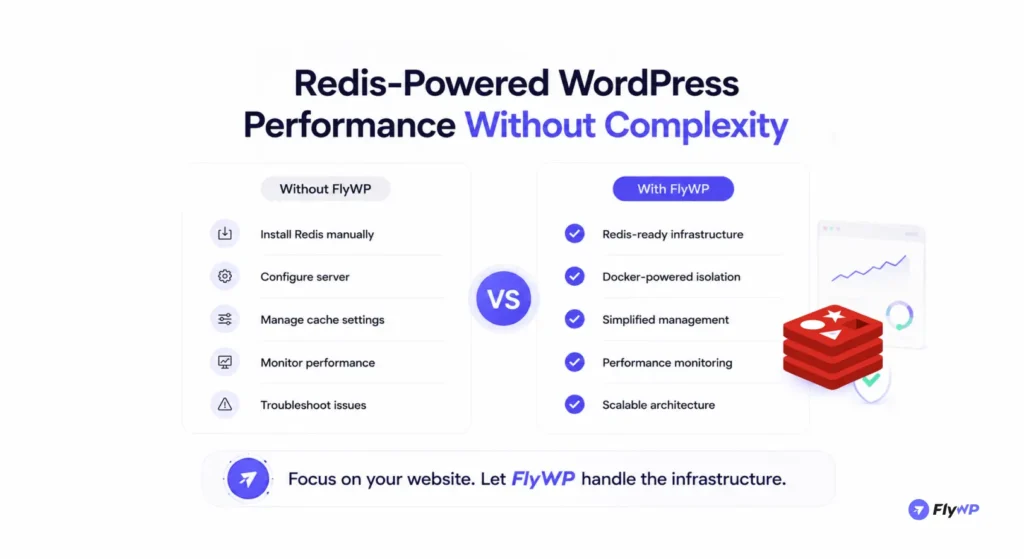
FlyWP removes most of that operational weight. It is a Docker-powered WordPress server management platform from weDevs, and Redis is part of the stack it provisions for you.
- Redis-ready infrastructure. Redis ships as part of the optimized server stack, so you are not installing or compiling anything by hand.
- Docker-powered environments. Each site runs in its own isolated container, and FlyWP handles the internal networking between your WordPress and Redis containers automatically. There is no manual
WP_REDIS_HOSTedits to get wrong. - One-click service management. You enable Redis object caching from the dashboard instead of editing files over SSH, and you can purge the object cache from the same place.
- Server optimization. FlyWP applies sensible defaults for caching, PHP, and the database from the start, so the surrounding stack supports Redis rather than fighting it.
- Performance monitoring. You get visibility into how your servers behave under load, which makes it easier to spot when caching needs attention.
- Scalability. Because the stack is containerized and built for WordPress, sites stay responsive as traffic grows, and you manage everything from one place.
The point is not that Redis is impossible to run yourself. It is the time you spend on plumbing is time you are not spending on the site. FlyWP turns Redis from a setup project into a setting.
Want Redis object caching without the manual setup? Try FlyWP and enable Redis on your WordPress sites with a single toggle.
Redis Best Practices
Once Redis is running, a handful of habits keep it healthy and fast.
- Pair Redis with page caching. Object caching speeds up dynamic requests. Page caching handles anonymous traffic. Together, they cover the whole site. Neither alone is enough.
- Monitor memory usage. Watch how much RAM Redis uses and whether it is evicting keys. Rising evictions usually mean it needs more memory or a tighter cache policy.
- Optimize your database. Keep autoloaded options small, clear expired transients, and clean up overhead in your tables. A lean database makes the cache misses that do happen cheaply.
- Keep Redis updated. Run a current, supported version to get security fixes and performance improvements. On a managed platform, this happens for you.
- Test performance before and after. Use a tool like Query Monitor to count database queries, and a load testing tool to measure behavior under traffic. Numbers tell you whether Redis is actually helping and where to tune next.
Does Redis Make WordPress Faster?
Yes. Redis improves WordPress performance by storing frequently accessed database objects in memory, reducing the number of database queries required to generate a page. This results in faster response times, lower server load, and better scalability.
FAQ
What is Redis Object Caching in WordPress?
Redis object caching stores the results of WordPress database queries in memory using Redis. This lets WordPress reuse data instead of re-querying MySQL on every page load. The result is lower database load and faster dynamic pages.
Is Redis good for WordPress?
Yes, Redis is a strong fit for most WordPress sites with meaningful traffic or dynamic content. It reduces database load and speeds up logged-in pages and the admin dashboard. The benefit grows as your site gets busier.
Does Redis make WordPress faster?
Yes, Redis speeds up WordPress by serving repeated database queries from memory instead of disk. This lowers Time to First Byte, especially on dynamic and logged-in pages. The effect is most noticeable on sites with heavy query counts.
Redis vs Memcached: Which is better?
Both are fast in-memory caches, and either works well for WordPress object caching. Redis is generally preferred because it supports richer data types, optional persistence, and broader tooling. For most WordPress and WooCommerce sites, Redis is the safer default.
Redis vs Page Cache: What’s the difference?
Page caching stores finished HTML pages, while Redis object caching stores individual database query results. Page caching serves anonymous visitors without running WordPress, and Redis speeds up dynamic and logged-in requests. The best setups use both layers together.
Is Redis useful for WooCommerce?
Yes, Redis is one of the most valuable upgrades for WooCommerce. Carts, checkouts, and account pages cannot be page cached, so they lean on the database, and Redis keeps those queries fast. Stores benefit most during sales and traffic spikes.
How do I enable Redis in WordPress?
Install and run Redis on your server, then install the Redis Object Cache plugin and click Enable Object Cache. Add your Redis connection details to wp-config.php if needed, then verify the plugin shows a connected status. On a managed host like FlyWP, you enable it with a single toggle.
Do I need Redis for a small WordPress website?
Not always. A small, low-traffic site with mostly static pages may run fine on page caching alone. Redis becomes worthwhile once you add WooCommerce, memberships, heavy plugins, or steady traffic that strains the database.
Conclusion
Redis earns its place in modern WordPress infrastructure by solving a problem that nothing else solves as cleanly. It removes repeated database work, the slowest part of building most pages, and serves that data from memory instead.
The result shows up everywhere. Faster database queries, lower server load, a quicker admin dashboard, and the ability to handle more traffic on the same hardware. Page caching covers anonymous visitors, and Redis covers everything page caching cannot reach.
That gap is exactly where WooCommerce lives. Carts, checkouts, and account pages skip page caching entirely, so a store without object caching leaves its most important pages running raw against the database. For any serious WooCommerce site, Redis is close to a baseline requirement rather than an optimization.
This is why Redis has shifted from an advanced tweak to an expected layer of a healthy WordPress stack. The remaining hurdle is operational, since installing, wiring up, and maintaining Redis takes real server work, especially across many sites.
Platforms built for this make the decision easy. FlyWP ships Redis as part of a Docker-powered WordPress stack and lets you enable object caching with a toggle, so you get the performance without the plumbing. Whether you run it yourself or let a managed platform handle it, adding Redis is one of the highest-value moves available for WordPress performance optimization.