Choosing the right cloud setup for WordPress in 2026 is no longer just about getting a server online – it’s about speed, scalability, and simplicity.
That’s why many users choose DigitalOcean for infrastructure and pair it with FlyWP to simplify server and WordPress management.
While DigitalOcean offers powerful and cost-effective cloud hosting, running WordPress directly on it still requires technical work, server setup, security, caching, backups, and ongoing maintenance. For many users, this creates unnecessary complexity.
FlyWP solves this by providing a modern control panel built specifically for WordPress. From one-click deployment and staging to SSL, backups, and performance optimization, it helps you manage everythingwithout dealing with server-level complexity.
The easiest way to host WordPress on DigitalOcean is by using FlyWP Managed Server, which lets you deploy and manage WordPress without manual server setup.
In this guide, you’ll learn the two best ways to host WordPress on DigitalOcean using FlyWP, starting with the easiest and most recommended option:
- FlyWP Managed Server: The fastest and simplest way to get started, with a fully managed, WordPress-optimized setup that requires no technical work
- FlyWP Self-Managed Server: Best for users who want full control over their infrastructure while keeping costs optimized
By the end, you’ll know exactly which option fits your needs in 2026.
Managed vs Self-Managed Hosting (Which One Should You Choose?)
When hosting WordPress on DigitalOcean, one of the most important decisions is choosing between Managed and Self-Managed hosting.
With FlyWP, you don’t have to choose between control and simplicity – you can pick the model that fits your workflow.
| Feature | Self-Managed Server | Managed Server |
|---|---|---|
| Control | Full control over server | Managed by FlyWP (with full control) |
| Setup | You configure | FlyWP handles setup |
| Technical Work | Medium | Minimal |
| Cost | Lower (infra only) | All-in-One Pricing at an Unbeatable Value |
| Maintenance | Your responsibility | Handled by FlyWP |
| Performance | Depends on setup | Optimized by default |
| Ease of Use | Moderate | Beginner-friendly |
Choosing the Right DigitalOcean Droplet for WordPress
Selecting the right Droplet on DigitalOcean is important for performance, cost efficiency, and scalability. Here’s a quick comparison to help you choose the best option for your WordPress setup:
DigitalOcean Droplet Types for WordPress:
| Droplet Type | Best For | Performance Level | When to Choose |
|---|---|---|---|
| Basic Droplet | Blogs, small business sites, CMS | ⭐⭐⭐ | Best starting point for most WordPress users (affordable + balanced) |
| General Purpose | Growing websites, agencies | ⭐⭐⭐⭐ | When you need more consistent performance and dedicated resources |
| CPU Optimized | High processing workloads | ⭐⭐⭐⭐ | Rarely needed for WordPress unless running custom heavy tasks |
| Memory Optimized | WooCommerce, large databases | ⭐⭐⭐⭐⭐ | Ideal for high-traffic stores or database-heavy applications |
| Storage Optimized | Data-heavy applications | ⭐⭐⭐⭐ | Not typically required for standard WordPress sites |
Pro Tip: Start with a Basic Droplet (1GB–2GB RAM) and scale as your traffic grows. With FlyWP, upgrading your server is simple and does not require complex migrations.
Method 1: Host WordPress on DigitalOcean with FlyWP Managed Server
If you want cloud-grade WordPress hosting without dealing with server management, FlyWP Managed Server is the easiest way to get startedin 2026. It is built for users who want the speed and flexibility of modern hosting but prefer to have FlyWP handle the technical side.
For beginners, agencies, business owners, and growing brands, this removes the usual complexity of managing a server while still delivering strong performance.
With FlyWP Managed Server, FlyWP provides a fully managed hosting experience where infrastructure, server optimization, and core management tasks are handled for you.
Instead of setting up and maintaining your own server, you launch WordPress through FlyWP’s managed environment and focus on running your website.
This means less time spent on DevOps tasks and more time spent on growth, content, SEO, and conversions.
Best For:
FlyWP Managed Server is ideal for:
- Beginners with little or no server experience
- Business owners who need reliability
- Agencies managing multiple client websites
- WooCommerce store owners who need stability
- Bloggers and creators focused on publishing
- Users moving away from shared hosting
How It Works:
Step 1: Create a FlyWP Account: Sign up and access your dashboard – this is where you’ll manage servers and WordPress sites in one place.
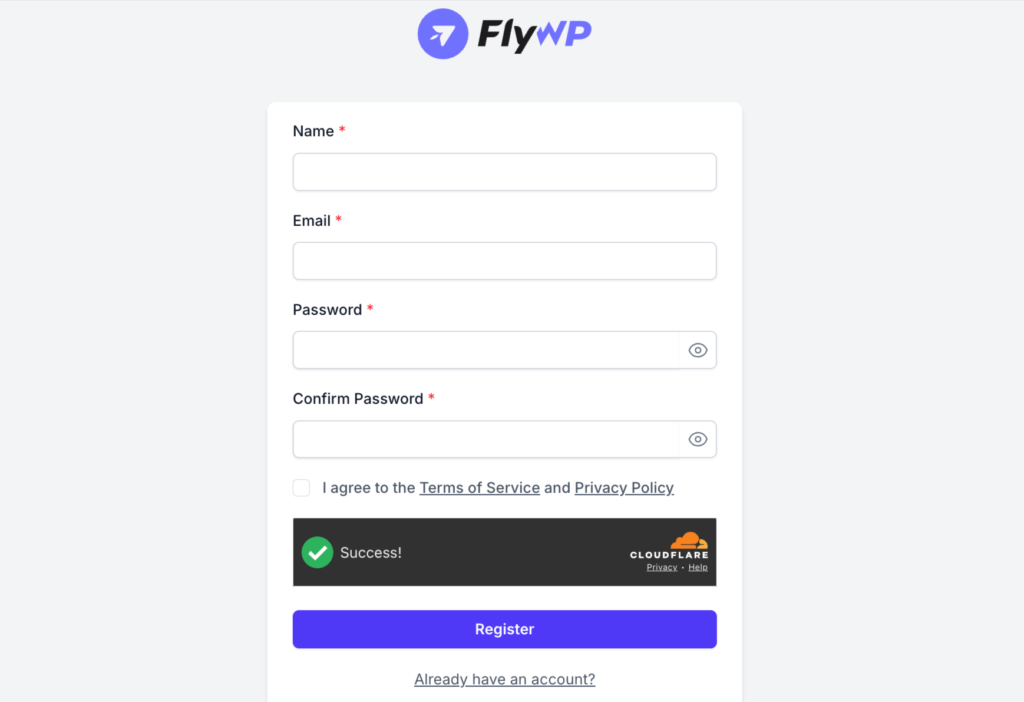
Step 2: Choose Managed Server Plan: Select the Managed Server option to let FlyWP handle infrastructure, setup, and optimization for you.
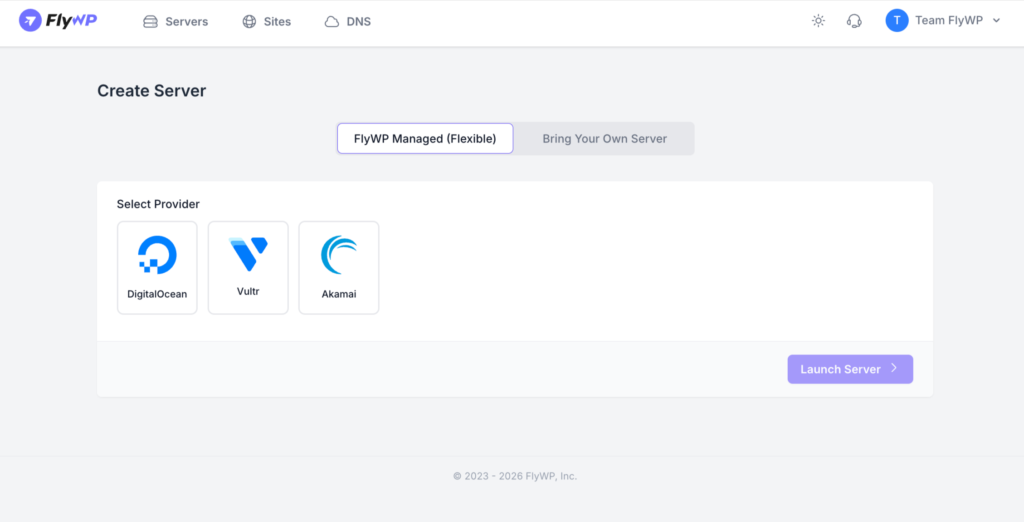
Step 3: Select Region and Resources: Pick your server location (closest to your audience) and choose CPU/RAM based on your website’s needs.
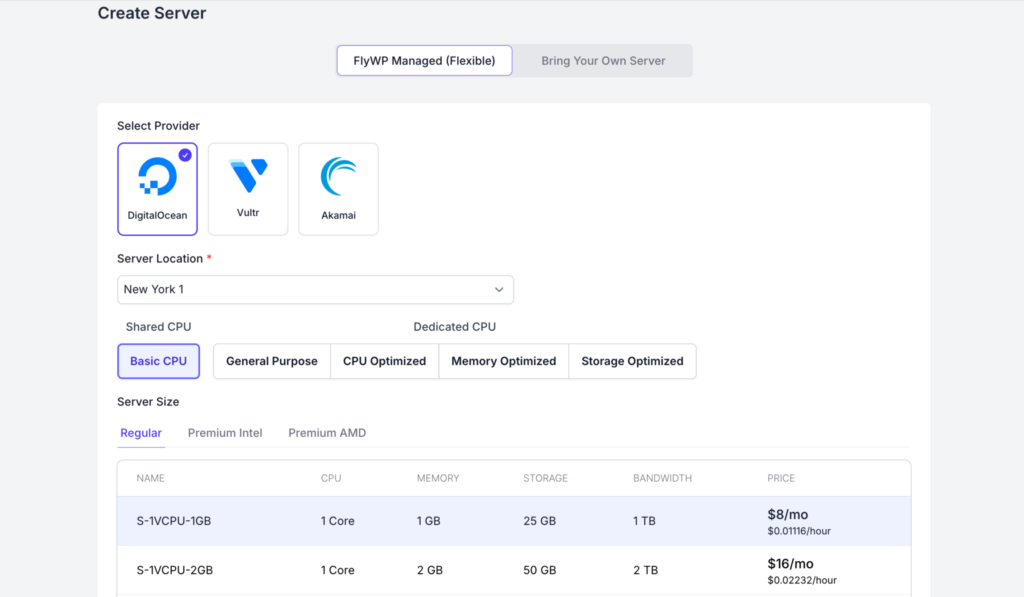
Step 4: Deploy Server Instantly: Launch your cloud server with pre-configured settings optimized for WordPress performance.
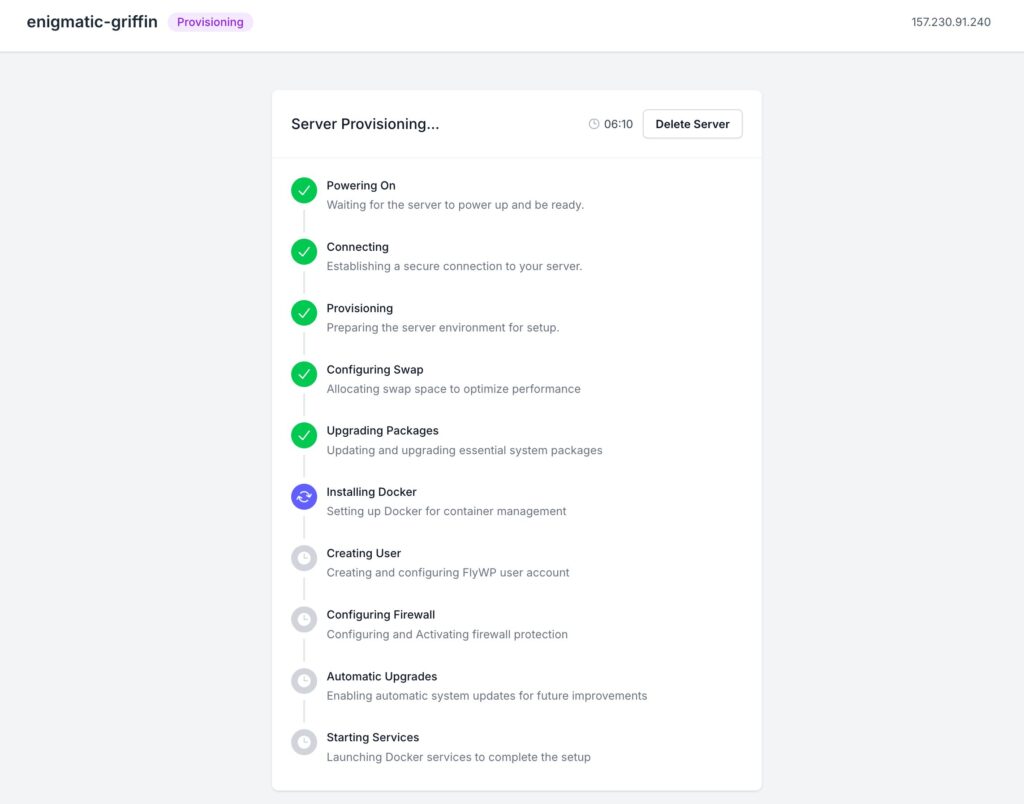
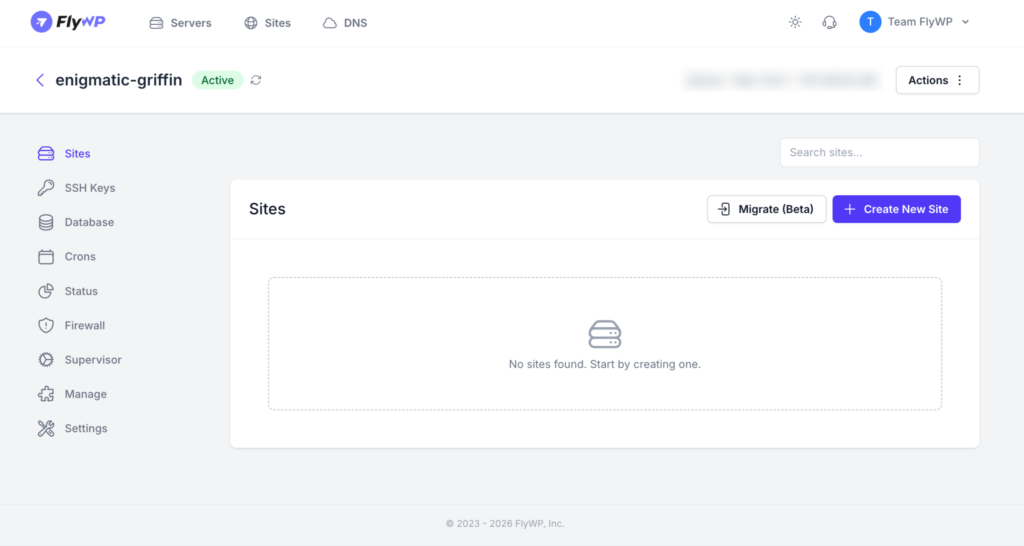
Step 5: Launch WordPress Instantly: Create your WordPress site with one click – no manual installation or configuration required.
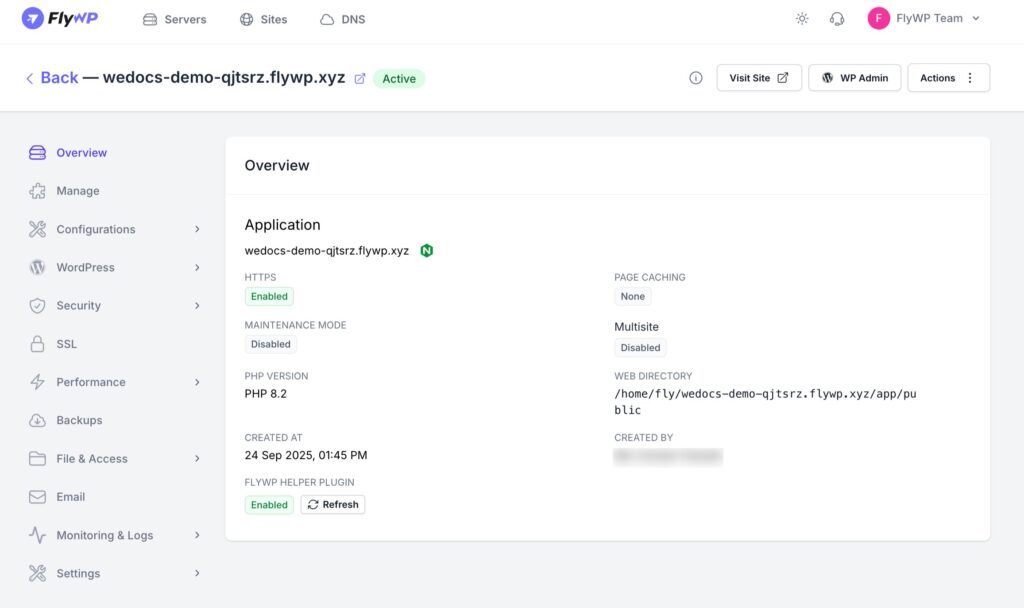
Step 6: Manage Everything from One Dashboard: Control domains, SSL, backups, staging, performance, and monitoring – all inside FlyWP without technical hassle.
Why Choose FlyWP Managed Server?
- Fastest Setup: Compared to manual cloud hosting, managed setup dramatically reduces launch time. You can go live in minutes instead of spending hours configuring servers.
- Simplified Management: Daily hosting tasks like backups, SSL, performance tools, and monitoring are easier to manage in one clean dashboard.
- Less Technical Involvement: No need to learn Linux commands, server security, package management, or stack tuning.
- Great Support Experience: When hosting is tied to a managed platform, users typically resolve issues faster than managing multiple vendors separately.
- Affordable Managed Hosting (Starting at $8/month): Compared with many premium managed WordPress hosts, FlyWP Managed Server aims to provide modern managed hosting value while keeping pricing competitive.
- Everything You Get: With FlyWP Managed Hosting, you get a fully provisioned and optimized cloud server handled directly through FlyWP, along with complete access to its modern control panel. All core FlyWP features are unlocked, giving you a WordPress-optimized environment ready to perform from day one – without manual setup or configuration.
- Everything in One Place: From server provisioning to day-to-day WordPress management, everything is handled within a single platform. This unified approach makes your hosting experience simpler, faster, more organized, and easier to scale – while keeping your overall costs efficient and predictable.
Final Word
If you want the easiest way to host WordPress with FlyWP, this is the strongest option for beginners. It combines convenience, speed, managed support, and excellent value – making it one of the smartest ways to launch WordPress in 2026.
Method 2: Host WordPress on DigitalOcean with FlyWP Self-Managed Server
If you want maximum control and the flexibility to manage your own cloud infrastructure, FlyWP Self Managed Server is the best-value option in 2026. If you already have a server on DigitalOcean, you can easily connect it with FlyWP and manage everything from a single dashboard.
This model is ideal for users who understand cloud hosting and want to combine full infrastructure ownership with simplified WordPress management.
With FlyWP Self Managed Server, you bring your own server, such as a DigitalOcean Droplet, and connect it to FlyWP.
Instead of paying for bundled managed hosting, you pay your cloud provider directly for infrastructure while using FlyWP to:
- Deploy WordPress
- Manage server performance
- Configure backups
- Enable SSL
- Monitor resources
- Handle day-to-day operations
This gives you the perfect balance of control and ease of management.
How It Works:
Getting started is simple:
Step 1: Create a Server on DigitalOcean: Launch a Droplet based on your traffic, performance, and scaling needs.
Step 2: Connect Server to FlyWP: Inside FlyWP, go to the server provider section and choose DigitalOcean from the list.
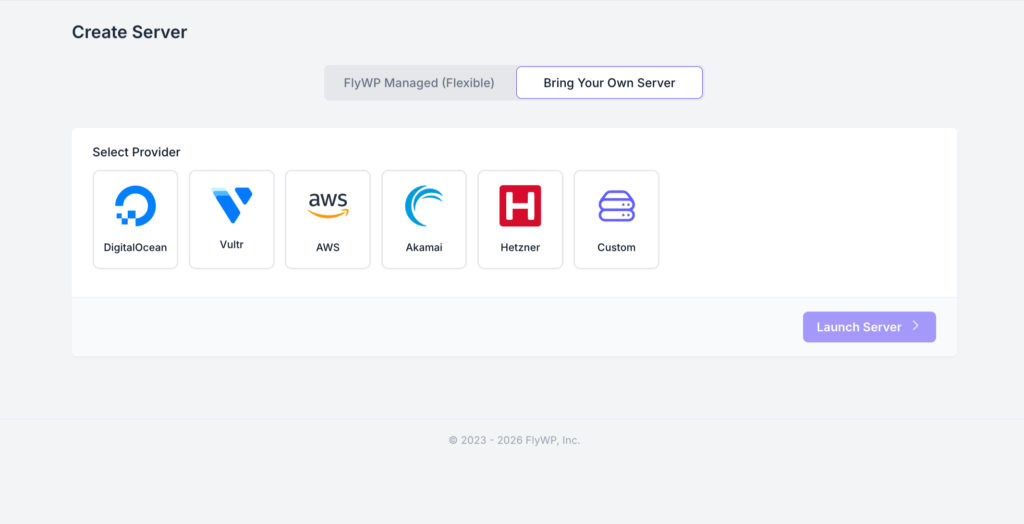
Step 3: Link via API Integration: Generate your DigitalOcean API token and securely connect it to FlyWP to enable server management.
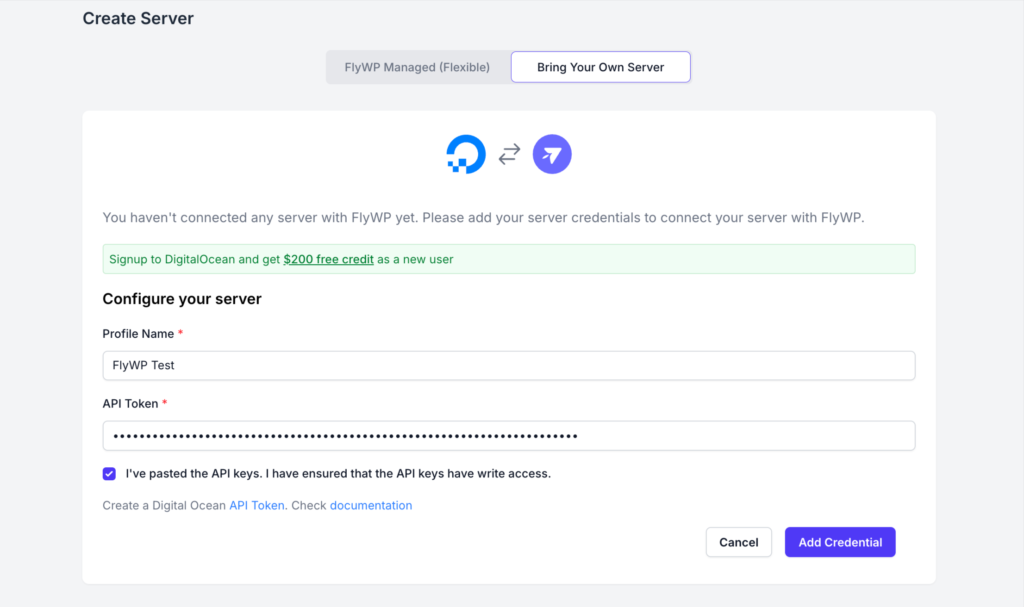
Step 4: Select Region and Resources: Once connected, choose your preferred server location, CPU, and RAM based on your website requirements.
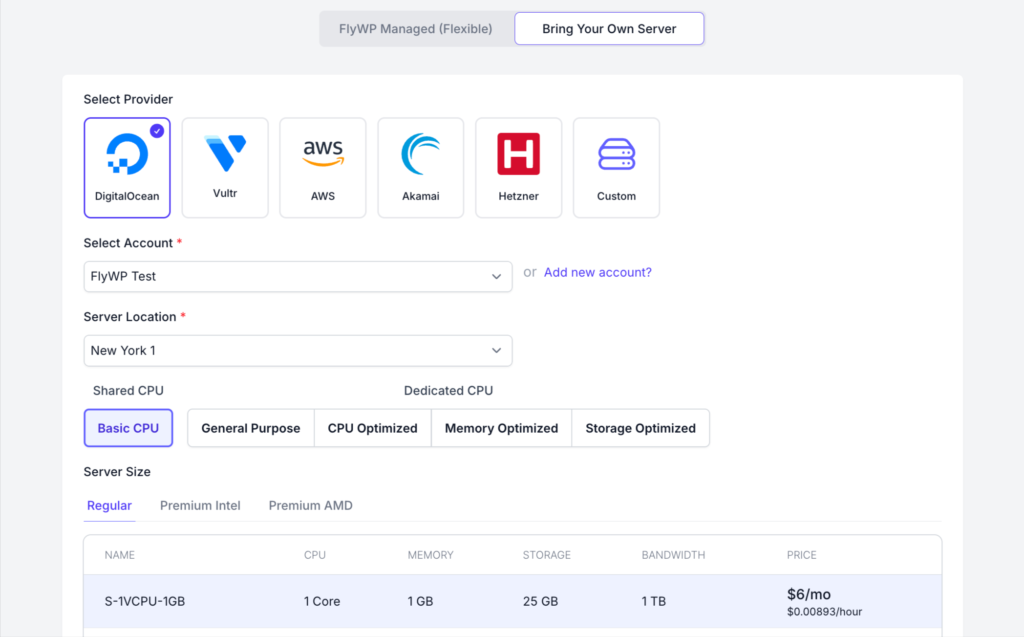
Step 5: Launch Server in Minutes: FlyWP automatically configures a WordPress-ready stack with modern performance optimizations.
Step 6: Deploy WordPress Sites: Launch one or multiple WordPress installations directly from the FlyWP dashboard.
Step 7: Manage Everything Easily: Control backups, SSL, caching, staging, monitoring, and team access – all in one place.
Final Verdict
If you want the best balance of price, performance, and simplicity, FlyWP Managed Server clearly stands out in 2026. Let’s break it down with a real example.
Example:
For a basic setup (1GB RAM, 1 vCPU, 25GB SSD storage, and 1TB bandwidth), you can get started with FlyWP Managed Server at just $8/month. This includes a fully provisioned and managed server, full access to the FlyWP control panel, all core features unlocked, and a WordPress-optimized environment ready to perform from day one.
In comparison, setting up the same configuration directly on DigitalOcean typically costs around $6/month for the server. When you add an average of an additional $5/month for server management, your total reaches $11/month, which is roughly 40% higher. On top of that, you still need to invest time and effort into setup, security, optimization, and ongoing maintenance.
Whether you use your own server or FlyWP-managed hosting, you get complete control, no locked features, and the freedom to grow without limits.
Frequently Asked Questions: SpinupWP vs FlyWP
What is the easiest way to host WordPress on DigitalOcean?
The easiest way is to use FlyWP Managed Server. It removes the need for manual server setup and lets you launch WordPress in minutes. Tip: Choose Managed if you want a hands-off experience.
What is FlyWP?
FlyWP is a customizable managed WordPress hosting platform and cloud server control panel that helps you deploy, manage, and scale WordPress websites with ease. You can either use FlyWP Managed Hosting for a fully managed experience or connect your own server and manage everything from a unified dashboard.
Instead of manually configuring servers, installing software stacks, and handling security, FlyWP provides a modern, WordPress-focused control panel where everything is simplified and accessible in one place.
It combines the power and flexibility of cloud hosting with the simplicity of managed WordPress hosting, making it an ideal solution for beginners, developers, agencies, and growing businesses.
What is the difference between Managed and Self-Managed in FlyWP?
Managed means FlyWP handles the server, while Self-Managed means you control it. Both use the same infrastructure but differ in responsibility and cost.
Tip: Choose based on your technical comfort and budget.
Can I connect my existing DigitalOcean server to FlyWP?
Yes, you can connect an existing DigitalOcean Droplet to FlyWP. You can link it via API or SSH and manage everything from the dashboard.
Tip: This is ideal if you already have running servers.
How much does it cost to host WordPress with FlyWP?
FlyWP Managed Server starts at around $8/month for basic setups. Self-managed costs depend on your cloud provider, typically starting from $5–$6/month.
Tip: Managed saves time, Self Managed saves cost.
Is DigitalOcean good for WordPress hosting?
Yes, DigitalOcean offers scalable and high-performance cloud infrastructure.
It is widely used for hosting WordPress websites of all sizes.
Tip: Pair it with FlyWP for easier management.
Which DigitalOcean plan is best for WordPress?
A 1GB–2GB RAM Basic Droplet is best for most WordPress sites.
Larger sites like WooCommerce may need 4GB or more.
Tip: Start small and scale as traffic grows.
Do I need technical knowledge to use FlyWP?
No, FlyWP is designed to reduce technical complexity.
Managed Server requires minimal technical knowledge to get started.
Tip: Beginners should start with Managed Server.
Can I host multiple WordPress sites on one server?
Yes, you can host multiple sites on a single server using FlyWP.
This is especially useful for agencies and freelancers.
Tip: Choose higher RAM plans for better performance.
Does FlyWP handle backups and security?
Yes, FlyWP provides tools for backups, SSL, and server management.
It helps reduce common security risks compared to manual setups.
Tip: Always enable backups and monitoring.
Is FlyWP cheaper than Cloudways or other managed hosts?
Yes, FlyWP generally offers lower pricing with similar core features.
It combines cloud infrastructure with a modern control panel at a competitive cost.
Tip: Compare total cost, not just server price.
Can I scale my server later?
Yes, you can upgrade your server resources anytime.
DigitalOcean allows vertical scaling without complex migrations.
Tip: Monitor usage and upgrade before performance drops.
Is FlyWP better than manual setup on DigitalOcean?
Yes, FlyWP simplifies server management while keeping cloud flexibility. Manual setup requires handling security, caching, backups, and optimization yourself. Tip: Use FlyWP to save time and avoid configuration errors.
Summary
DigitalOcean remains one of the most powerful and cost-efficient cloud platforms for hosting WordPress in 2026. It offers the flexibility, scalability, and performance that modern websites need – but managing it manually can be complex and time-consuming.
That’s where FlyWP changes the experience.
FlyWP simplifies DigitalOcean hosting by providing a WordPress-focused control panel that removes technical friction while keeping full cloud flexibility. Whether you choose FlyWP Managed Server for a hands-off experience or FlyWP Self Managed Server for full control and cost efficiency, both options help you launch, manage, and scale WordPress sites with ease.
From one-click deployments and staging to SSL, backups, caching, and performance optimization, FlyWP brings everything into one place, making WordPress hosting faster, simpler, and more efficient.
If you’re looking for the easiest way to host WordPress on DigitalOcean without sacrificing control or performance, FlyWP is one of the smartest choices in 2026.