

WordPress powers more than 40% of all websites on the internet, largely because of its plugin ecosystem. Need a store? Install WooCommerce. Need a contact form? Add WPForms. Whatever you’re building, there’s likely a plugin for it.
But every plugin you install becomes part of your site’s codebase, and like any software, plugins can contain flaws. Most are harmless. A small percentage introduce security weaknesses attackers can exploit. These are known as WordPress plugin vulnerabilities.
Plugin vulnerabilities are a normal part of software development, not proof that WordPress is inherently insecure. Every major platform, from Windows to Chrome to enterprise software, regularly ships security updates because new vulnerabilities are constantly discovered. What separates secure sites from compromised ones isn’t whether vulnerabilities exist. It’s how quickly they’re identified, understood, and mitigated.
In this guide, you’ll learn what plugin vulnerabilities are, how they turn into real attacks, why “just update your plugins” isn’t the full answer, and how modern tools like virtual patching close the gap.
What Is a WordPress Plugin Vulnerability?
A WordPress plugin vulnerability is a flaw in a plugin’s code that could let someone perform actions the developer never intended, such as viewing sensitive data, uploading malicious files, or taking control of a site. The word “could” matters: a vulnerability is a potential weakness, not proof an attack has happened.
It helps to separate three terms that get used interchangeably:
- Vulnerability: an unlocked window, a design flaw
- Exploit: the method used to climb through it, the attack itself
- Malware: what gets left behind afterward, often the outcome
Understanding the difference helps you prioritize updates without assuming every disclosed vulnerability means your site has already been hacked.
Why Plugin Vulnerabilities Happen
Modern plugins can contain tens of thousands of lines of code and interact with WordPress core, other plugins, databases, and third-party APIs. Every interaction adds complexity, and complexity creates room for mistakes: unvalidated input, a missed permission check, an improperly sanitized database query.
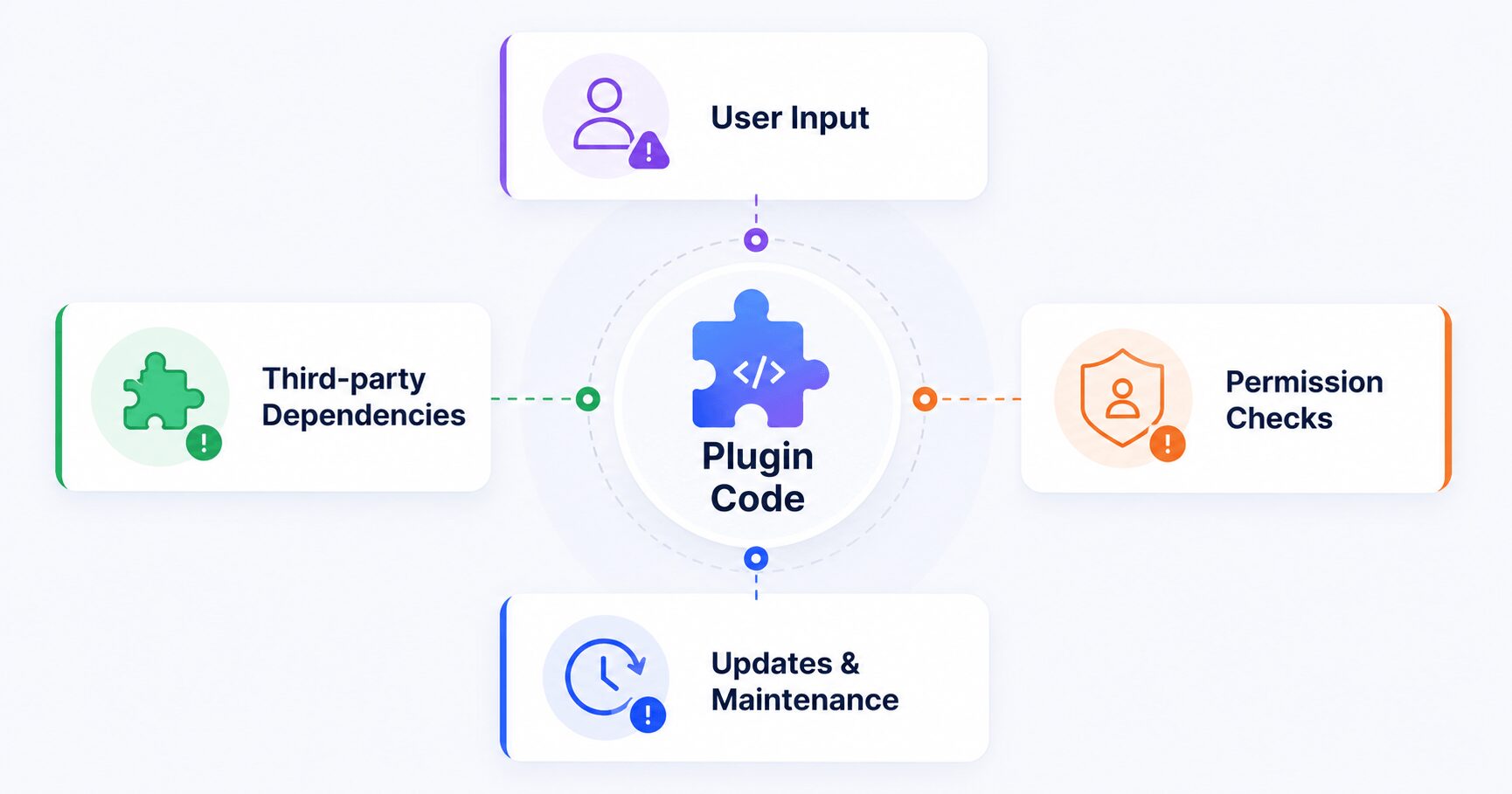
A few other factors compound the problem. Plugins often depend on third-party libraries, so a flaw in a dependency can introduce a vulnerability even when the plugin’s own code is clean. Some plugins are abandoned entirely, meaning a discovered vulnerability may never receive an official fix. And even well-maintained plugins don’t get updated by every site owner right away, since teams often need to test compatibility before deploying to production.
Why Plugins Are the Biggest WordPress Security Risk
WordPress core is maintained by a dedicated team with rigorous testing and a predictable release cycle. Plugins are different: the ecosystem includes tens of thousands of them, built by everyone from solo freelancers to global software companies, each evolving at its own pace. That diversity is one of WordPress’s greatest strengths, and it’s also why plugins account for the overwhelming majority of disclosed vulnerabilities.
Research from Patchstack shows the scale. In 2025, more than 11,240 WordPress vulnerabilities were disclosed. 91% affected plugins. Around 43% remained unpatched at the time of reporting, and nearly 70% were discovered by Patchstack’s own researchers.
Those numbers don’t mean WordPress is getting less secure. More vulnerabilities are being found because security research has become more active and automated testing has improved. Finding a flaw before an attacker does is a sign the ecosystem is working. The real challenge begins after disclosure, when some site owners update immediately, others wait days or weeks, and some never update at all. That delay is where attackers find their opening.
Common Types of Plugin Vulnerabilities
Not every vulnerability works the same way. Understanding the major categories explains why certain updates get marked “critical.”
- Cross-Site Scripting (XSS): lets an attacker inject malicious JavaScript into a page that other visitors later load, which can steal login cookies or hijack administrator sessions.
- SQL Injection: occurs when unvalidated input reaches a database query, potentially exposing or modifying stored data.
- Broken Access Control: missing or incorrect permission checks that let unauthorized users reach functionality meant to stay restricted, often with little technical skill required.
- Authentication Bypass: flaws that let attackers skip part of the login process entirely, sometimes gaining admin access without valid credentials.
- Arbitrary File Upload: improperly validated uploads that let attackers place executable files on the server, frequently leading to full site compromise.
- Cross-Site Request Forgery (CSRF): tricks an already logged-in user’s browser into performing an action, like changing settings, without their knowledge.
How a Vulnerability Becomes a Real Attack
Discovering a vulnerability doesn’t put every site at risk overnight, and releasing a patch doesn’t instantly make every site safe again. Between those two events sits a critical window many site owners overlook.
Most vulnerabilities are found first by security researchers, not attackers. Through a process called responsible disclosure, a researcher privately notifies the plugin developer, who investigates and releases a fixed version, for example moving from 3.4.1 to 3.4.2. If site owners update promptly, the vulnerability closes before it’s widely exploited.
After users have had time to update, the vulnerability is disclosed publicly, including severity ratings and affected versions. That transparency is valuable, but it also tells attackers exactly what to look for. From there, automated bots scan the internet for sites still running the vulnerable version and attempt the exploit at scale.
Some site owners update immediately; others wait for a scheduled maintenance window, and agencies managing many client sites often need days to test and roll updates out safely. The longer a vulnerable version stays live, the longer attackers have to find it.
This window, the period between public disclosure and successful patch deployment, is known as the protection gap. During it, researchers and attackers alike know exactly how to exploit the flaw, but many sites simply haven’t updated yet. It exists not because updates are ineffective, but because deploying them safely takes time, and attackers know it.
Why Updating Plugins Isn’t Always Enough
“Keep your plugins updated” is good advice, and it remains the foundation of WordPress security. But it’s incomplete on its own, for a few practical reasons.
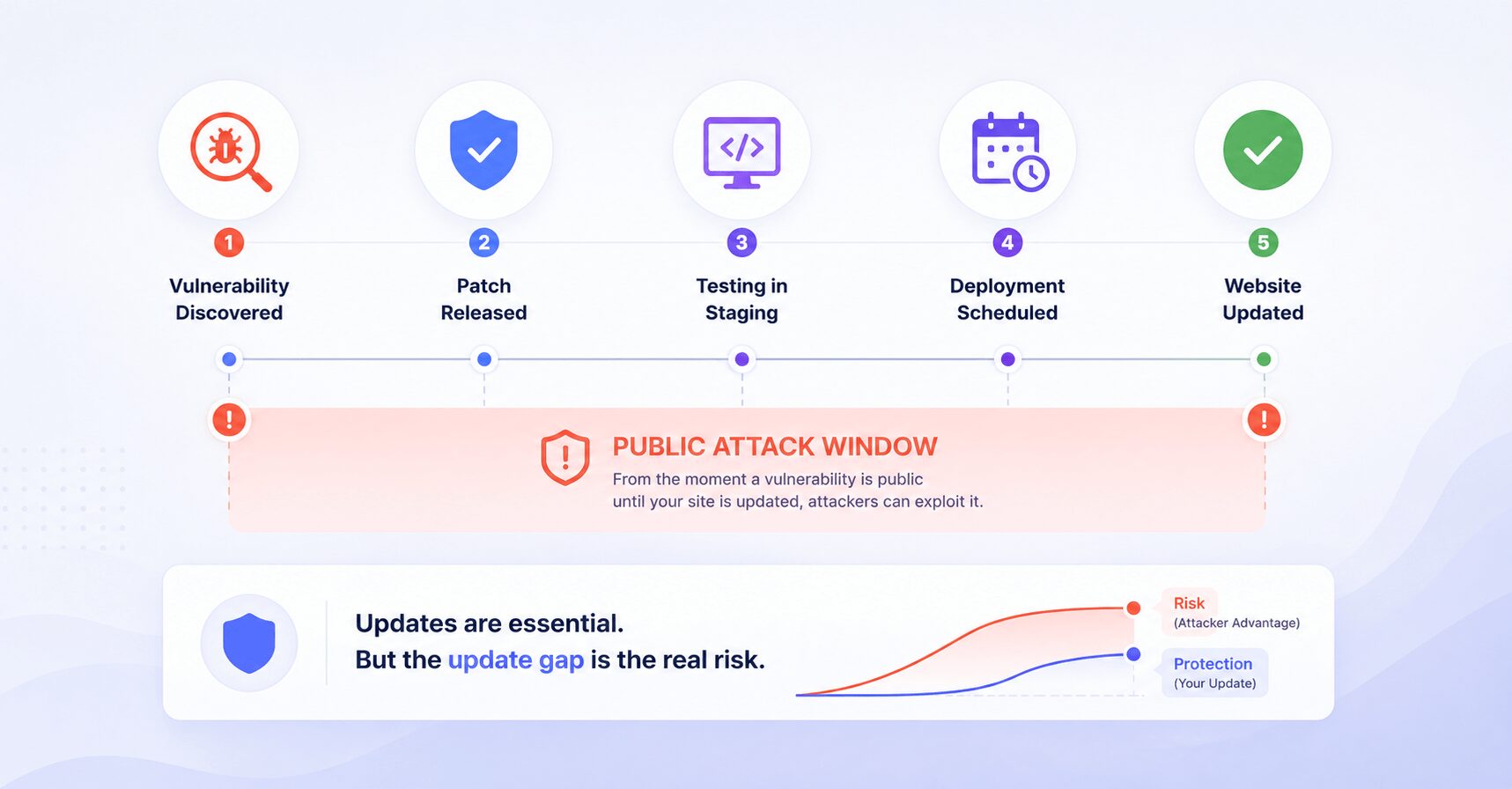
Real websites aren’t updated instantly. A business running WooCommerce won’t install a major update the moment it drops; they’ll test it in staging, verify payment flows, and schedule deployment. That process is sensible, but the vulnerability may already be public while it happens. Agencies managing dozens or hundreds of client sites face this at scale: the challenge isn’t deciding whether to update, it’s tracking everything that needs attention across every site at once.
Some plugins never receive a fix at all. When a developer discontinues a project or a plugin is removed from the WordPress repository, a newly discovered vulnerability may go unpatched permanently, leaving site owners to either replace the plugin or add temporary protection while they plan the migration.
Modern Security Is About Layers
WordPress security used to mean a short checklist: install a security plugin, update core, use strong passwords. Those practices still matter, but today’s threat landscape calls for layered defenses that compensate for each other’s limitations, the same way a house is protected by more than just a front door lock.
A solid strategy combines reliable hosting, frequent backups, timely updates, multi-factor authentication, least-privilege user access, continuous vulnerability monitoring, and, where appropriate, virtual patching. No single layer stops every attack, but together they significantly reduce both the likelihood and impact of a compromise.
A Practical WordPress Security Checklist
Most compromises trace back to a handful of preventable issues: outdated plugins, weak passwords, excessive permissions, and unmonitored vulnerabilities. Treat this as an ongoing routine rather than a one-time setup.
- Keep WordPress core and plugins updated. Install security releases promptly and test major upgrades before deploying to production.
- Audit and remove what you don’t need. Delete inactive plugins entirely rather than just deactivating them; vulnerabilities can still affect plugin files sitting unused on the server. Replace anything that looks abandoned.
- Choose plugins from trusted, actively maintained sources. Check update frequency, install count, and developer responsiveness before adding anything new.
- Review user roles regularly. Apply least privilege, remove unnecessary admin accounts, and delete inactive users.
- Enable multi-factor authentication and use strong, unique passwords for every admin account, ideally through a password manager.
- Schedule automated, tested backups stored off-site. A backup you haven’t verified isn’t one you can rely on.
- Secure the hosting environment with server-level firewalls, malware scanning, and HTTPS everywhere.
- Monitor vulnerabilities continuously and prioritize by severity. Don’t wait for your regular update day; a flaw disclosed on Monday can leave a site exposed for days if updates only happen on Friday. When responding, weigh CVSS score, whether a public exploit exists, and potential business impact.
What Is Virtual Patching?
Security updates are essential, but they aren’t always immediate, and attackers don’t wait for your testing cycle. This is where virtual patching comes in: a technique that blocks known exploit attempts without modifying the vulnerable plugin’s code itself.
Think of a faulty door lock. Replacing it permanently solves the problem, but if the locksmith can’t come until tomorrow, you might post a guard at the door overnight. The guard doesn’t fix the lock; they simply stop anyone from taking advantage of it while you wait. Virtual patching works the same way, acting as a protective layer during the protection gap between disclosure and deployment.
| Traditional Updates | Virtual Patching |
|---|---|
| Fixes the vulnerable code | Blocks known exploit attempts |
| Permanent solution | Temporary mitigation |
| Requires plugin deployment | Can begin protecting immediately |
| Essential for long-term security | Reduces exposure while updates are planned |
Virtual patching is not a replacement for updates. You should still install the developer’s official fix once it’s available. It simply reduces risk during the gap before you can.
Where FlySecurity Pro Fits in Your Security Checklist
Managing vulnerabilities on one site is manageable. Managing them across dozens or hundreds of client sites means answering the same questions every day: which plugins became vulnerable, which sites are affected, how severe is it, and does a fix already exist? Checking multiple vulnerability databases and plugin changelogs manually doesn’t scale.
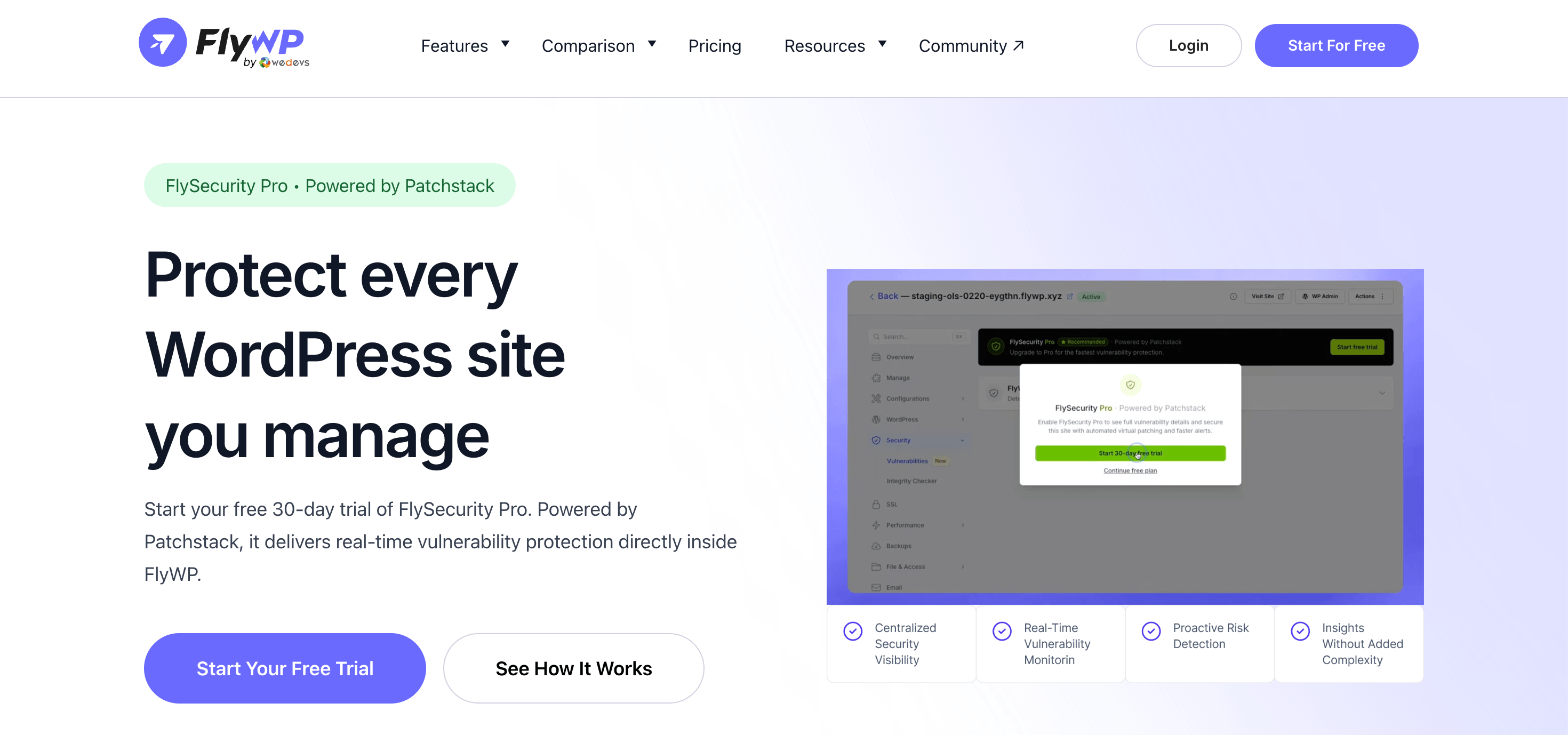
This is the problem FlySecurity Pro is built to solve. Built directly into FlyWP and powered by Patchstack, it centralizes vulnerability monitoring across your websites. It delivers real-time intelligence with severity and version details, and applies Patchstack-powered virtual patching automatically. The goal isn’t to replace your update workflow; it’s to make that workflow faster and easier to manage, so you get visibility into vulnerabilities before they become incidents rather than after.
Frequently Asked Questions – WordPress Plugin Vulnerabilities
Are WordPress plugins safe?
Yes, the vast majority are safe when actively maintained and kept up to date. Like any software, vulnerabilities can occasionally surface, which is why regular updates and monitoring matter.
Can inactive plugins still be exploited?
Sometimes. Deactivating a plugin stops it from running, but the files remain on the server, and certain vulnerabilities can still be exploitable. If you no longer need a plugin, delete it rather than just deactivating it.
Are premium plugins more secure than free ones?
Not necessarily. Security depends on code quality, maintenance, and developer responsiveness, not price. Plenty of free plugins follow strong security practices, and plenty of paid ones don’t.
What should I do if one of my plugins becomes vulnerable?
Check whether an official update is available and install it as soon as practical after testing. If no fix exists, consider disabling or replacing the plugin. Where available, virtual patching can reduce exposure while you decide.
Does virtual patching replace plugin updates?
No. It’s designed to complement traditional updates, not replace them. You should still install official security fixes whenever they become available.
Final Thoughts
WordPress plugin vulnerabilities aren’t a sign that WordPress is insecure. They’re a natural consequence of maintaining one of the world’s largest open-source ecosystems, with tens of thousands of plugins built by thousands of independent contributors. New vulnerabilities will keep being discovered, just as they are on every major software platform.
The real question isn’t whether vulnerabilities will exist. It’s how prepared you are when they do. That means choosing well-maintained plugins, removing what you don’t need, reviewing permissions, backing up regularly, monitoring new disclosures, and layering in defenses like virtual patching.
For agencies and businesses managing multiple WordPress sites, staying ahead of vulnerabilities can become a full-time job on its own. Solutions like FlySecurity Pro simplify that work by combining real-time monitoring with Patchstack-powered virtual patching inside the FlyWP dashboard, so you spend less time chasing advisories and more time building reliable websites.
The goal was never to eliminate every vulnerability; that isn’t possible. It’s to reduce exposure, respond quickly, and make successful attacks significantly harder.