If you have ever looked at a managed hosting bill and thought, “I am paying too much for too little control,” this comparison is for you. Whether you’re a freelancer managing 5 sites or an agency handling 50+, this guide will help you pick the right control panel for your workflow.
FlyWP and SpinupWP both try to solve the same core problem: make WordPress server management feel manageable for people who are technical and non- technical, those who are not trying to live in DevOps all day.
In this FlyWP vs SpinupWP comparison, we break down everything – pricing, features, performance, and real-world usability so you can decide which control panel actually fits your workflow in 2026.
TL;DR:
- Best overall value: FlyWP – flexible usage-based pricing, pay-per-server model, unlimited sites, built-in backups, and full team collaboration included by default. No feature gating as you scale.
- Best for simplicity (but limited flexibility): SpinupWP – clean LEMP stack and solid documentation, but fixed pricing and fewer options if your workflow evolves.
- Best for scaling agencies: FlyWP – designed for multi-server, multi-client environments with centralized control, better cost efficiency, and fewer operational bottlenecks.
- Best for traditional setups: SpinupWP – reliable if you prefer a strict Nginx-only environment, but less adaptable compared to modern, flexible stacks.
What is the difference between FlyWP and SpinupWP? (Direct Answer)
The main difference between FlyWP vs SpinupWP is in pricing flexibility and infrastructure control.
FlyWP offers usage-based pricing, pay-per-server self-managed plans, and managed hosting in one platform, along with multiple stack options like Nginx and OpenLiteSpeed. SpinupWP uses a fixed monthly pricing model, focuses on a LEMP (Nginx) stack, and requires you to manage servers separately through cloud providers.
FlyWP vs SpinupWP: Key Differences
You already know FlyWP is a Docker-powered WordPress server management platform that supports major cloud providers(DigitalOcean, Vultr, Linode, AWS, GCP, Hetzner, Azure) and custom servers. Its major change on March 31, 2026, is that you can now deploy and manage cloud servers directly through FlyWP with greater flexibility. The tier-based plans have been replaced with a usage-based pricing model for self-managed servers. The pricing of self-managed servers has also been changed to usage-based pricing models.
SpinupWP is also a modern cloud server control panel for WordPress that takes a more focused, refined route. It uses a traditional LEMP stack (Linux, Nginx, MySQL, PHP) and has spent years building an exceptionally polished product around that foundation. SpinupWP does not provision servers for you – you always bring your own, connecting it via SSH. The documentation is some of the best in the WordPress hosting space, and its community is active and knowledgeable.
FlyWP vs SpinupWP: Quick Side-by-Side Comparison (2026)
Here’s a quick FlyWP vs SpinupWP comparison table to orient you before we dig into the details:
| Category | FlyWP | SpinupWP |
|---|---|---|
| Starting price (self-managed) | $5/server/mo (Starter, 1-3 servers) | $12/mo (Essentials, 1 server) |
| Managed hosting option | Yes, from $7/mo (server + panel) | No |
| Pricing model | Pay-per-server (BYOS) or managed (combined bill) | Fixed monthly plan + volume discounts for add. servers |
| Unlimited sites | Yes, on all paid servers/plans | Yes, on all plans |
| Backup included | Yes, core feature on all paid plans | Yes, but depth varies by plan |
| Staging | Included | Included |
| Team features | Included on all paid plans | Advanced plan only; extra users at $2/mo each |
| Web stack options | Nginx + OpenLiteSpeed + Redis | Nginx/LEMP only; no OpenLiteSpeed |
| Cloud provider flexibility | DO, Vultr, AWS, GCP, Hetzner, Akamai, Azure, custom | DO, Vultr, Akamai, Hetzner, custom |
| Server provisioning | Yes (FlyWP Managed mode) | No (BYOS only) |
FlyWP vs SpinupWP Features Comparison
Let’s break down the key features of FlyWP vs SpinupWP to give you clearer insights into how each platform performs.
Server & Cloud Provider Support
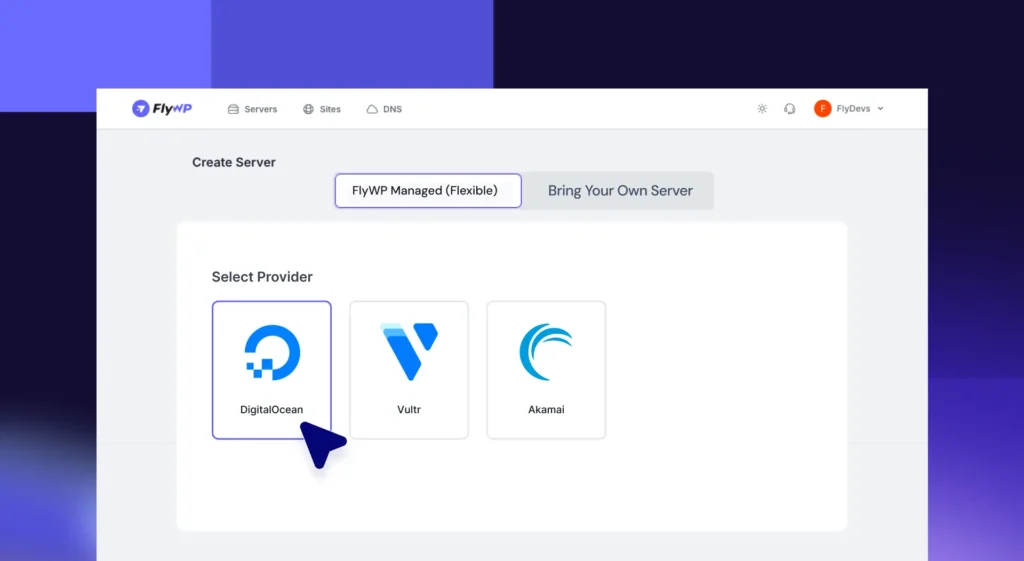
FlyWP supports a wide range of providers – DigitalOcean, AWS, GCP, Vultr, Hetzner, Linode (Akamai), Azure, and even custom servers. What really stands out, though, is that you can provision servers directly inside FlyWP. That means you’re not constantly jumping between dashboards – especially useful if you’re managing multiple clients across different providers.
SpinupWP supports the major providers too, including AWS, DigitalOcean, Google Cloud, Hetzner, Akamai/Linode, and Vultr, and it also works with on-premises machines as long as it can SSH into them. but SpinupWP doesn’t handle server provisioning for you. You’ll need to create and manage servers from your cloud provider’s dashboard, then connect them to SpinupWP.
Verdict on server support: FlyWP has broader provider coverage and the added convenience of direct provisioning. SpinupWP is BYOS-only, which is fine for experienced developers but less beginner-friendly.
Performance & Caching
In real client setups, both platforms deliver solid performance when configured well. FlyWP supports PHP 8.5 for Nginx servers and PHP 8.4 for OpenLiteSpeed, along with Redis and FastCGI caching. The March 12, 2026 update also added support for newer PHP versions, making FlyWP one of the most current options for PHP version management.
SpinupWP is more opinionated about its stack – it uses Nginx FastCGI caching and Redis within a traditional LEMP approach, and explicitly does not offer OpenLiteSpeed. That consistency can be a feature if you want fewer decisions to make and a proven configuration. But if you want stack flexibility, SpinupWP does not offer it.
Verdict on performance: FlyWP wins for stack choice. SpinupWP wins for simplicity and a single, well-tested configuration.
Backup System
FlyWP includes backups as a core feature on all paid plans, with support for Amazon S3, Cloudflare R2, Google Cloud Storage, Wasabi, and any custom S3-compatible provider. Backups are not gated behind a higher tier. After deploying multiple sites using FlyWP across different providers, we found the backup workflow to be consistent and reliable across all of them.
SpinupWP’s backup system is strong but tiered: the Essentials plan includes one daily scheduled snapshot per site, while the Advanced plan unlocks up to 4 daily, 4 weekly, and 4 monthly snapshots per site. If granular backup scheduling matters to your workflow, you need the Advanced plan at $19/mo.
Verdict on backups: FlyWP is more inclusive. SpinupWP’s Advanced plan is excellent but the Essentials backup depth is limited.
Staging & Site Management
FlyWP includes staging environments, Git-based deployment, WordPress Multisite support, and unlimited websites on all paid servers – all from one unified dashboard. That is a very agency-friendly mix, and it is all available from the entry-level paid tier.
SpinupWP also supports unlimited sites and unlimited staging sites on both plans, including cloning to the same server or to another server. In practice, SpinupWP’s staging workflow is well-polished and has been refined over the years. FlyWP’s feels more like a broader operating layer, while SpinupWP feels like a precision toolkit.
Verdict on staging and site management: Both are strong. SpinupWP has more refined staging workflows; FlyWP covers more ground in a single dashboard.
Team & Collaboration Features
FlyWP now includes team collaboration on every paid plan, with role management and access control. This was part of the March 2026 update’s commitment to removing feature walls – backups, team features, and all core functionality are available at the base paid tier.
SpinupWP does have team features, but they are tied to the Advanced plan and carry extra cost: additional users are $2/mo each. On top of that, site monitoring costs $1/mo per site as a separate add-on. That is a sensible modular model, but it is less generous when you are managing a growing team on a budget.
Verdict on team features: FlyWP is more inclusive here. SpinupWP’s team features cost more and require the higher plan.
UI/UX & Ease of Use
Both dashboards are clean and well-organized. SpinupWP’s interface is built around a practical, fewer-software philosophy. That usually translates into a cleaner mental model for developers who like minimalism and want a controlled LEMP setup.
FlyWP is both user-friendly and feature-dense, and the product direction is clearly toward reducing friction. Features like Magic Login (one-click WP-Admin access without credentials), a WP-Config Manager in the dashboard, and full WordPress CLI access make it feel genuinely modern.
Verdict on UI/UX: Both platforms are well-designed, but they serve different mindsets. If you want a minimal, focused interface for a single server setup, SpinupWP wins. If you want a modern, feature-rich dashboard built for managing multiple servers and clients, FlyWP is the stronger choice.
FlyWP vs SpinupWP: Pros and Cons
FlyWP
Pros:
- FlyWP Managed option lets you provision servers and get a single bill, removing the need to manage two accounts
- Supports both Nginx and OpenLiteSpeed; more stack flexibility than SpinupWP
- Docker-based site isolation improves security and reduces cross-site contamination risk
- Team collaboration, backups, staging, and Magic Login included at every paid tier
- Supports more cloud providers (AWS, GCP, Azure, Hetzner, DO, Vultr, Akamai, custom)
- Permanent free tier available (1 server, 1 site)
- Active development with frequent changelog updates
Cons:
- No free trial period
- FlyWP Managed is currently available only via DigitalOcean, Vultr, and Akamai (not AWS or GCP for the managed billing path)
- OpenLiteSpeed is powerful but requires more tuning knowledge than Nginx for edge cases
SpinupWP
Pros:
- Exceptionally well-documented – some of the best WordPress hosting docs available anywhere
- Years of real-world refinement – a mature, stable, proven product
- The traditional Nginx/LEMP stack is well-understood and widely supported
- Predictable, consistent pricing model
- Strong, knowledgeable community
- Refined staging and site cloning workflows
- Free trial available – test the platform before paying
Cons:
- BYOS-only – no server provisioning; you manage two accounts and two dashboards
- The starting price of $12/mo is higher than FlyWP’s $5/server/mo at the entry level
- Team features and advanced backup scheduling require the $19/mo Advanced plan, plus add-on costs
- No OpenLiteSpeed support
- Extra users cost $2/mo each, even on the Advanced plan
Pick the Right Plan for Your Needs
FlyWP Pricing
FlyWP’s March 2026 update introduced two fundamentally different ways to use the platform:
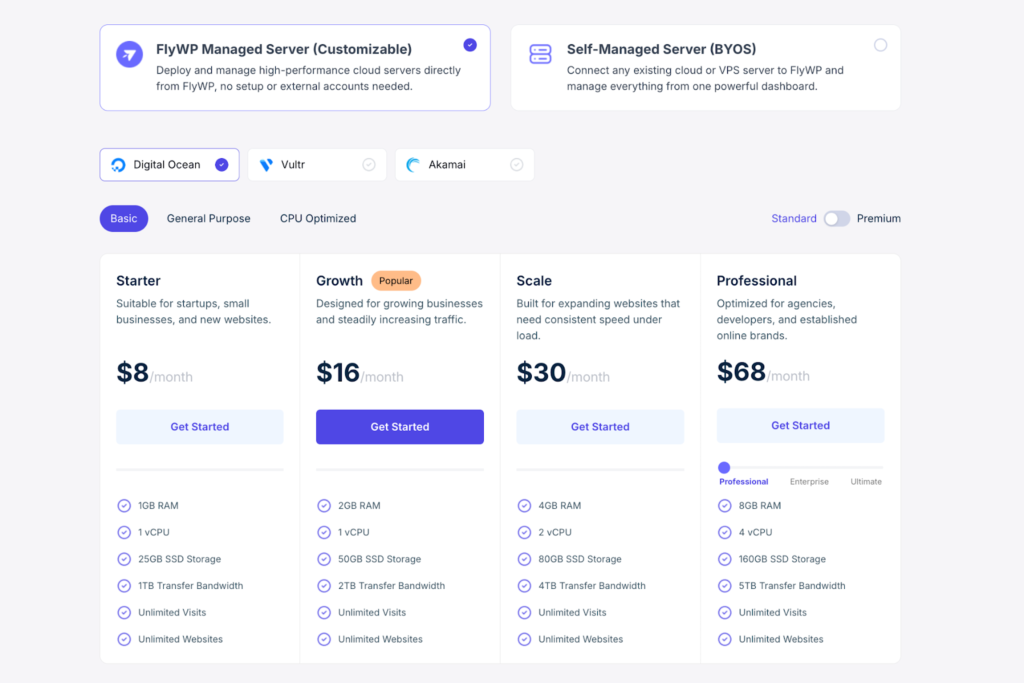
FlyWP Managed Hosting Plans:
For users who want FlyWP to handle the server provisioning and infrastructure management, customizable managed plans start from $7/month. These all-in-one plans cover both the server cost and the FlyWP control panel – no separate billing with your cloud provider required. You choose your cloud provider (DigitalOcean, Vultr, or Akamai), configure your server specs, and everything else is managed by FlyWP.
What’s included in managed hosting:
- Server deployment and configuration
- FlyWP control panel with all features unlocked
- Infrastructure management and monitoring
- Cloudflare and third-party integrations
Self-Managed Server / BYOS Pricing:
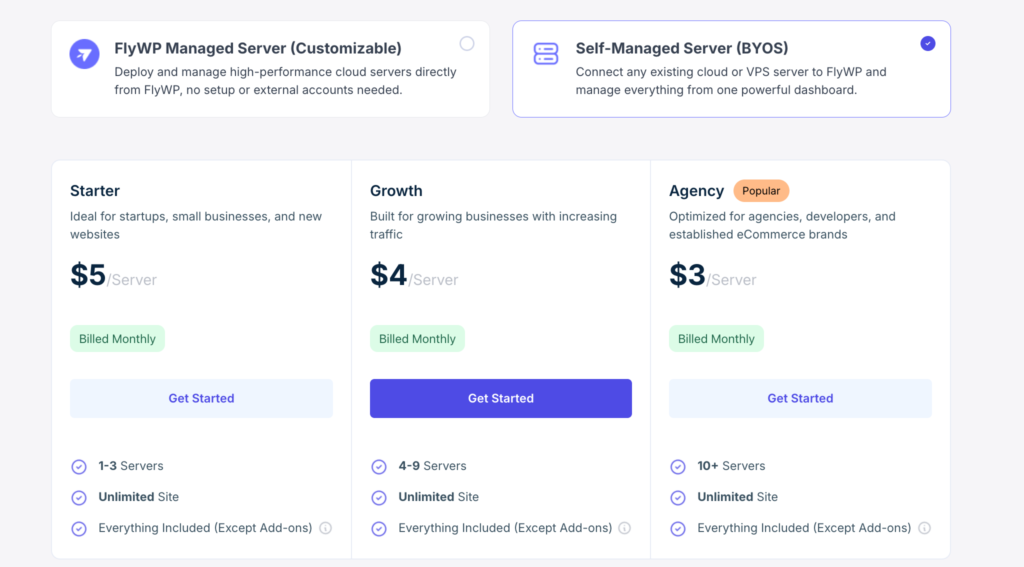
For users who connect their own cloud servers, FlyWP now charges based on the number of servers you manage, with no feature restrictions. Every plan includes unlimited sites and full access to all core FlyWP features ( Except Add-ons).
- Starter Plan: $5/server/month – for 1 to 3 servers
- Growth Plan: $4/server/month – for 4 to 9 servers
- Agency Plan: $3/server/month – for 10 or more servers
For the most up-to-date pricing details, visit FlyWP pricing page.
Free Forever Plan – Start at Zero Cost:
Not ready to commit yet? FlyWP offers a free forever plan that lets you host 1 server and 1 site completely free – no credit card required. It’s the perfect way to test the platform before scaling up. When you’re ready to grow, you can upgrade to a paid plan at any time.
SpinupWP Pricing
When comparing SpinupWP pricing vs FlyWP, the structure is fundamentally different. SpinupWP uses fixed monthly plans rather than per-server usage billing:
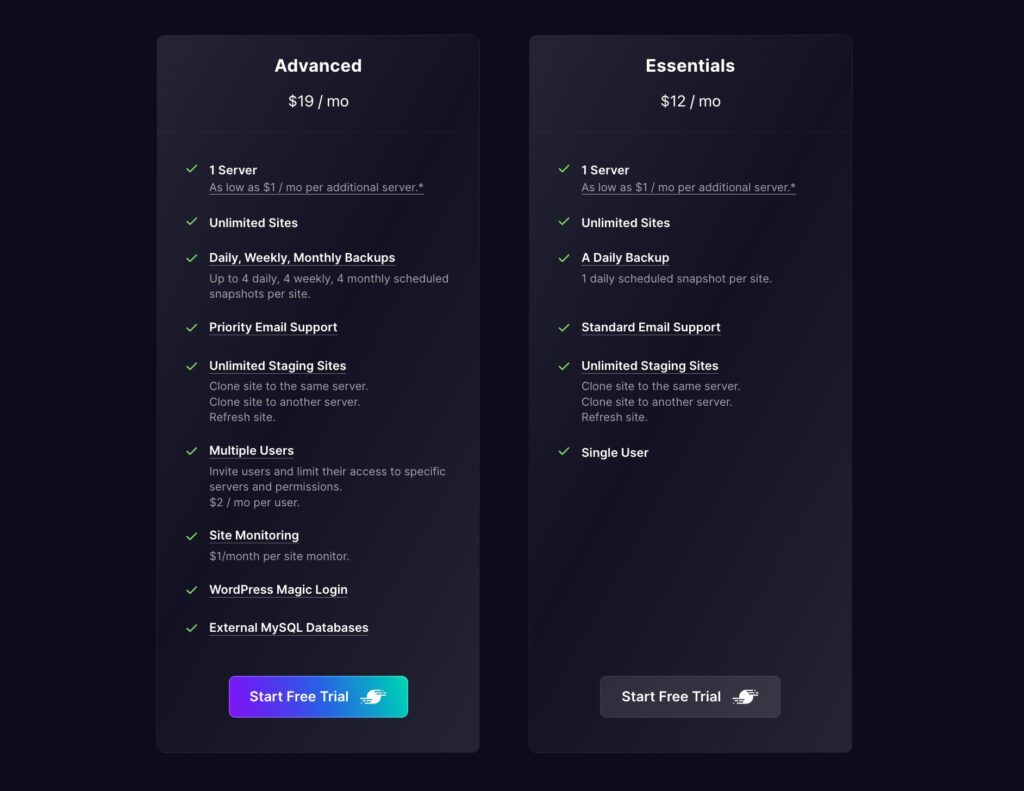
- Essentials – $12/month: 1 server, unlimited sites, 1 daily backup snapshot per site, single user, standard email support.
- Advanced – $19/month: 1 server, unlimited sites, full backup scheduling (daily/weekly/monthly), unlimited staging, multiple users at $2/month each, site monitoring at $1/month per site, priority support, external MySQL databases.
Additional servers are volume-tiered and vary by plan. On the Advanced plan: $10/month for servers 2–3, and on the Essentials plan: $8/month for servers 2–3. Beyond that, both plans share the same volume pricing – dropping to $5/month for 4–6 servers, all the way down to $1/month at 61+ servers. SpinupWP also offers a 7-day free trial so you can test the platform before committing to a paid plan.
For a full breakdown of current plans and pricing, see SpinupWP pricing plans.
Who Should Choose What?
The FlyWP vs SpinupWP decision comes down to your priorities – here’s how to know which one is the right fit.
Choose FlyWP if
- You want a usage-based pricing model with no feature restrictions tied to server count
- You manage or plan to manage multiple servers across different clients
- You want OpenLiteSpeed as a stack option
- Docker-based site isolation matters to you for security or performance
- You want the option to provision and manage servers from a single dashboard with one bill
Choose SpinupWP if
- You want a mature, proven product with years of refinement behind it
- Documentation quality is a priority – SpinupWP’s is genuinely excellent
- You prefer a traditional, predictable LEMP stack
- You’re already running on SpinupWP and the ecosystem works for your workflow
- You value a strong, established community of WordPress hosting professionals
Final Verdict: SpinupWP vs FlyWP
SpinupWP vs FlyWP is ultimately a decision between flexibility vs familiarity. SpinupWP deserves its reputation. It is mature, well-documented, and clearly built by people who understand WordPress infrastructure at a serious level. For teams that want a stable, Nginx-first control panel and do not care about OpenLiteSpeed or a managed-hosting hybrid, it remains a very credible choice.
That said, FlyWP is the more compelling buy in 2026 for most developers, freelancers, and small agencies. Its new usage-based model removes the worst kind of pricing friction; its core features are available without artificial gates, and its managed-hosting option adds convenience without forcing you to abandon control. For price-to-value, FlyWP now feels like the best WordPress server control panel in 2026. If you are looking for an alternative to SpinupWP, FlyWP is your answer.
Try FlyWP today and see whether the new pricing model fits your workflow or not.
Frequently Asked Questions: SpinupWP vs FlyWP
What is FlyWP?
FlyWP is a cloud‑based server management panel built specifically for deploying and optimizing WordPress sites on your own VPS or cloud server. It focuses on simplicity, strong caching, and a polished UI for freelancers and small agencies.
What is SpinupWP?
SpinupWP is a modern server control panel that spins up WordPress‑optimized servers and automates many best‑practice configurations. It is built for developers and agencies who want very fine‑grained control and detailed output, often using SSH‑heavy workflows.
Which is easier to use?
FlyWP is generally easier for non‑technical or semi‑technical users thanks to its GUI‑first, Docker‑style design and simpler setup. SpinupWP is more configurable but assumes more comfort with SSH and server internals. If you prefer “click‑to‑deploy” and clear dashboards, lean toward FlyWP; if you like CLI and low‑level control, try SpinupWP.
Which is better for a WordPress agency – FlyWP or SpinupWP?
FlyWP is the stronger agency choice in 2026 – team collaboration is included on every paid tier, pricing scales down as you add servers, and all core features are available without feature gates. SpinupWP requires the $19/mo Advanced plan for team features and charges extra per user.
Can I switch from SpinupWP to FlyWP without losing my sites?
Yes. FlyWP includes a migration tool and offers free site migration assistance. The environments are different enough (Docker vs traditional LEMP) that you should test thoroughly before cutting over DNS.
Which uses Docker, and why does it matter?
FlyWP uses Docker-based site isolation, which improves security but can use more memory on small servers. SpinupWP runs a single Nginx/PHP stack per server, which is lighter on RAM when hosting many sites.
Does SpinupWP support OpenLiteSpeed?
No. SpinupWP is built entirely around Nginx and does not offer OpenLiteSpeed. FlyWP supports both Nginx and OpenLiteSpeed, giving you more flexibility depending on your performance needs.
Is FlyWP free?
Yes. FlyWP offers a free forever plan that includes 1 server and 1 site with no credit card required. SpinupWP offers a free trial but does not have a permanent free plan.
Which is cheaper – FlyWP or SpinupWP?
FlyWP starts at $5/server/month on the self-managed plan, compared to SpinupWP’s $12/month entry plan. For agencies managing multiple servers, FlyWP gets cheaper as you scale, dropping to $3/server/month at 10+ servers.
Can I use my own server with both FlyWP and SpinupWP?
Yes, both support BYOS (Bring Your Own Server). However FlyWP also offers a managed hosting option where it provisions the server for you, while SpinupWP is BYOS-only with no server provisioning.
Which has better documentation – FlyWP or SpinupWP?
SpinupWP is widely recognized for having some of the best WordPress hosting documentation available. FlyWP’s documentation is solid and improving rapidly, but SpinupWP still holds the edge here for depth and clarity.