# Centralized Bulk Updates
> Managing WordPress updates across multiple sites and servers can become time-consuming and overwhelming at the same time. Meet Bulk Updates feature on FlyWP.
Source: https://flywp.com/docs/site/centralized-bulk-updates/
Managing WordPress updates across multiple sites and servers can become time-consuming and overwhelming at the same time. With FlyWP’s new centralized **Bulk Updates** feature, we’ve made taking control of your updates easier than ever. Let’s see how you utilize the Bulk Update feature.
[Video: Centralized Bulk Updates with FlyWP | Update All Your WordPress Sites in Minutes](https://www.youtube.com/watch?v=SkxwGgF-v8M)
## How to use the Bulk Update feature for WordPress Sites?
**Step 1:** Log in to your FlyWP account.
**Step 2:** Open the **Sites** tab from the top-left side of your dashboard.
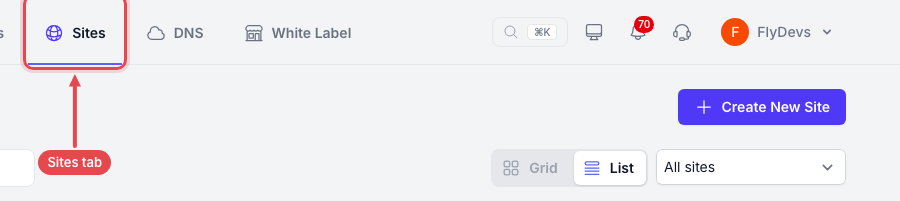
**Step 3:** You will get the list of the websites on your FlyWP Team account.
Tick the checkbox next to each site you want to update. To select several sites at once, use the scope menu in the toolbar: **All**, **None**, **Active only**, or **WordPress only**.
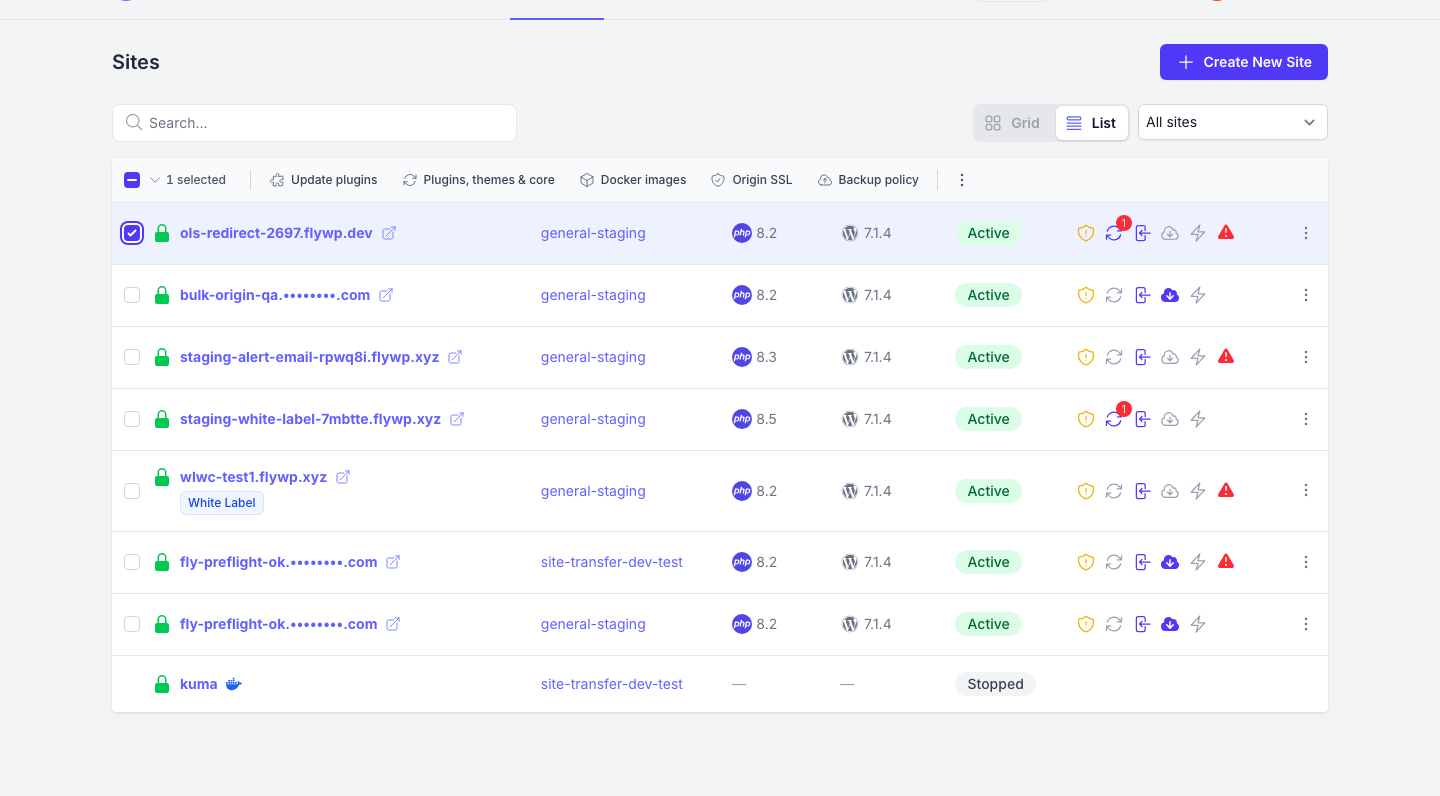
Then use the toolbar to choose the type of update you want to apply: **Update plugins**, **Plugins, themes & core**, or the dots menu for **Update all plugins**, **Update all themes**, **Update core**, or **Update plugins, themes and core**.
:::note
This action will apply to every selected site, across all the servers in your account.
:::
- *Update all plugins:* *This will update all the Plugins on the selected websites.*
- *Update all themes:* *This will update all the Themes on the selected websites.*
- *Update core:* *This will update WP Core versions of the selected websites.*
- *Update plugins, themes and core:* *This will update Plugins, Themes, and WP Core versions on the selected sites all at once.*
:::note
Updates run only on running Standard WordPress sites. Bedrock, PHP, Laravel and one-click app sites, and any site that is not running (for example, sleeping), are skipped. The confirmation names the skipped sites. If every selected site is skipped, nothing runs.
:::
**Step 4:** You’re done. Your updating process will start and may take few minutes to be completed. If an update is already running on a site, a new update for that site waits in the queue until the first one finishes, for up to about 30 minutes.
## How to Batch update plugins and themes on a single WordPress site?
**Login** → **Sites** → You will get the list of the websites on your Team account.
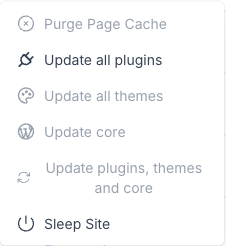
Click on the “**Three Dot**” button on the right side of the specific website. You will get the option to update all the plugins, all the themes, WP core, and everything at once.
Click on your desired action to get it done.
:::note
This action will apply to a single website that you selected. The update actions appear only for Standard WordPress sites.
:::
- *Update all plugins:* *This will update all the Plugins on this website.*
- *Update all themes:* *This will update all the Themes on this website.*
- *Update core:* *This will update WP Core versions of this website.*
- *Update plugins, themes and core:* *This will update Plugins, Themes, and WP Core versions of this site, all at once.*
#### **Special Note**
- Bulk updates run over SSH with WP-CLI. The **FlyWP Helper** plugin is not required to run them.
- The FlyWP Helper plugin is still used to refresh the update list on a single site's overview. Keep it installed and up to date. You can install it from [wordpress.org](https://wordpress.org/plugins/flywp/).
Hope you enjoy the efficient update management for your WordPress websites from a single dashboard on FlyWP. If you have any queries feel free to contact us at support@flywp.com.
## In this section
- [Whitelist FlyWP API in Cloudflare](https://flywp.com/docs/site/centralized-bulk-updates/whitelist-flywp-api-requests-in-cloudflare.md)